STEP 1
STEP 1 STEP 1
STEP 1 –
––
–
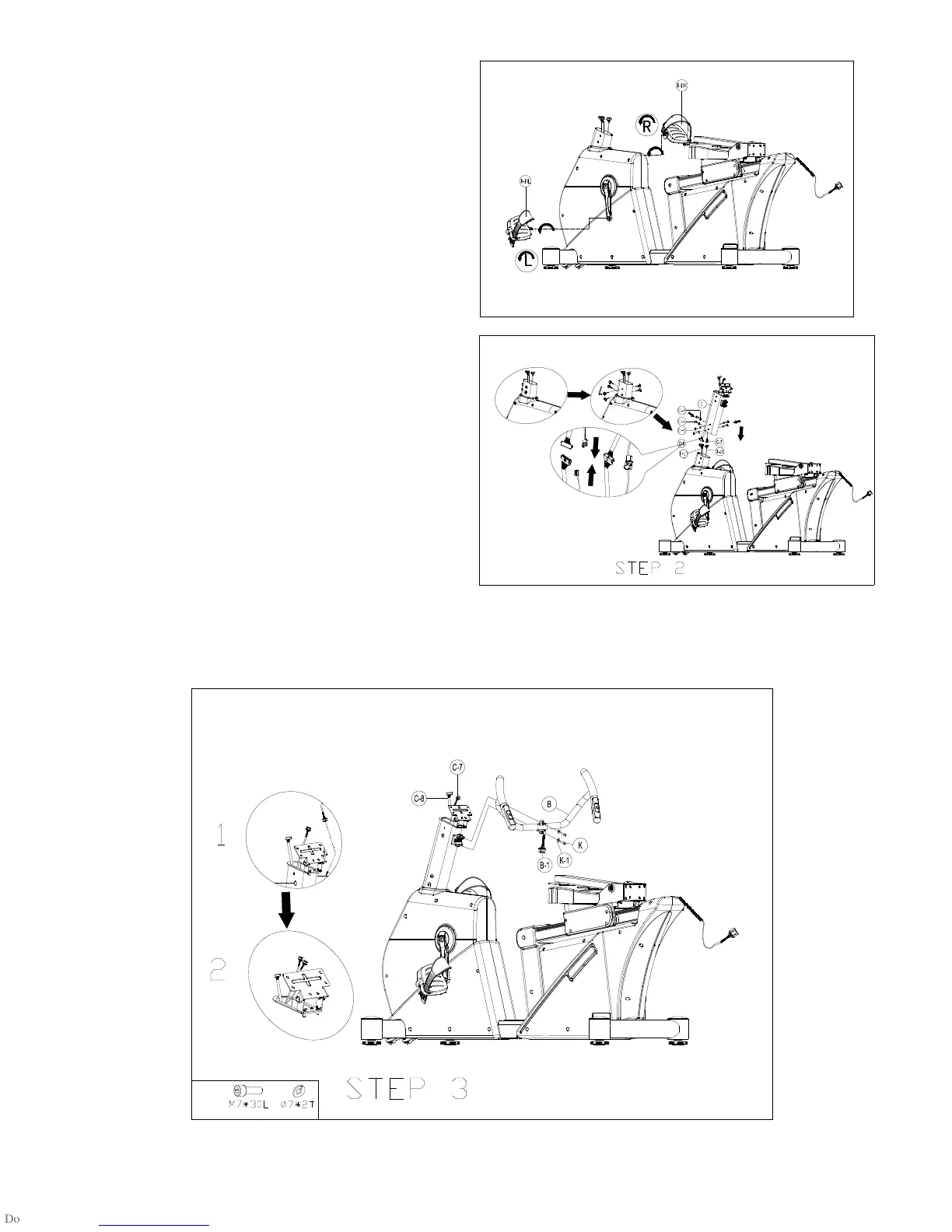
Install Pedals
Insert the Right Pedal (D-10R) into the right arm of the Crank
assembly and finger tighten in a clockwise direction until the
thread is fully inserted in the crank.
Repeat for the Left Pedal (D-10L) and finger tighten in an
anticlockwise direction. Tighten both with the wrench.
STEP 2
STEP 2 STEP 2
STEP 2 –
––
–
Install Handlebar Post
Take off screws and washers(C-4/C-5/C-6) from handlebar post.
Connect upper hand pulse wire (C-7) with lower hand pulse wire
(D-18), upper computer cable (C-8) with lower computer cable (D-17).
Then attach handlebar post (C) with main frame by screws,
flat washers and wave washers .
STEP 3
STEP 3 STEP 3
STEP 3 –
––
–
Install Handlebar
Insert two hand pulse wire with body fat (B-1) into handlebar post hole(L&R), then pull them out from handlebar post.
Fixing handlebar (B) onto handlebar post by screws (K) and spring washers (K-1).
2*
STEP 1
R
L



 To Next Page