15
• Use the digital optical (TOSLINK) inputs if possible to reduce noise.
Digital optical issues: ‘Clicking’ or no sound
• Connect the TV optical output to the soundbar optical input preferentially.
• Ensure both ends of the optical cable have had the protective plastic tip
removed.
• Ensure both ends of the cable have been inserted fully; a distinct ‘click’ will
be felt when the cable is properly seated.
• Check the output format of the optical signal from the playing device.
Choose ‘normal’ or ‘PCM’ format. Refer to the TV manufacturer’s handbook
for more information. You can also contact Orbitsound for advice, see
contact help line in this handbook and on the packaging.
No sound from subwoofer (soundbar working)
• Check the subwoofer cable is connected properly, and that only the metal
parts of the wire are inserted into the socket.
• Press the Bass + button on the remote control, or try a reset (press and hold
the power button on the soundbar for 3 seconds until the unit resets).
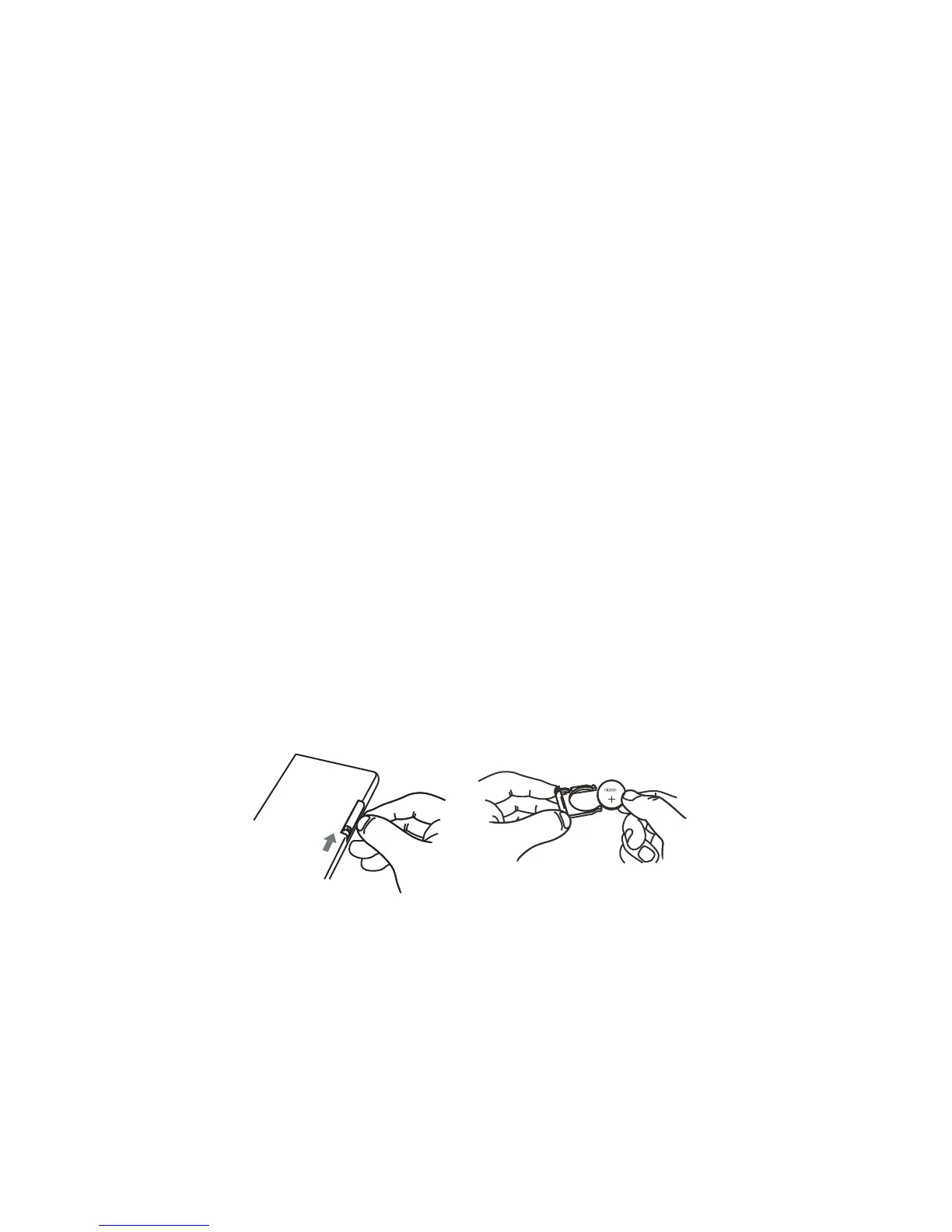
Battery replacement (remote)
Replace remote battery with anode up (+) from back-side.
BATTERY: CR 2025
Hint: The Orbitsound remote can be used with a CR2025 or a larger CR2032
battery. The larger battery (CR2032) will give greater life capacity. Contact
Orbitsound support for help with these batteries.


 To Next Page