4
Control panel overview
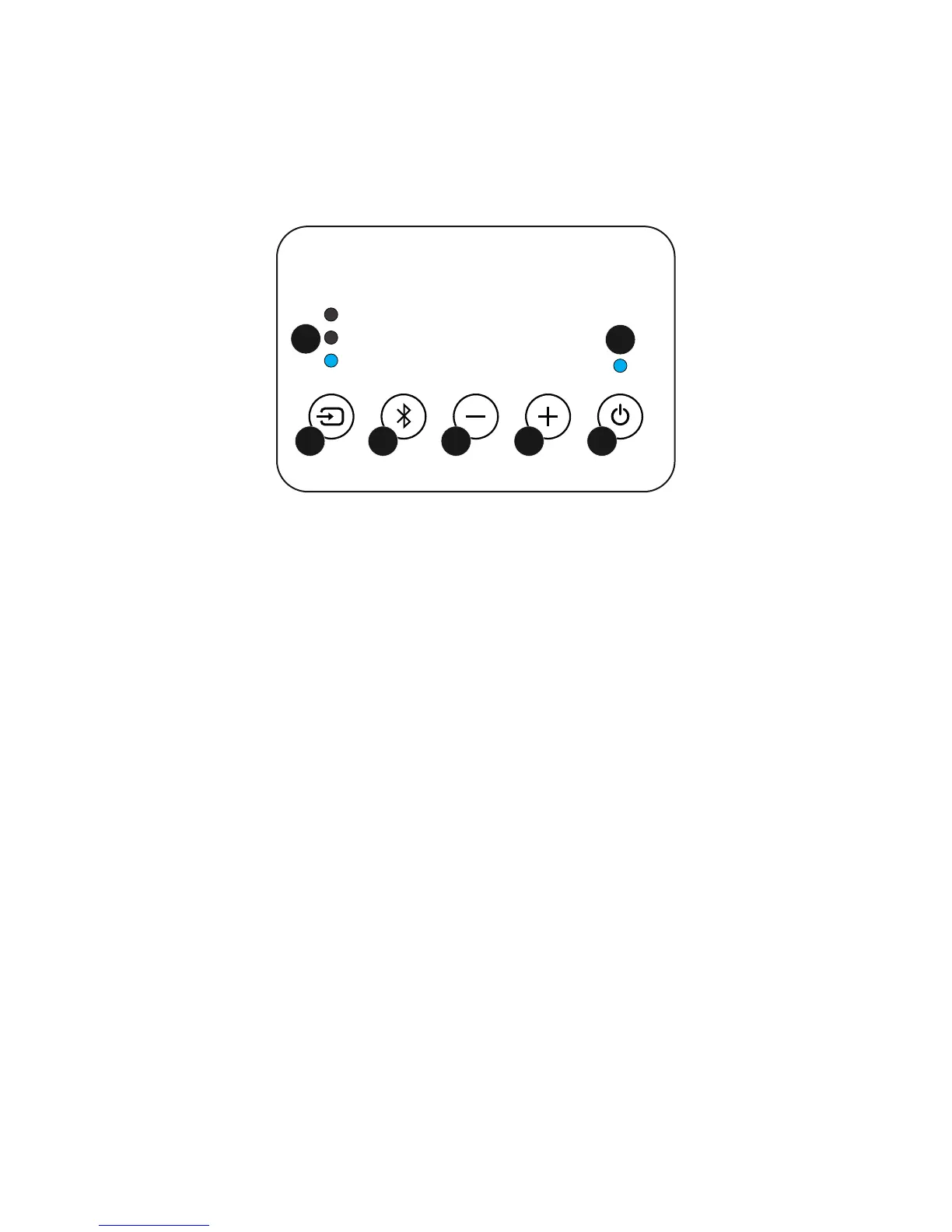
The soundbar can be controlled from the control panel:
Optical
Bluetooth
Aux
1
2 3 4
5
6
7
1. Source: Press to cycle through the inputs. This controls what device is
playing through the soundbar.
2. Bluetooth: Short press to renew a Bluetooth connection / start playback.
Long press (Press and hold) to enter pairing mode.
3. Vol - : Reduce volume.
4. Volume +: Increase volume.
5. Standby: Enter standby mode or power on.
6. Source LED: Shows which source is currently playing
7. Status: Blue shows the soundbar is on. Red shows standby. The light
will flash when a button is pressed on the remote or on the
control panel.
Hint: Long press the power button to reset the soundbar. This will reset the
source, volume, treble and bass memory to factory default settings. Press and
hold for 3 seconds. The soundbar will confirm by flashing the power/status light
3 times. The unit will reset and optical source will be selected.


 To Next Page