10
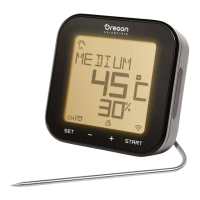
TARGET TEMPERATURE MODE
Once you activate this
mode, you can view the
cooking status, current food
temperature, target cooking
temperature and progress data
(%)atthesametime.
TIMER MODE
Once you activate this
mode, you can view the
cooking status, current food
temperature and counting
down timer at the same time.
NOTE If the food is over-
cooked, the timer will continue
working but counting up with
alert beep sounds.
NOTE The probedoes not requireinsertion before
starting the program.
REMOVE COOKING HISTORY
Press and hold START for 5 seconds to remove the last
cooking mode setting.
RESET
Press RESET in the battery compartment using a pointed
object such as a straightened paper clip.
SPECIFICATION
TYPE DESCRIPTION
DISPLAY UNIT
L x W x H
90 x 90 x 30.5 mm
3.54 x 3.54 x 1.20 in
Weight
146g(5.15ounces)
without battery
Temperature measuring
range
0°Cto300°C(32°Fto572°F)
Temperature unit °C / °F
Power 2xUM-3(AA)1.5Vbatteries
Heat resistance for
transmitter / table stand
Around60°C(140°F)
Measurement cycle 6 seconds
METAL PROBE
Length 175mm(7in)
Weight 62g(2.22ounces)
Heat resistance for
metal probe
Around380°C(716°F)
Temperature range 0°Cto300°C(32°Fto572°F)

 To Next Page
 Loading...