Page
08
Operation Controls
and Functions
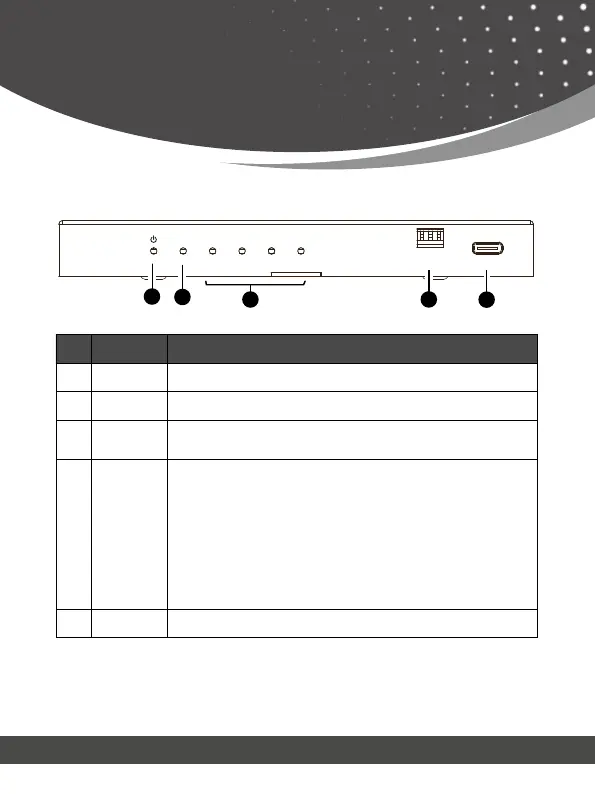
No. Name Function Description
1.
Power LED
The Red LED will light up when the device is powered on.
2. IN LED
The Green LED will light up when an active source is detected.
3.
OUT LED
(1~4)
The Green LED will light up when an active display device is
connected.
4.
EDID DIP
switch
Use the DIP switch to set EDID.
[DIP]=111: Copy OUT 1 port sink EDID (as factory default)
[DIP]=110: 4K60 (4:4:4), 2.0CH
[DIP]=101: FRL12G_8K_HDR, 2.0CH
[DIP]=100: FRL12G_8K_HDR, 5.1CH
[DIP]=011: FRL12G_8K_HDR, 7.1CH
[DIP]=010: FRL10G_8K_HDR, 2.0CH
[DIP]=001: FRL10G_8K_HDR, 5.1CH
[DIP]=000: FRL10G_8K_HDR, 7.1CH
5. SERVICE Firmware update port.
Front Panel
IN
EDID SERVICE
1
0
OUT 1 OUT 2 OUT 3 OUT 4
3
1
2
4
5



 To Next Page