EasyManua.ls Logo

Orion XTREME 3752 - Troubleshooting Tips

Orion XTREME 3752
24 pages
Print Icon
To Next Page IconTo Next Page
To Previous Page IconTo Previous Page
Loading...
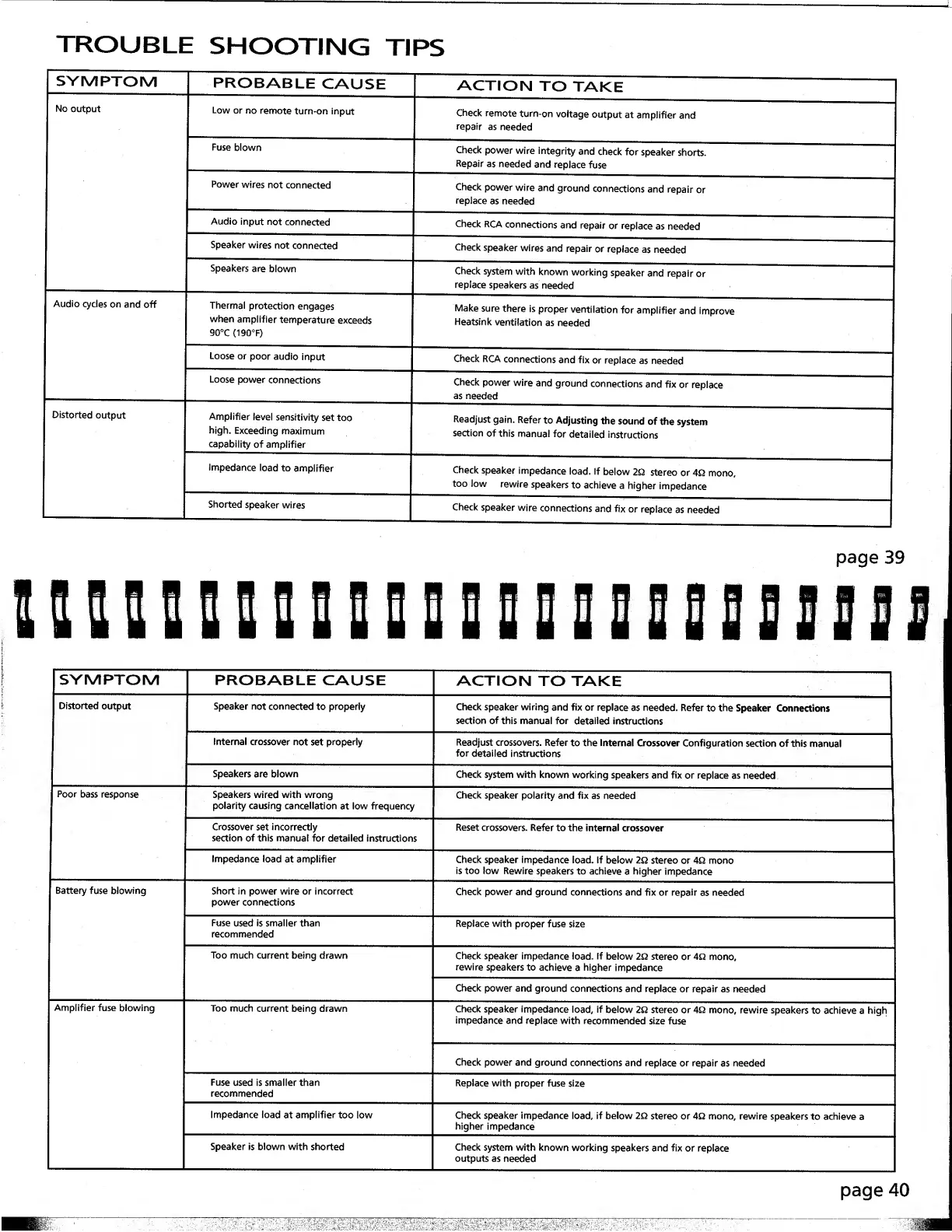
TROUBLE
SHOOTING
TIPS
SYMPTOM
Audio
cycles
on
and
off
PROBABLE
CAUSE
Low
or
no
remote
turn-on
input
Power
wires
not
connected
Audio
input
not
connected
Speaker
wires
not
connected
Speakers
are
blown
Thermal
protection
engages
when
amplifier
temperature
exceeds
90°C
{190°F)
ACTION
TO
TAKE
Check
remote
turn-on
voltage
output
at
amplifier
and
repair
as
needed
Check
power
wire
integrity
and
check
for
speaker
shorts.
Repair
as
needed
and
replace
fuse
Check
power
wire
and
ground
connections
and
repair
or
replace
as
needed
Check
RCA
connections
and
repair
or
replace
as
needed
Check
speaker
wires
and
repair
or
replace
as
needed
Check
system
with
known
working
speaker
and
repair
or
replace
speakers
as
needed
Make
sure
there
is
proper
ventilation
for
amplifier
and
improve
Heatsink
ventilation
as
needed
Loose
or
poor
audio
input
Loose
power
connections
Amplifier
level
sensitivity
set
too
high.
Exceeding
maximum
capability
of
amplifier
Impedance
load
to
amplifier
Shorted
speaker
wires
Check
RCA
connections
and
fix
or
replace
as
needed
Check
power
wire
and
ground
connections
and
fix
or
replace
as
needed
Readjust
gain.
Refer
to
Adjusting
the
sound
of
the
system
section
of
this
manual
for
detailed
instructions
Check
speaker
impedance
load.
If
below
2Q
stereo
or
4Q
mono,
too
low
rewire
speakers
to
achieve
a
higher
impedance
Check
speaker
wire
connections
and
fix
or
replace
as
needed
SYMPTOM
PROBABLE
CAUSE
ACTION
TO
TAKE
Distorted
output
Poor
bass
response
Battery
fuse
blowing
Speaker
not
connected
to
properly
Internal
crossover
not
set
properly
Speakers
are
blown
Speakers
wired
with
wrong
polarity
causing
cancellation
at
low
frequency
Crossover
set
incorrectly
section
of
this
manual
for
detailed
Instructions
Impedance
load
at
amplifier
Short
in
power
wire
or
incorrect
power
connections
Fuse
used
is
smaller
than
recommended
Check
speaker
wiring
and
fix
or
replace
as
needed.
Refer
to
the
Speaker
Connections
section
of
this
manual
for
detailed
instruaions
Readjust
crossovers.
Refer
to
the
Internal
Crossover
Configuration
section
of
this
manual
for
detailed
instructions
Check
system
with
known
working
speakers
and
fix
or
replace
as
needed
Check
speaker
polarity
and
fix
as
needed
Reset
crossovers.
Refer
to
the
internal
crossover
Check
speaker
impedance
load,
if
below
2Q
stereo
or
AQ
mono
is
too
low
Rewire
speakers
to
achieve
a
higher
impedance
Check
power
and
ground
connections
and
fix
or
repair
as
needed
Replace
with
proper
fuse
size
Too
much
current
being
drawn
Too
much
current
being
drawn
Fuse
used
is
smaller
than
recommended
Impedance
load
at
amplifier
too
low
Speaker
is
blown
with
shorted
Check
speaker
impedance
load.
If
below
2Q
stereo
or
4Q
mono,
rewire
speakers
to
achieve
a
higher
impedance
Check
power
and
ground
connections
and
replace
or
repair
as
needed
Check
speaker
impedance
load,
if
below
2Q.
stereo
or
4Q
mono,
rewire
speakers
to
achieve
a
high
Impedance
and
replace
with
recommended
size
fuse
Check
power
and
ground
connections
and
replace
or
repair
as
needed
Replace
with
proper
fuse
size
Check
speaker
impedance
load,
if
below
2Q
stereo
or
4Q
mono,
rewire
speakers
to
achieve
c
higher
impedance
Check
system
with
known
working
speakers
and
fix
or
replace
outputs
as
needed
page
40