15
SWITCHES, DIALS & INDICATORS:
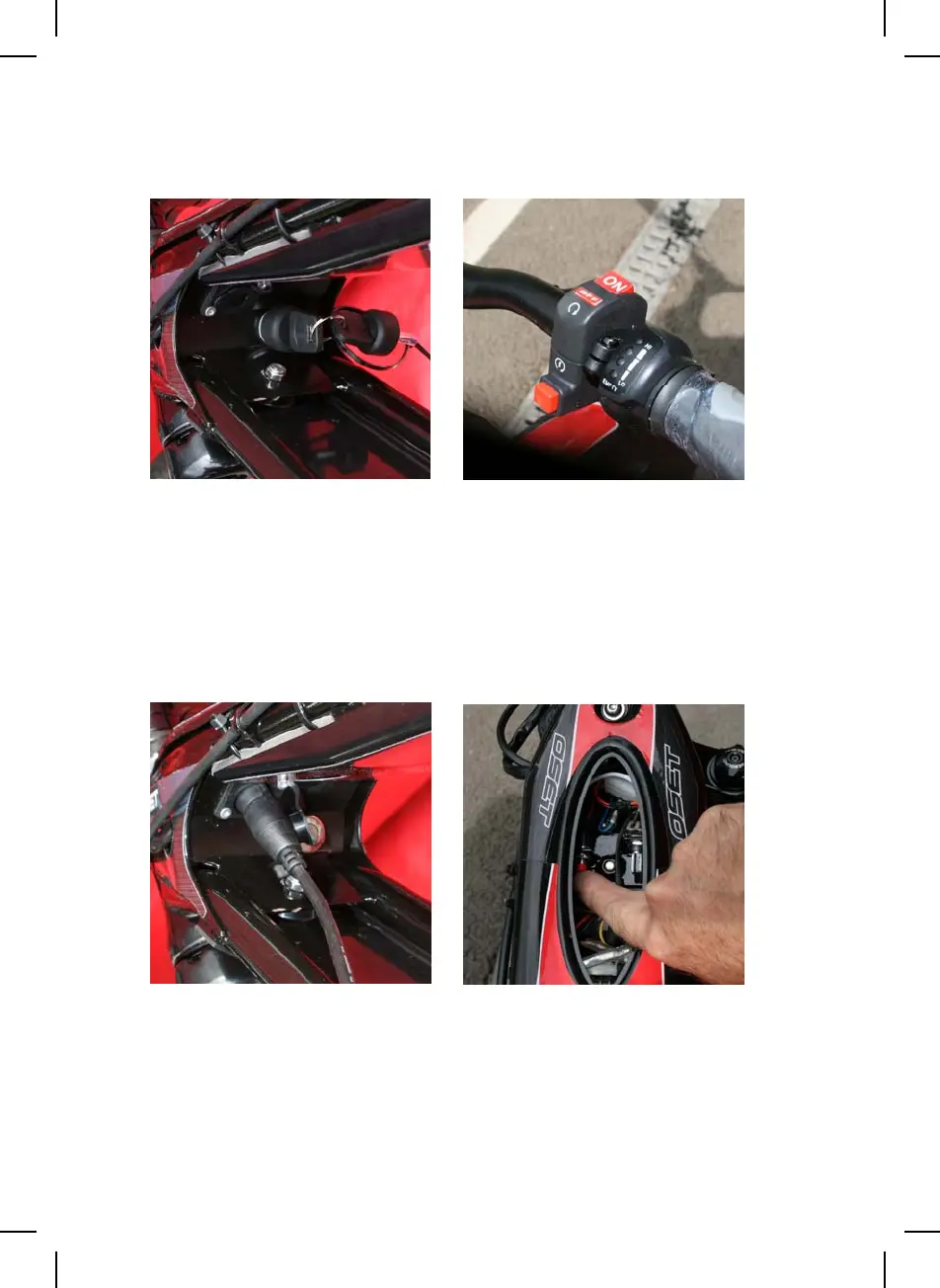
The switch and charge port are under the ‘tank’ area, on the under side.
Key Switch:
The key switch turns the power on
and off. When the rider is sitting on
the bike, this is located underneath
them on the right side of the bike, at
the front. This location encourages
the rider to turn the key with their
right hand. The key is removable,
and should be removed when the
bike is not in use.
Charger Port:
When it’s time to recharge the bike,
the battery charger connector
attaches to this port. Before
attaching, ensure that the power is
switched to the off position. Please
refer to the battery and charging
section (page 23) of this manual for
more information.
Optional handlebar switch:
This switch is in addition to the key
switch and provides extra functionality.
The key switch MUST be in the ‘on’
position for the handlebar switch to
operate. With the key switch in the ‘on’
position, the handlebar switch can be
used to turn the bike on and off. The
responsible adult can remove the key
when the bike is not in use.
Speed switch:
The speed switch is located underneath
the rubber bung for convenience. This
must be altered/changed by a
responsible adult only. When pressed in
the ‘in’ position, the bike will have a
maximum speed set at 100%. When in
the ‘out’ position speed will be reduced to
75%.


 To Next Page