OPERATING INSTRUCTIONS
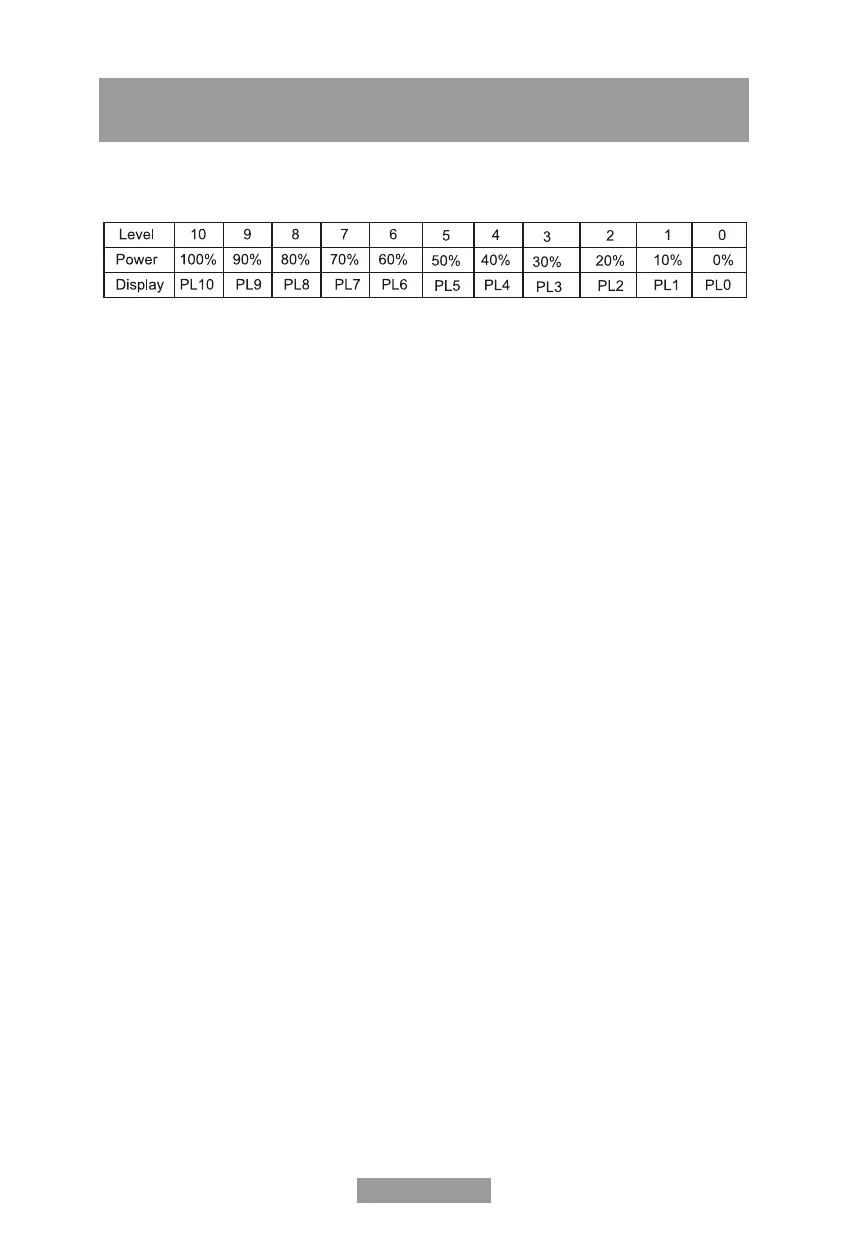
1. Energy Level
11 energy levels are available.
2. Clock settings
When the microwave oven is plugged into an outlet, the oven will display "0:00"
1. Press "CLOCK", the LED will show 00: 00;
2. Press the number keys and enter the correct time. The time entry should be 1: 00-12: 59.
For example, if it is now 10:12, press "1,0,1,2".
3. Press "CLOCK". to confirm and the clock will light up.
Note: (1) If the time entry is more than 1: 00-12: 59, the setting is not valid. You cannot
confirm and finish the setting by pressing "CLOCK".
(2) If you want to reset the clock, repeat steps 1 to 3.
3. Kitchen timer
1. Press "KITCHEN TIMER", the LED will show 00:00, the first hour figure will flash.
2. Press the number keys and enter the correct time (maximum cooking time is 99 minutes
and 99 seconds).
3. Press "START/+30SEC. To confirm the setting.
4. When the set time is reached, the buzzer will sound 5 times. If the clock is set, the LED will
show the current time.
4. Microwave Cook
1. Press "TIME COOK" once, the screen will display "00:00".
2. Press number keys to input the cooking time; the maximum cooking time is 99
minutes and 99 seconds.
3. Press "POWER" once, the screen will display "PL10". The default power is 100% power.
Now you can press number keys to adjust the power level.
4. Press "START/+30SEC." to start cooking.
Example: to cook food with 50% microwave power for 15 minutes:
1. Press "TIME COOK" once. "00:00" displays.
2. Press "1", "5", "0", "0" in order.
3. Press "POWER" once, then press "5" to select 50% microwave power.
4. Press "START/+30SEC" to start cooking.
English-9


 To Next Page