EasyManua.ls Logo

oticon IIc - Replace T-Cap filter; Replace O-Cap filter

oticon IIc
37 pages
Print Icon
To Next Page IconTo Next Page
To Previous Page IconTo Previous Page
Loading...
28 29
About Getting started Daily use Options Tinnitus Warnings More info
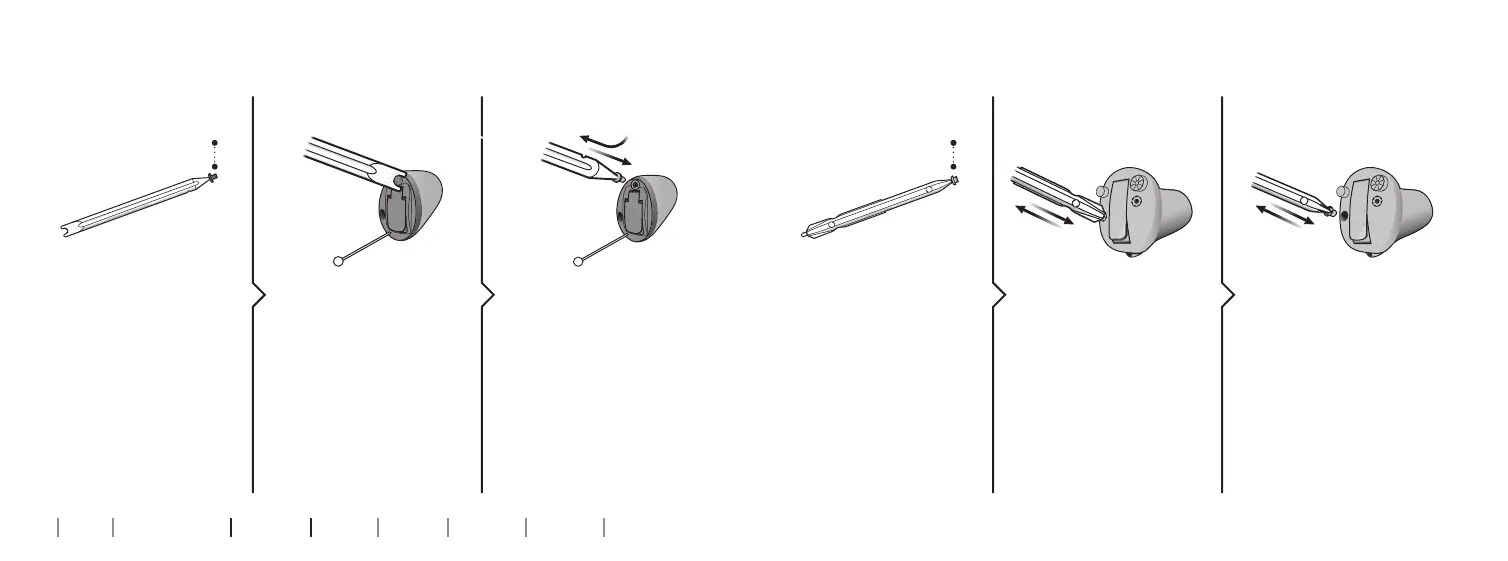
Replace T-Cap fi lter
(hearing aids with size 10 battery)
2. Remove 3. Insert
Remove the tool from
the packaging. The tool
has two ends, one for
removal and one with
the new T-Cap  lter.
Push the tool fork
under the top edge of
the used T-Cap  lter
and lift it out.
Insert the new T-Cap
lter and remove the
tool by twisting it
slightly. Throw the tool
out after use.
1. Tool
new  lter
Replace O-Cap fi lter
(hearing aids with size 312 and 13 batteries)
2. Remove 3. Insert
Remove the tool from
the packaging. The tool
has two ends, one for
removal and one with
the new O-Cap  lter.
Push the pointed end
of the tool into the
existing O-Cap  lter
and pull it out.
Insert the new O-Cap
lter using the other
end of the tool and
remove. Throw the
tool out after use.
1. Tool
new  lter

Related product manuals