2 Unpacking AURICALHIT
1. Unpack the device carefully.
When you unpack the device and accessories, it is a good idea to keep the packing material in which they were
delivered. If you need to send the device in for service, the original packing material will protect against damage dur-
ing transport, etc.
2. Visually inspect the equipment for possible damage.
If damage has occurred, do not put the device into operation. Contact your local distributor for assistance.
3. Check with the packing list to make sure that you have received all necessary parts and accessories. If your package is
incomplete, contact your local distributor.
3 Installation
• Place AURICALHIT on an absolutely stable surface.
• In order to exclude ambient noise and to comply with the ANSI S3.22 standard, place the system in a moderately
quiet room.
3.1 Connecting the device
1. Install OTOsuite on the PC. See the OTOsuite Installation Guide.
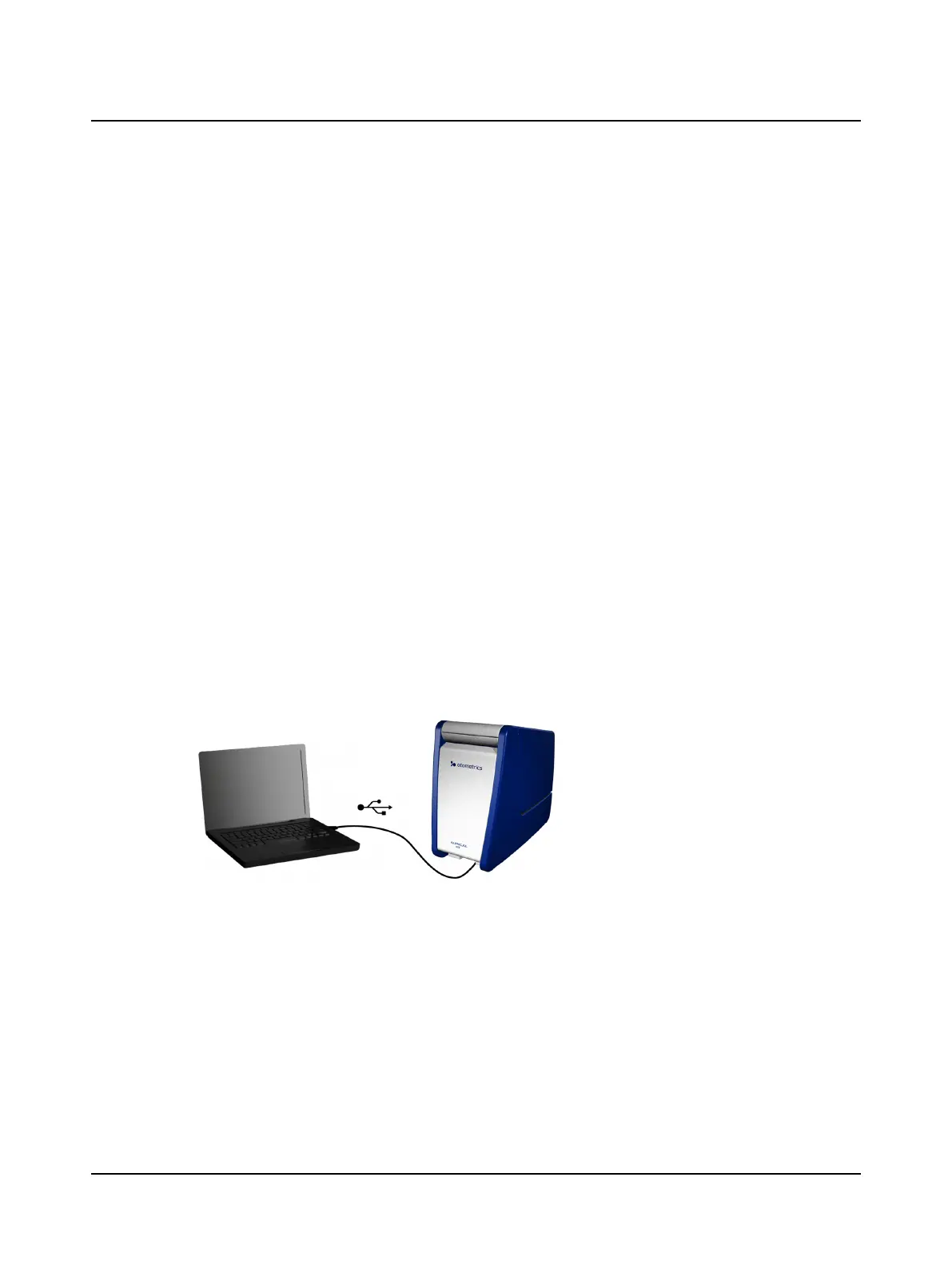
2. Connect the USB cable from the USB socket under AURICALHIT to a USB socket in the PC. AURICAL HIT is powered by
the PC.
AURICALHIT is selected automatically in OTOsuite.
4 The test chamber
Using AURICALHIT and positioning hearing instruments in the test chamber are described in Testing hearing instruments
► 9.
Otometrics - AURICALHIT
5
2 Unpacking AURICALHIT


 To Next Page