EasyManua.ls Logo

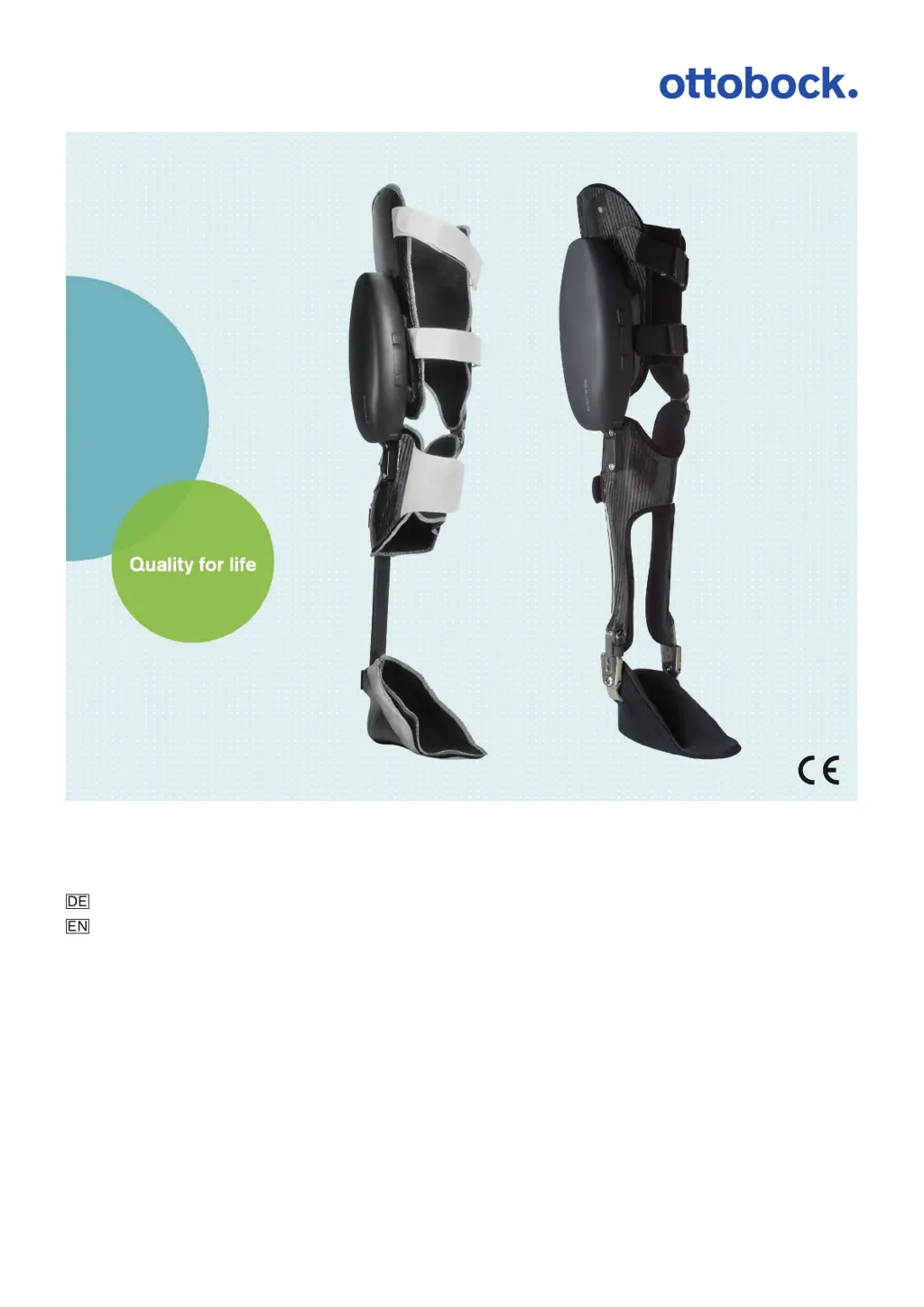
Otto Bock C-Brace - User Manual

Otto Bock C-Brace
88 pages
Go to English
Print Icon
To Next Page IconTo Next Page
Loading...
C-Brace
Gebrauchsanweisung (Fachpersonal)..................................................................... 3
Instructions for use (qualified personnel) ................................................................. 45

Table of Contents

Questions and Answers

  • Y
    Yolanda WhiteAug 3, 2025
    How to fix blue LED not lit on Otto Bock C-Brace Medical Equipment 60X7 BionicLink?
    • J
      johnsonjasonAug 3, 2025
      If the blue LED on your Otto Bock Medical Equipment's 60X7 BionicLink isn't lit, it could be due to several reasons: * The 60X7 BionicLink might not be properly connected to the product. Ensure it is securely connected. * The product battery may be drained. Try charging the product battery. * The connecting cable between the 60X7 BionicLink and the product could be defective. In this case, replace the connecting cable. * The battery charger might be connected to the product. Disconnect it, as the product won't function while the charger is connected. * The BionicLink plug on the product might be defective. Inspect the plug for damage. If the contacts are damaged, have it inspected by an authorized Ottobock Service Center.
  • P
    patricia99Aug 7, 2025
    What to do if the green LED on Otto Bock Medical Equipment 60X5 BionicLink PC is not lit?
    • S
      Samantha BishopAug 8, 2025
      If the green LED on your Otto Bock Medical Equipment's 60X5 BionicLink PC isn't lit, it indicates the device isn't operational. Check the BionicLink's connection to the PC. Try connecting the 60X5 BionicLink PC to a different USB port on the PC. If you're using a USB hub, connect the 60X5 BionicLink PC directly to the USB port on the PC.
  • D
    Danielle AndersonAug 13, 2025
    Why is the blue LED on Otto Bock C-Brace 60X7 BionicLink continuously lit?
    • J
      Jerry OconnellAug 13, 2025
      If the blue LED on your Otto Bock Medical Equipment's 60X7 BionicLink is continuously lit, it means the connection to the PC is unstable due to excessive distance. Reduce the distance between the product and the 60X5 BionicLink PC.
  • D
    Dylan BuchananAug 18, 2025
    What causes the blue LED on Otto Bock C-Brace Medical Equipment 60X5 BionicLink PC to not light up?
    • H
      Haley WebbAug 18, 2025
      If the blue LED on your Otto Bock Medical Equipment's 60X5 BionicLink PC is not lit, it indicates that the connection to the PC is disrupted due to excessive distance. To resolve this, reduce the distance between the product and the 60X5 BionicLink PC.
  • S
    Selena Pierce MDAug 23, 2025
    What to do if calibration error occurs for knee angle on Otto Bock C-Brace Medical Equipment?
    • Y
      Yvette SimonAug 23, 2025
      When you encounter a calibration error related to the knee angle on your Otto Bock Medical Equipment, verify the patient's positioning, check for any mechanical blockages (like caught fabric), and ensure there's no extreme flexion contracture on the knee joint exceeding 10 degrees, as calibration isn't possible in such cases, and the patient cannot use the product.
  • G
    gloverrobertAug 27, 2025
    How to troubleshoot calibration error for toe and heel load on Otto Bock Medical Equipment?
    • J
      jessicacolemanAug 27, 2025
      When a calibration error occurs with toe and heel load on your Otto Bock Medical Equipment, check the following: * Confirm weight was applied to the leg with the product and there was no knee joint movement. * Ensure high footwear isn't laced too tightly, loading the spring element. * Inspect the connecting cable to the spring element plug for damage. * Verify the foot/thigh components are correctly screwed to the spring element. * Check if the spring element is bent. If so, and the connection between its halves is loose, tighten the 4 screws on the clamp adapter of the foot component. If alignment isn't restored, the spring element must be replaced. * Ensure the spring element is properly connected and its contacts are in good condition.

Summary

Foreword

Product Description

Design and Components

Details the C-Brace orthosis with spring element and Sensor Ankle components.

Hydraulics and Function

Explains the hydraulic unit and microprocessor control of gait phases.

Application

Indications for Use

Specifies the intended use for orthotic fittings of lower limbs.

Indications (Spring Element & Sensor Ankle)

Lists conditions for using the orthosis with different constructions.

Contraindications (Spring Element & Sensor Ankle)

Lists conditions against using the orthosis with different constructions.

Qualifications (Technician & Staff)

Outlines required qualifications for technicians and nursing staff.

Use and Field of Application

Describes how the orthosis aids daily activities and patient adaptation.

Safety

Warning Symbols and Instruction Structure

Explains warning symbols and the structure of safety instructions provided.

General Safety Instructions

Covers essential safety precautions, product handling, and maintenance.

Transportation and Power Safety

Details safe practices for transport, power supply, and battery charging.

Alignment and Product Application

Provides guidance on product alignment, adjustment, and correct application methods.

Proximity and Environmental Hazards

Warns about interference from magnetic fields and environmental conditions.

Safe Use and Mode Switching

Addresses safe operation, vehicle use, and proper mode switching procedures.

Movement Pattern Safety Notes

Offers safety advice for specific movements like standing, walking, and stairs.

Safety Modes and Overheating

Explains safety modes, signal occurrences, and risks of overheating.

Scope of Delivery and Accessories

Scope of Delivery

Lists the items included in the product package.

Accessories

Lists optional accessories available for the product.

Charging the Battery

Connecting Charger and Power Supply

Step-by-step guide for connecting the power supply and battery charger.

Product Charging and Charge Level Display

Instructions for connecting the charger to the product and checking battery status.

Preparation for Use

Spring Element Orthosis Setup

Outlines initial steps for fitting the C-Brace with a spring element.

Sensor Ankle Orthosis Setup

Details the initial setup for the C-Brace with a Sensor Ankle.

Adjustment with C-Soft

Introduction and Indications

Introduces the C-Soft software and its application indications.

Installation and Data Transfer

Covers software installation and PC data transfer procedures.

BionicLink Connection

Explains how to connect the BionicLink for wireless communication.

Ottobock DataStation and C-Soft Application

Guides through launching the C-Soft application and starting a new job.

Program Start and Password Entry

Details the process of starting the C-Soft program and entering credentials.

Establishing and Managing Connections

Covers connecting, disconnecting, and reconnecting the product to C-Soft.

Calibration Procedures

Details the required calibration steps for product adjustment.

Adjustment Procedure and Parameters Overview

Outlines the adjustment process and provides an overview of key parameters.

Specific Adjustment Parameters

Explains detailed adjustment parameters like STP Flexion Damping, SWP, and Toe Load.

Use

Donning and Doffing Procedures

Step-by-step instructions for applying and removing the orthosis.

Product Removal and Storage

Covers removing the product, storing it, and managing hydraulic bleeding.

Movement Patterns and Safety

Details safe practices for various movements like standing, walking, and stairs.

Mode Management

Explains basic, additional, LOM, and STA modes and their switching.

Additional Operating States (Modes)

Empty Battery Mode

Describes behavior and safety when the battery is critically low.

Charging Mode

Notes product status during battery charging.

Safety Mode

Explains the product's behavior and usage in safety mode.

Cleaning

General Cleaning Instructions

Provides guidance on cleaning the main product with a damp cloth.

Textile and Sensor Ankle Cleaning

Details cleaning procedures for specific components like textile parts and the Sensor Ankle.

Maintenance

Replacing the Spring Element

Step-by-step guide for removing and inserting the spring element.

Replacing the Sensor Ankle

Instructions for replacing the Sensor Ankle component.

Service

Product Service Inspection

Outlines the required service inspection intervals and procedures.

Ankle Joint Service

Specifies service requirements for the system ankle joint.

Disposal

Legal Information

Liability and Warranty

Defines the manufacturer's liability and terms of use.

CE Conformity and Trademarks

Lists CE conformity statements and trademark information.

Technical Data

General Information and Environmental Conditions

Details general product specs, environmental operating conditions, and storage.

Component Specifications

Provides technical details for battery charger, power supply, spring elements, and ankle joints.

Appendices

Symbols and Operating States

Explains used symbols, operating states, and their corresponding beep signals.

Troubleshooting and Error Resolution

Covers common issues, error signals, and solutions for the product and software.

Otto Bock C-Brace Specifications

General IconGeneral
BrandOtto Bock
ModelC-Brace
CategoryMedical Equipment
LanguageEnglish

Related product manuals