E-122-8-E
1
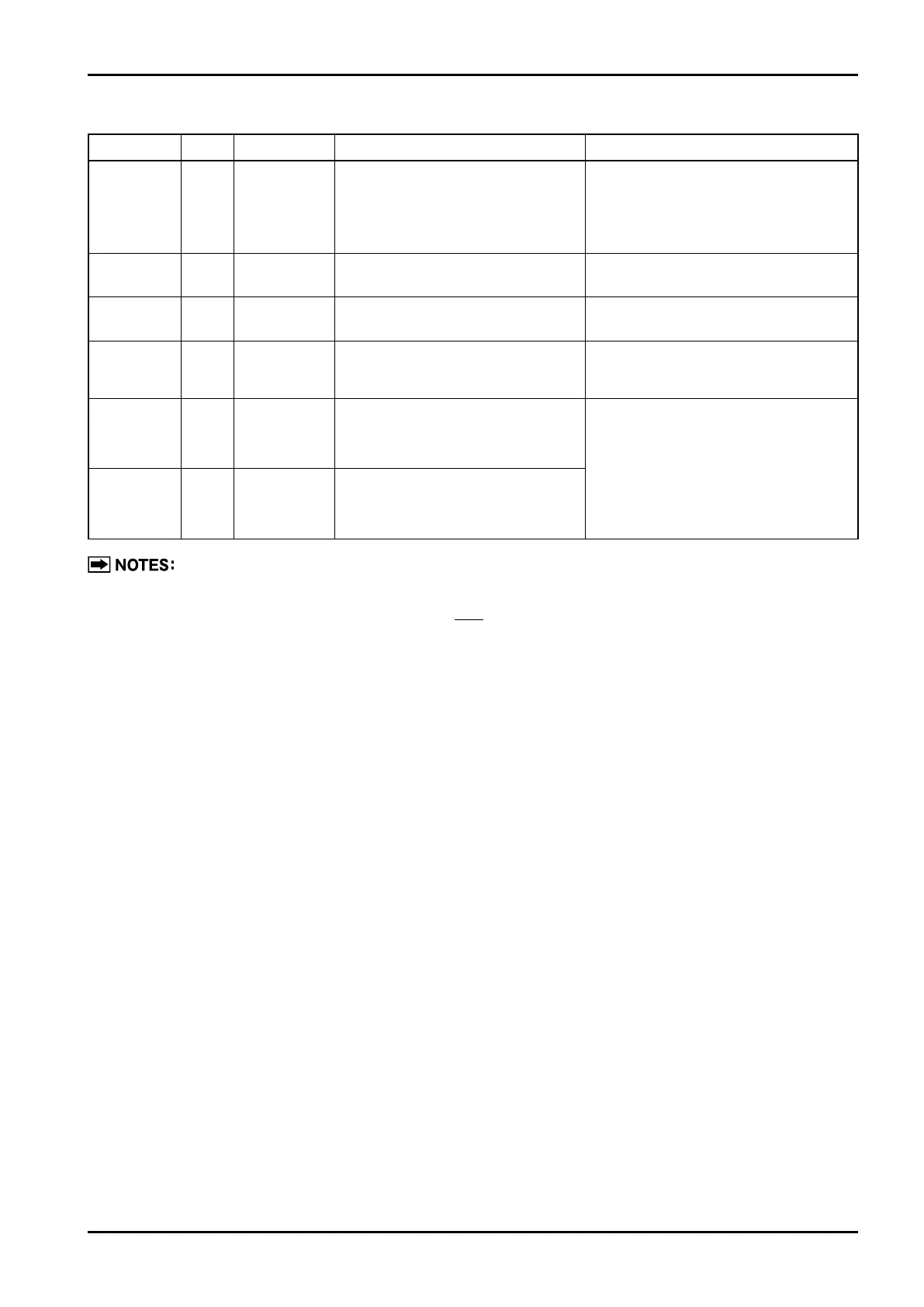
Parameter Code Default Setting Description Remarks
Analog
damping
(Note 3)
AdAn 2.5
●
Analog time constant (soft)
(Unit: [sec])
●
Setting range:0.0〜99.9
If ripples in analog output are too large,
select a larger AdAn to stabilize
fluctuation of reading.
Ex.: To change analog output time const.
from 2.5 [sec] to 5 [sec]
→ Set to "AdAn 5.0[sec]".
4mA trim
(Note 3)
A04
−
●
Analog output 4mA trim See "Parameter Setup Procedure" for detail.
20mA trim
(Note 3)
A20
−
●
Analog output 20mA trim See "Parameter Setup Procedure" for detail.
Pulse width Pon
Depends on
specification.
Factored pulse output "ON" width
(Unit: [msec])
Ex.: To change pulse width from 1
(msec)
to 50
(msec)
→ Set to "Pon 50" (msec).
(Note 4)
Pulse dummy
output 1
Pd1
Not a parameter
to be setup
●
Furnishes a 1Hz simulated
factored pulse output irrespective
of flowmetering.
●
This function is useful in loop check, etc.
●
For operation in practice, see
"About Dummy Output Features (special
functions)."
Pulse dummy
output 2
Pd2
Not a parameter
to be setup
●
Furnishes a 10Hz simulated
factored pulse output irrespective
of flowmetering.
1. When conversion factor (H) has been set, change pulse weight (Pu) etc.
must be changed relative to the new unit after conversion.
2. Be sure to set up a value such that ≦ Pu ≦ F×H×10000.
3. Indicated only on Model EL0122 provided with F/l board.
4. Be sure to set a value such that factored pulse "OFF" width>1 ms.
※For the factory-set parameters, refer to “Default Parameter Settings”supplied with the product.
F×H
2



 To Next Page