ENG-10
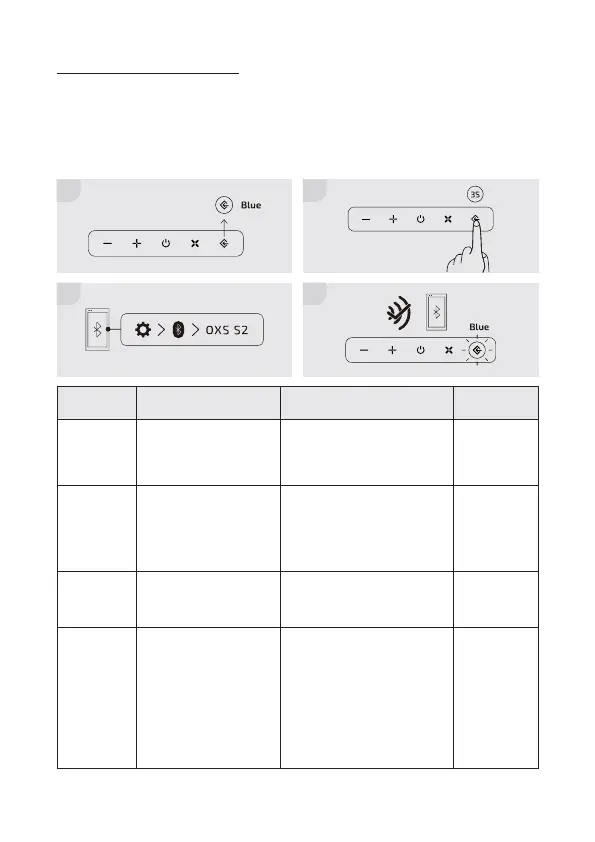
Connecting via Bluetooth
Check before connection
- Only one device can be connected at a time.
- You can connect to a Bluetooth-enabled Computer.
- Make sure the device you need to connect is close to the soundbar within a 10m range.
- Enter <0000> if a PIN code is required during the connection.
Modes
Pairing
Connect-
able
Connected
Disconnect
LED behavior
Flashing blue
Flashing blue
Solid blue
From solid
blue to ash-
ing blue
Description
Pairing with new
devices
Ready to connect to the
last paired device. Turn
on Bluetooth on your
device and select OXS
S2 to connect.
When a device is con-
nected to the sound bar
via Bluetooth
To disconnect your de-
vice from the soundbar
How to activate*
Hold and press the input se-
lector button on the top of the
soundbar or on the remote
control for 3 seconds
Automatically activated
when the soundbar is not
connected
Automatically activated when
a device is successfully paired
Hold and press the input
selector button on the top
of the soundbar or on the
remote control.
- Disconnection takes some
time because the TV must
receive a response from the
soundbar. The time varies on
the model.
*All these actions must be done when the input selector is set to Bluetooth mode (LED: blue).
1
3
2
4


 To Next Page