3. CONTROLS
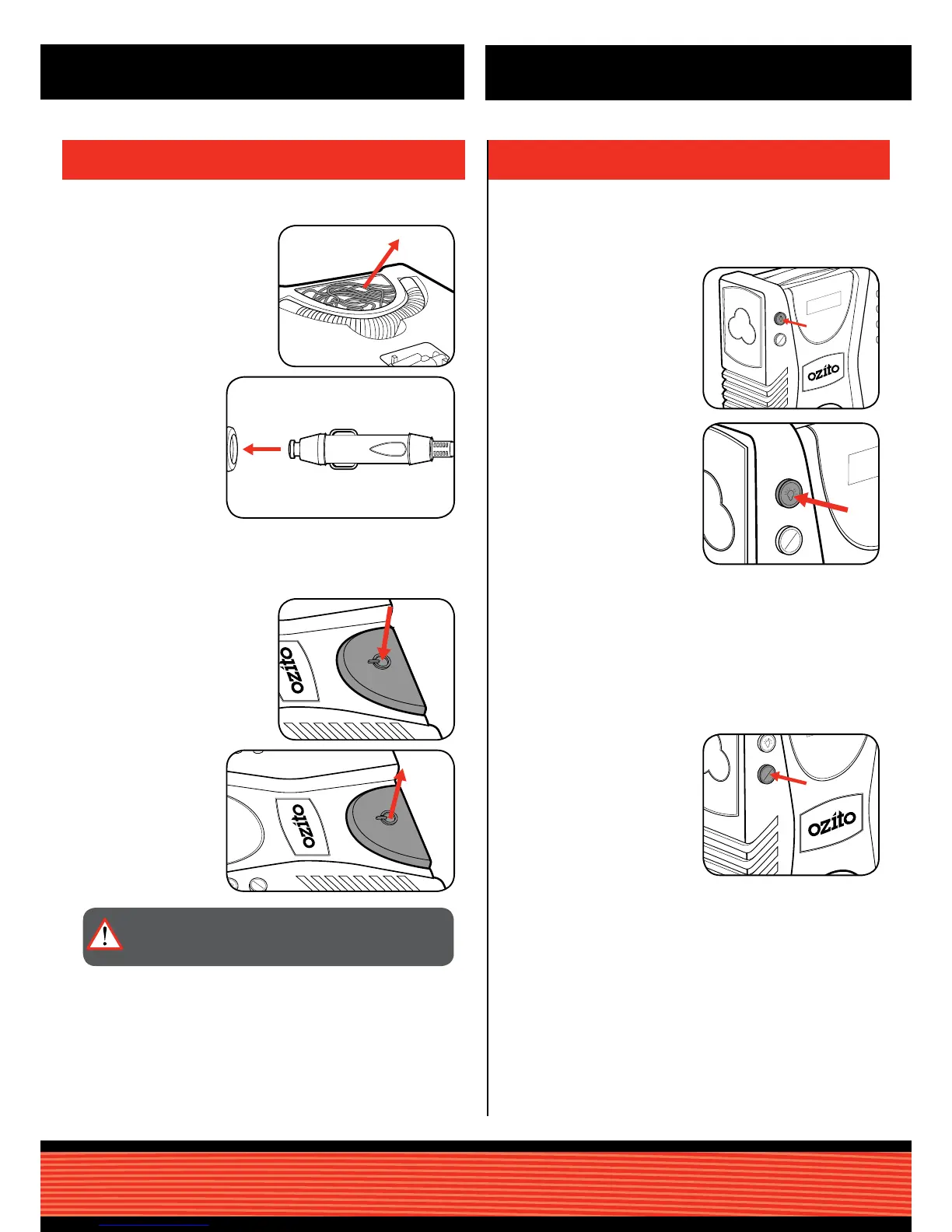
Light Button
PSI / BAR Button
1 To turn the LED light on, press
the light button in.
1 To switch between the two
pressure units, press the PSI /
BAR button.
2 To turn the LED light off, press
the light button again.
Note: The compressor must be connected to the power for the LED
light to work.
The compressor has a built-in LED light for ease of use at night or in a
dark area.
The digital pressure reading can be switch between PSI and BAR to
match the requirements on the item being inated.
To identify the current pressure units, a light will be illuminated on the
right side of the digital display.
2. SWITCHING ON & OFF
Connecting to a 12V outlet
Switching On and Off
1 Roll out the 12V socket from
the base of the unit.
1 To start the air compressor
press down the on/off button
with your foot.
The compressor is tted with a foot peddel on/off button to allow ease
of use while holding adaptors and the item being inated.
2 Connect the 12V
socket to 12V DC
outlet which can be
found in your vehicle.
Check car outlet for
sufcent power up to
120W.
2 Release the on/off
button to stop the
compressor.
WARNING:COMPRESSED AIR CAN BE DANGEROUS.
NEVER POINT THE OUTLET NOZZLE TOWARDS ANY
PART OF YOUR BODY OR ANOTHER PERSON.
OPERATION


 To Next Page