AUTO
SCANNER
1/6
Diagnostic Menu
Read Codes
Erase Codes
Data Stream
Freeze Frame
I/M Readiness
Vehicle Information
AUTO
SCANNER
OBD2/EOBD Code Reader
[ ] = SetuP
[ ] = Scan
OBDII
AUTO
SCANNER
Entering System
### ###
Entering system,
Please wait....
AUTO
SCANNER
Monitor Status
Read Codes
DTCs in this ECU
Monitors OK
Monitors INC
Monitors N/A
Ignition Compression
0
0
0
10
AUTO
SCANNER
OBD2/EOBD Code Reader
[ ] = SetuP
[ ] = Scan
OBDII
AUTO
SCANNER
Entering System
### ###
Entering system,
Please wait....
AUTO
SCANNER
Monitor Status
Read Codes
DTCs in this ECU
Monitors OK
Monitors INC
Monitors N/A
Ignition Compression
0
0
0
10
AUTO
SCANNER
OBD2/EOBD Code Reader
[ ] = SetuP
[ ] = Scan
OBDII
AUTO
SCANNER
Entering System
### ###
Entering system,
Please wait....
AUTO
SCANNER
Monitor Status
Read Codes
DTCs in this ECU
Monitors OK
Monitors INC
Monitors N/A
Ignition Compression
0
0
0
10
AUTO
SCANNER
Read Codes
Read Codes
Current DTCs ($03)
Pending DTCs ($07)
Permanent DTCs ($0A
1/3
AUTO
SCANNER
1/4
Current DTC
P0115
Engine Coolant
Temperature Sensor 1
Circuit
AUTO
SCANNER
DTC num.
Read Codes
CT DTC: 00
PD DTC: 00
PT DTC 00
AUTO
SCANNER
Read Codes
Read Codes
Current DTCs ($03)
Pending DTCs ($07)
Permanent DTCs ($0A
1/3
AUTO
SCANNER
1/4
Current DTC
P0115
Engine Coolant
Temperature Sensor 1
Circuit
AUTO
SCANNER
DTC num.
Read Codes
CT DTC: 00
PD DTC: 00
PT DTC 00
AUTO
SCANNER
Read Codes
Read Codes
Current DTCs ($03)
Pending DTCs ($07)
Permanent DTCs ($0A
1/3
AUTO
SCANNER
1/4
Current DTC
P0115
Engine Coolant
Temperature Sensor 1
Circuit
AUTO
SCANNER
DTC num.
Read Codes
CT DTC: 00
PD DTC: 00
PT DTC 00
5. DIAGNOSTIC MENU
OAST-050
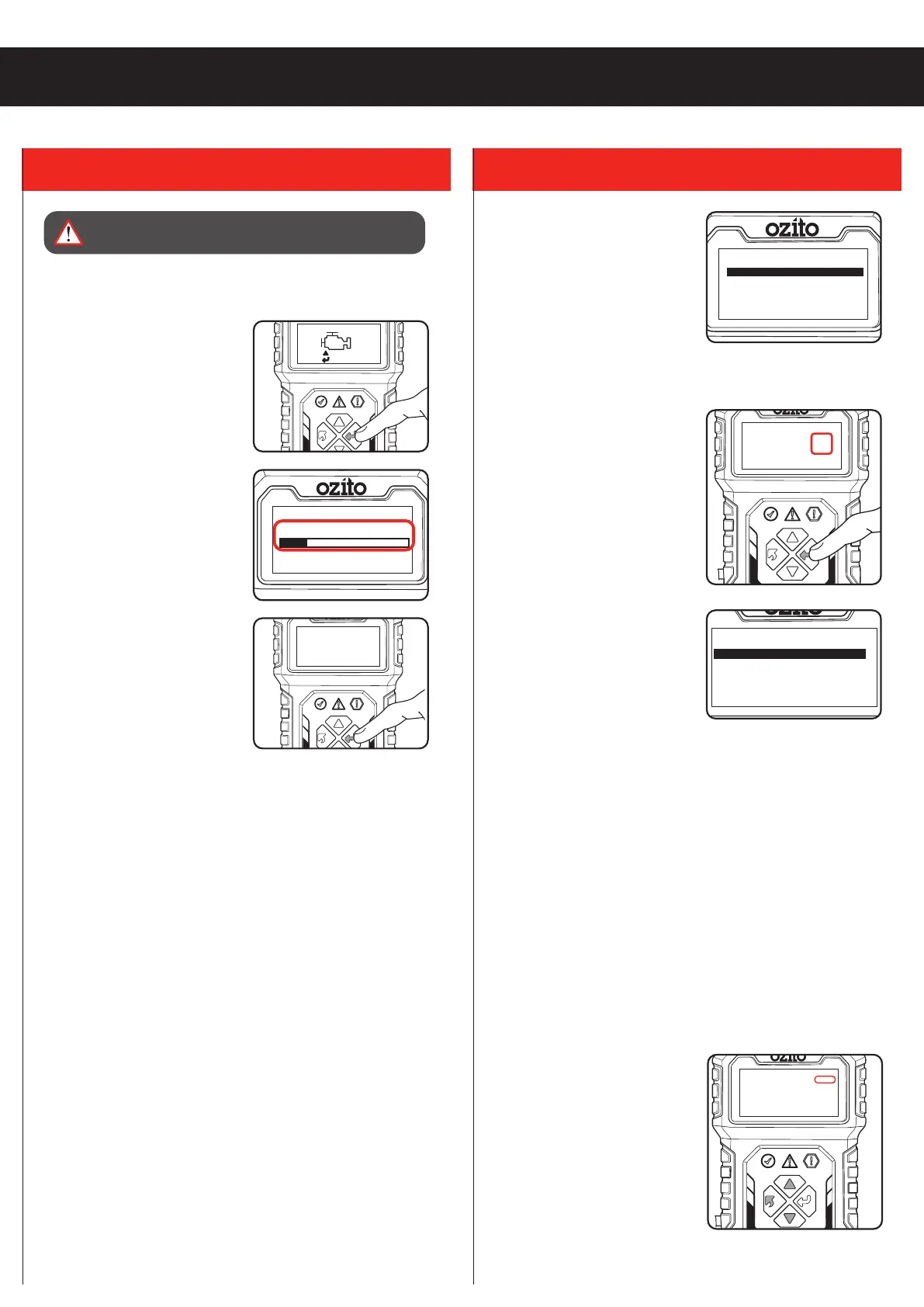
• Read Codes: Read the
diagnostic trouble code (DTC)
in the engine or transmission
system and display the standard
definition.
Ignition on, engine off or running
1. Use the “UP” and “DOWN”
buttons to select a Read Codes and press the “OK” button to
confirm.
If there are DTC’s, the backlit
LCD will display the number of
codes:
2. Press “OK” button
CT (Current) DTC codes- Are
generated by the current hardware
failure. The current fault code(s) for
the hardware failure are generated
by a continuous fault and can
only be cleared if the hardware is
repaired.
PD (Pending) DTC codes- They
indicate problems that the control
module has detected during the current or last driving cycle but
are not considered serious yet. Pending Codes will not turn on
the malfunction indicator lamp (MIL) unless the same problem is
detected again. If the fault does not occur within a certain number
of warm-up cycles, the code clears from memory.
PT (Permanent) DTC codes- These codes cause the control
module to illuminate the malfunction indicator light (MIL) when
emission-related fault occurs. These DTCs cannot be cleared until
it is confirmed that the problem is fixed.
2. Use the “UP or “DOWN” button to select Current, Pending or
Permanent codes from the Read Codes menu and press the
“OK” button. See Diagnostic Trouble Codes (DTC) heading in
this manual.
Note: If no DTCs, a “The vehicle has no fault codes” message
shows on the backlit LCD.
3. View the DTCs and their
definitions on the backlit LCD
Display. Press “BACK” button to
return to previous screen.
4. If more than one DTC is found,
the number to the right of the
backlit LCD indicates sequence
of DTCs. Use the “UP” and
“DOWN” button to check all the
codes.
Scan
Ignition on, engine running.
1. From the home screen, press
the “OK” button to enter the
Scan interface.
2. Wait for the menu to appear.
A sequence of messages
displaying the OBD2 protocols
and progress bar will be
observed on the backlit LCD
until the vehicle protocol is
detected.
3. View a summary of the system
status (MIL status, DTC counts,
Monitor status) on backlit LCD.
4. Press the “OK” button for
Diagnostic Menu
WARNING! OPERATE VEHICLE IN A WELL- VENTILATED
AREA, EXHAUST GASSES ARE POISONOUS.


 To Next Page
 Loading...