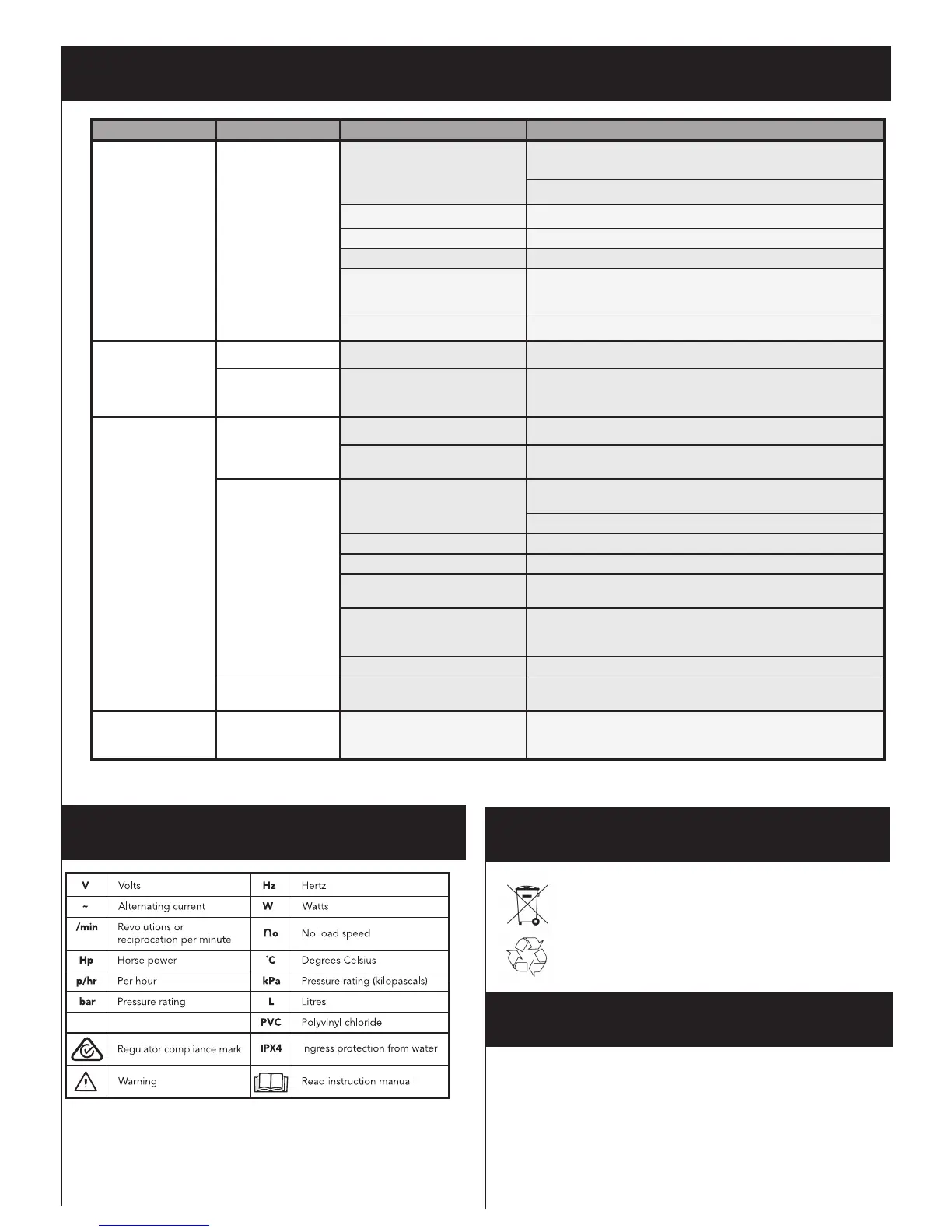
DESCRIPTION OF SYMBOLS
CARING FOR THE ENVIRONMENT
Power tools that are no longer usable should not be disposed of
with household waste but in an environmentally friendly way. Please
recycle where facilities exist. Check with your local council authority
for recycling advice.
Recycling packaging reduces the need for landll and raw materials.
Reuse of recycled material decreases pollution in the environment.
Please recycle packaging where facilities exist. Check with your
local council authority for recycling advice.
Spare parts can be ordered from the Special Orders Desk
at your local Bunnings Warehouse.
For further information, or any parts not listed here, visit
www.ozito.com.au or contact Ozito Customer Service:
Australia 1800 069 486
New Zealand 0508 069 486
E-mail: enquires@ozito.com.au
SPARE PARTS
TROUBLESHOOTING
Problem LED Display Possible Cause Solution
The pump operates
but water is not
owing
Yellow, green and red
LEDs are on
There is air in the pump head Disconnect from power supply, open the priming screw and ll the
pump head with water
Verify the joints are sealed tightly with Teon tape
The suction pipe is blocked Disconnect from power supply, clean the suction pipe
The pump is not primed Following instructions “Priming The Pump”
The in-line lter is blocked Clean the lter
The inlet and outlet are not
connected with the pipe or hose
correctly
Connect the inlet and outlet with pipe or hose correctly, ensure
there is no leakage. Use Teon tape on all connections.
No water ow from supply Check if the supply source has sufcient water
The pump won’t start No LEDs on Power not switched on If the yellow light doesn’t illuminate, check the mains supply
Yellow LED on On button has not been pressed Once connected with the mains power, the yellow light will
illuminate. When this occurs, press the On button.
Pumps stops No LEDs on The mains power is disconnected Check the mains power
Power failure When power is restored, the yellow light will illuminate, press the
On button
Yellow and red LEDs
are on
There is air in the pump head Disconnect from power supply, open the priming screw and ll the
pump head with water
Verify all joints are sealed tightly with Teon tape
The suction pipe is blocked Disconnect from power supply, clean the suction pipe
The pump is not primed Follow instructions “Priming The Pump”
The external in-line lter is
blocked
Clean the external lter
The inlet and outlet are not
connected with the pipe or hose
correctly
Connect the inlet and outlet with pipe or hose correctly, ensure
there is no leakage. Use Teon tape on all connections
No water ow from supply Check if the tank has plenty of water
Yellow LED ashing System has reached cut off
pressure of 3.8 bar
This is normal operation. The pump will start automatically once
the outlet system pressure is below 1.5 bar. Open outlet.
Pump cannot be
started by pressing
On button
Yellow LED on and
red LED ashing
Pump has gone to self protection
mode due to frequent on/off cycle
Check if there are any leaks in the outlet system. Fix any leaks
found. Ensure Teon tape is used on all connections. Pump must
be disconnected from mains power to reset.


 To Next Page
 Loading...