16
TDC777D OPERATOR’S MANUAL (501-3432100)
MAKING USER SETTINGS
About User Settings
Your installer should have made the correct settings so that your set-top is compatible with your HDTV or TV.
However, you may wish to change some settings, for example if you purchase a new HDTV. You can make the
following settings and you can also reset them to the factory defaults.
• TVAspectRatio(thescreen’swidth-to-heightratio,orshape)
• TVDisplayCapability(screenresolution)
• AutoPillarbox
• ClosedCaptions
• FrontPanelSettings
• HardDiskSleepMode(forenergysaving)
• HDMISettings
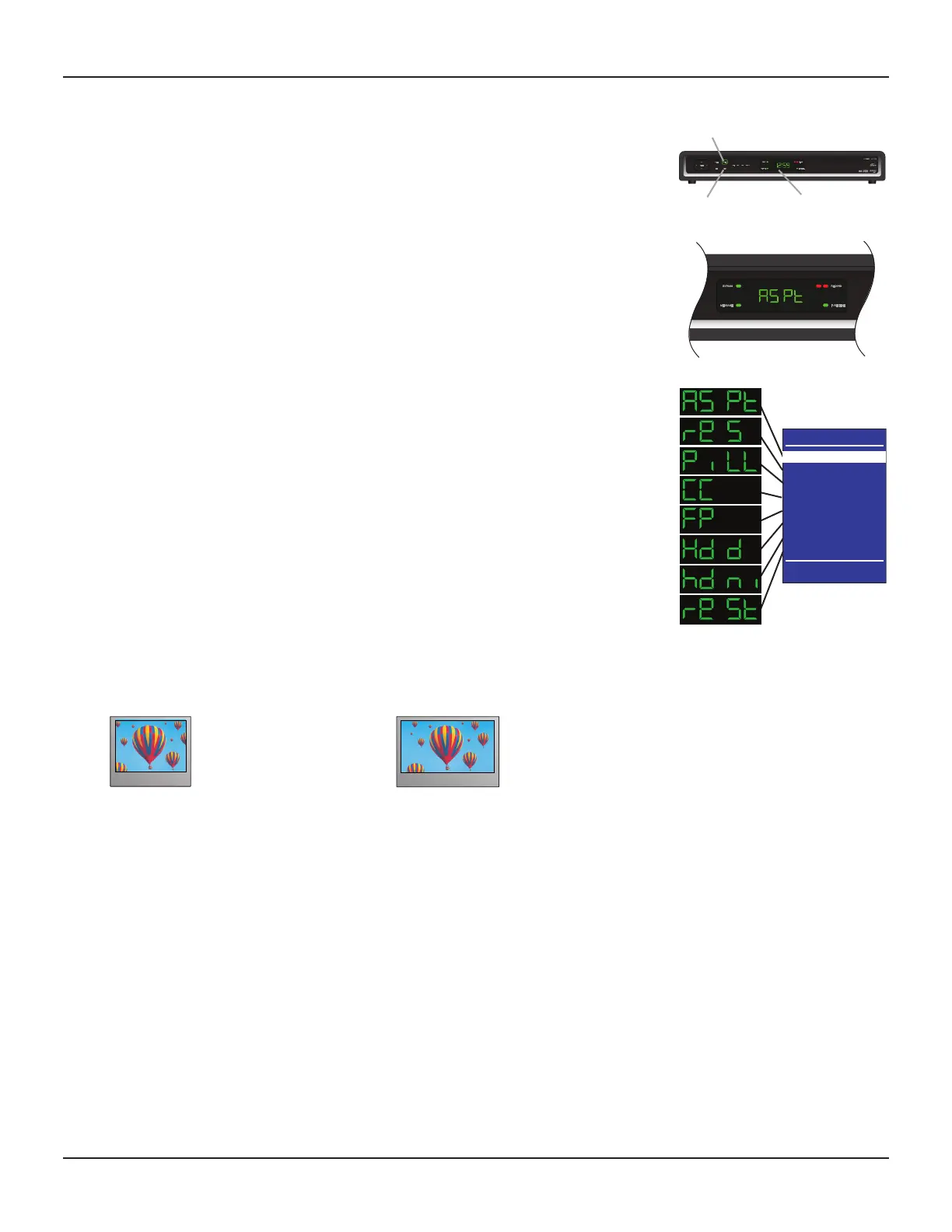
You use the buttons on the front panel of your set-top to make the settings and you can see them on the front-
panel display. You can also look at on-screen menus, but note that, until your set-top has been set up to match
the display capability of your TV (see page 12), these menus may not be visible.
Putting your set-top into User Settings mode
1. Make sure that your set-top is turned on (the POWER light is green).
2. Press the POWER button on your set-top (the POWER light goes red), then press the MENU button.
“ASPt” (or another of the 8 “words” shown right) should then appear on the front-panel display. If it does
not appear, press the MENU button again. You should see the PACE USER SETTINGS menu on your TV
screen.
3. When you have finished making changes (see pages 16 through 23), press the POWER button to remove
the PACE USER SETTINGS menu and return to normal viewing.
PACE USER SETTINGS
TV Aspect Ratio
TV Display Capability
Auto Pillarbox
Closed Captions
Front Panel Settings
Hard Disk Sleep Mode
HDMI Settings
Restore Defaults
Select[OK] Exit[POWER]
POWER button.
MENU button front-panel display
About the TV Aspect Ratio
The TV that you have connected to your set-top has an aspect ratio (width-to-height ratio) of 4:3 (basic/
standard) or 16:9 (widescreen). You must set the appropriate TV Aspect Ratio (4:3 or 16:9) on your set-top, so
that it is compatible with your TV.
4:3 standard TV,
EDTV or HDTV
16:9 HDTV


 To Next Page