23
TDC777D OPERATOR’S MANUAL (501-3432100)
MAKING USER SETTINGS (cont.)
Restoring the factory default settings
If you wish, you can restore the user settings and subtitle settings to their factory defaults. All the changes you
have made will be lost and the settings will revert to those that were programmed in the factory. The factory
settings are:
USER/SUBTITLE SETTINGS menu item Options Factory default setting
TV Aspect Ratio – 16:9
TV Display Capability 1080p24 Pass
1080p30 Pass
1080i
720p
480p
480i
No
No
Yes
No
Yes
Yes
Auto Pillarbox – No
Closed Captions – Off
Configure Captions Various All Auto except Hi Def CC, which
is Service 1
Front Panel Settings Standby Brightness
Viewing Brightness
IR Receiver
Std
High
On
Hard Disk Sleep Mode (Standby Sleep Mode) – Yes
HDMI Settings Audio Output Mode
Disable Auto Detect
Auto
No
Subtitles – Off
Subtitle Language – English
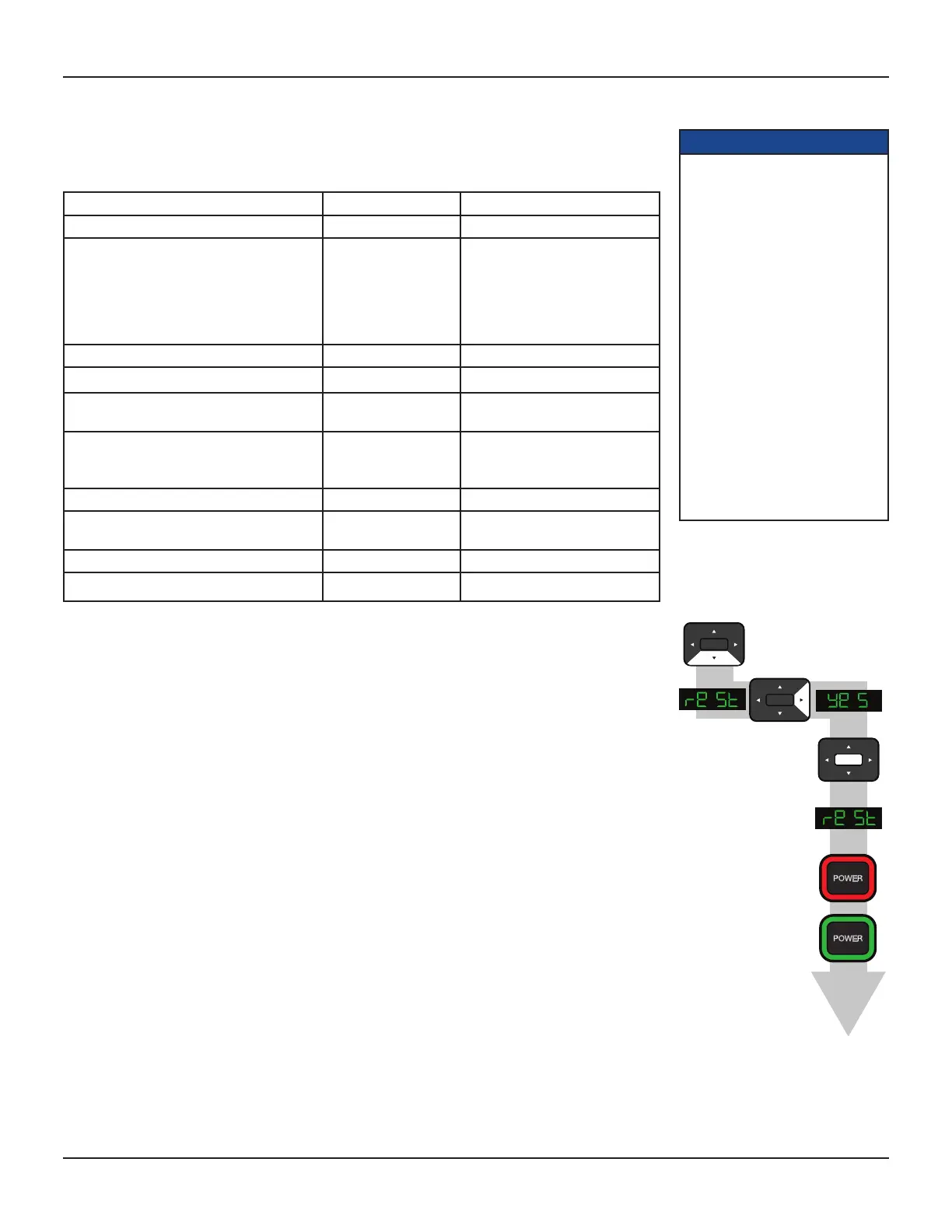
The flow diagram (right) shows how you use the arrow, SELECT, and POWER buttons on your set-top’s front
panel to change the display and make the settings. See also the instructions below.
If you have not done so already, put your set-top into User Settings mode, as described on page 16.
1. Press the D button until the front panel shows “reSt” (short for “restore factory settings”), as shown right,
and Restore Defaults is highlighted on the PACE USER SETTINGS menu.
2. Press the R button.
“YeS” appears on your set-top’s front panel and the message: “Restore Default. Press OK to confirm”
appears on your TV screen. (If, at this stage, you no longer wish to restore the factory settings, press the
L button.)
3. To confirm and restore the factory settings, press the SELECT button.
The factory settings are restored, and the PACE USER SETTINGS menu reappears.
4. If you want to continue changing the settings, see the sections from page 16 onwards. If you have finished
changing the settings, press the POWER button. Your set-top then switches on with the restored settings.
SELECT
SELECT
SELECT
NOTE
If your set-top and HDTV are
connected via a standard HDMI
cable, your HDTV may pass
information about the required
settings back to your set-top (see
page 17). If you wish to restore
your set-top’s settings to those
created by your HDTV, you must
disconnect the HDMI cable from
your set-top before you restore the
factory default settings. When you
reconnect your HDTV to your set-
top via the HDMI cable, your HDTV
will pass back the information
again.
Always turn off your set-top, wait
60 seconds, then disconnect your
set-top from the wall AC outlet
before you connect or disconnect
any other equipment to or from its
rear panel.


 To Next Page