8. 8.
VI. Operating Instructions
-SC8130S/W & SC8136S/W
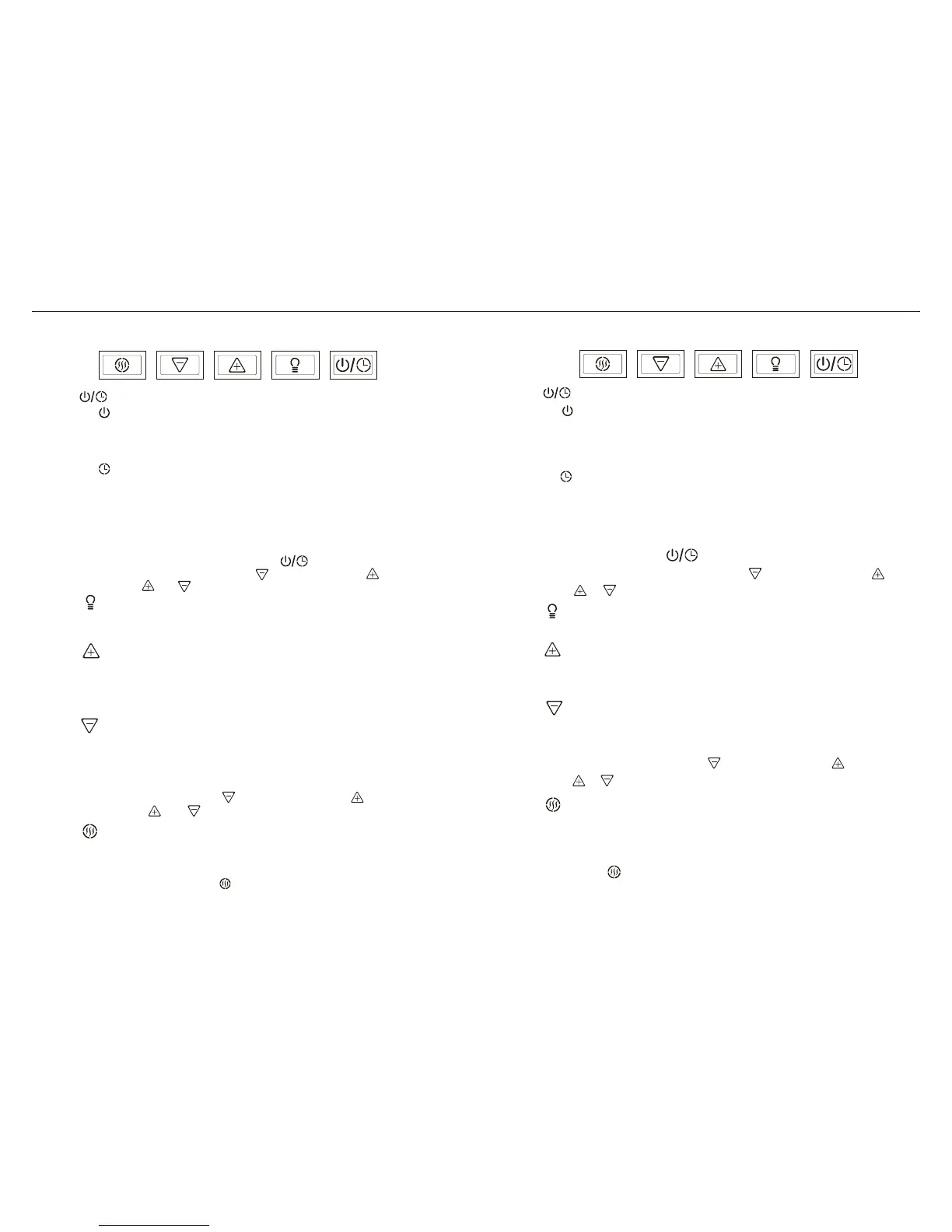
(1) On/Off
(1) Lights are two levels, press once is bright, press again is dim, press again
to turn off.
■ When activating the fans or steam clean, the will lights on.
■ Delay-Off speed indicator Speed 1 : only blinks. Speed 2 : only blinks.
Speed 3 : both and blink.
(2) Delay-off
1. On/Off & Delay-off:
2. Light Switch:
六.按鍵說明
-SC8130S/W & SC8136S/W
1. 開/關按鍵 & 延遲關機按鍵:
(1) 開/關按鍵:
2. 電燈按鍵:
(1) 電燈為兩段式。按第一次全亮;按第二次微亮;再按一次可關閉電燈。
• 按壓一次開啟風扇﹔再按壓一次關閉風扇。
• 此按鍵有記憶功能,自第二次使用會在上次關機的速度和電燈段數
啟動。
• Press to turn on the fans and press again to turn off the fans.
• From fans are off, press to turn on the range hood at the last speed and
light level it was turned off at.
• With the fans on or off press and hold this button for 3 seconds to start
the delay off. The fans will change to speed 1 and this button will blink
on and off indicating delay off function has started. The fans and lights
will automatically turn off after 5 minutes.
• The fans speed is adjustable during delay off.
• Clean function is not available during delay off.
(2) 延遲關機按鍵:
• 按下此按鍵3秒鐘可啟動延遲關機功能。會自動進入最低風速,此按
鍵會閃爍警示延遲關機功能已啟動。5分鐘後風扇和電燈會自動關閉。
• 延遲關機啟動時仍可調整風速。
• 延遲關機啟動時不可執行蒸氣清洗功能。
3.
風速
加速按鍵:
(1) 每按一次則速度遞增,至最高速為止。即1 → 2 → 3(最高速)。
(2) 當風扇停止運轉時,按此按鍵會在上次關機的速度和電燈段數啟動。
5.
清洗
按鍵:
(1) 按下此按鍵啟動蒸氣清洗功能。
(2) 清洗時此按鍵恆亮。
(3) 執行蒸氣清洗功能時,不可執行風扇速度增減。
(4) 缺水時, 按鍵會閃爍。
(5) 清洗功能異常時,會啟動自動鎖定功能,所有指示燈會閃爍警示該鎖
定功能啟動。
■ 風速指示燈說明: 低速:只會亮起 按鍵。中速:只會亮起 按鍵。
高速: 和 按鍵皆會亮起。
■ 當啟動風扇或蒸氣清洗, 按鍵會亮起。
■ 延遲關機風速指示燈說明:低速:只會閃爍 按鍵。中速:只會閃爍 按鍵
高速: 和 按鍵皆會閃爍。
(1) Press to start steam cleaning process.
(2) This button will illuminate when the range hood is cleaning.
(3) During the steam cleaning process, the fan speed button will not be available.
(4) When water level is low, the button will blink.
(5) Steam clean function will auto-lock when the function is unusual, all indication
lights will blink indicating an error.
5. Steam Clean:
(1) Press this button to decrease the fan speed, fan speed will change from
3 → 2 → 1 (Lowest speed).
(2) From fans are off, press to turn on the range hood at the last speed and
light level it was turned off at.
4. Speed Down:
(1) Press this button to increase fan speed, fan speed will change from
1 → 2 → 3 (Highest speed).
(2) From fans are off, press to turn on the range hood at the last speed and
light level it was turned off at.
3. Speed Up:
4.
風速
減速按鍵:
(1) 每按一次則速度遞減,至最低速為止。即3 → 2 → 1(最低速)。
(2) 當風扇停止運轉時,按此按鍵會在上次關機的速度和電燈段數啟動。
■ Speed indicator: Speed 1 : only lights on. Speed 2 : only lights on.
Speed 3 : both and light on.


 To Next Page