8 -
EDR 2000 DVD Recorder User's Guide
GETTING STARTED - CONNECTING
Connecting to a Television
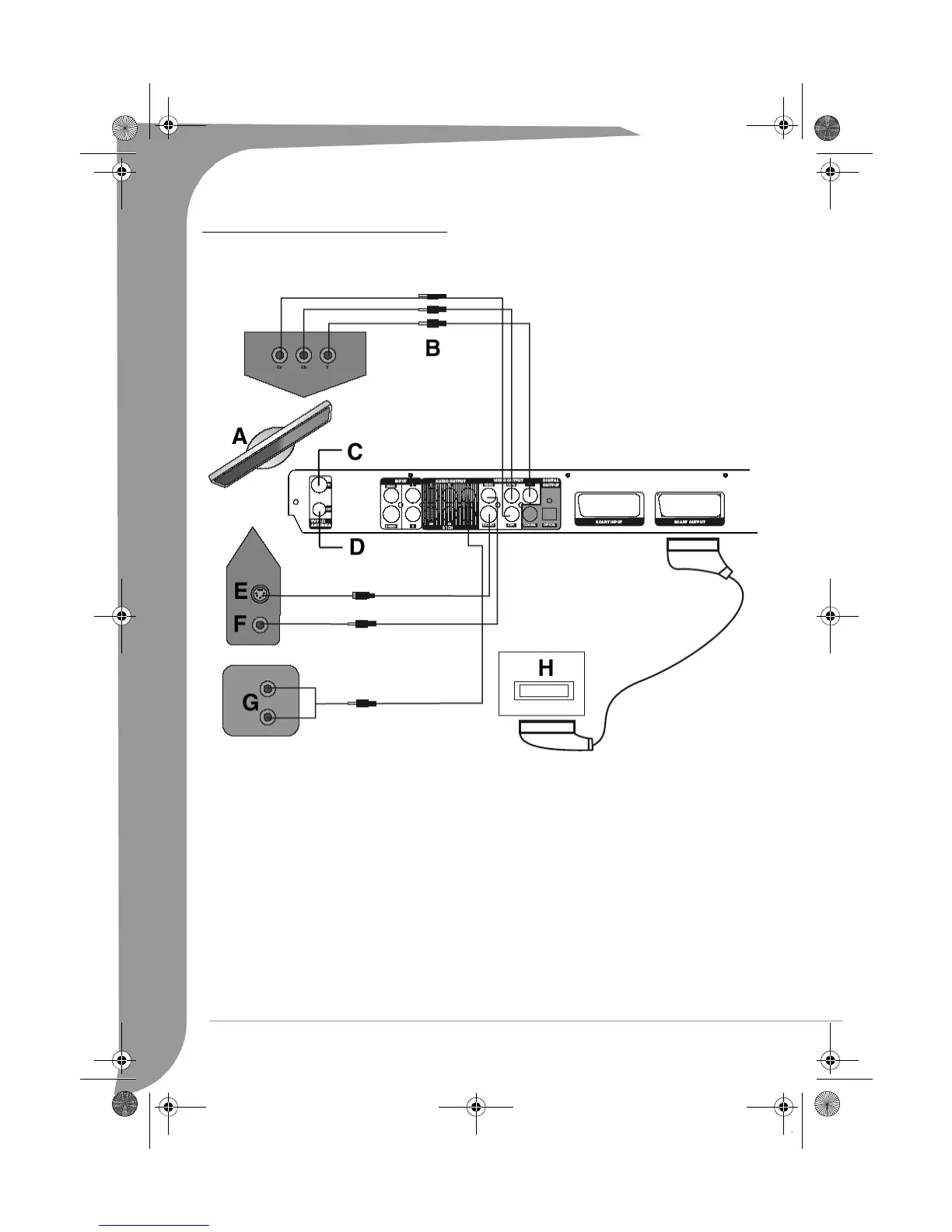
A. TV
B. Component video output
C. RF antenna input
D. RF antenna output
E. S-Video input
F. Video input
G. Audio input
H. SCART input
There are three kinds of video outputs available, namely Component Video, S-Video and Composite Video.
In terms of picture quality, Component Video is the best; S-Video comes next, while the Composite Video is
less satisfying. There is a scart output available also. A Composite Video (CVBS), a Component Video (RGB)
and audio (L & R) outputs are built into the scart output. When the scart output is used, none of the above-
mentioned cables are needed for connection.
Note: For Digital Cable and Satellite TV users please connect your decoder’s output to the relevant input on
the recorder.
EDR-2000-UG.book Page 8 Jeudi, 20. octobre 2005 8:32 08



 To Next Page