21
Settings
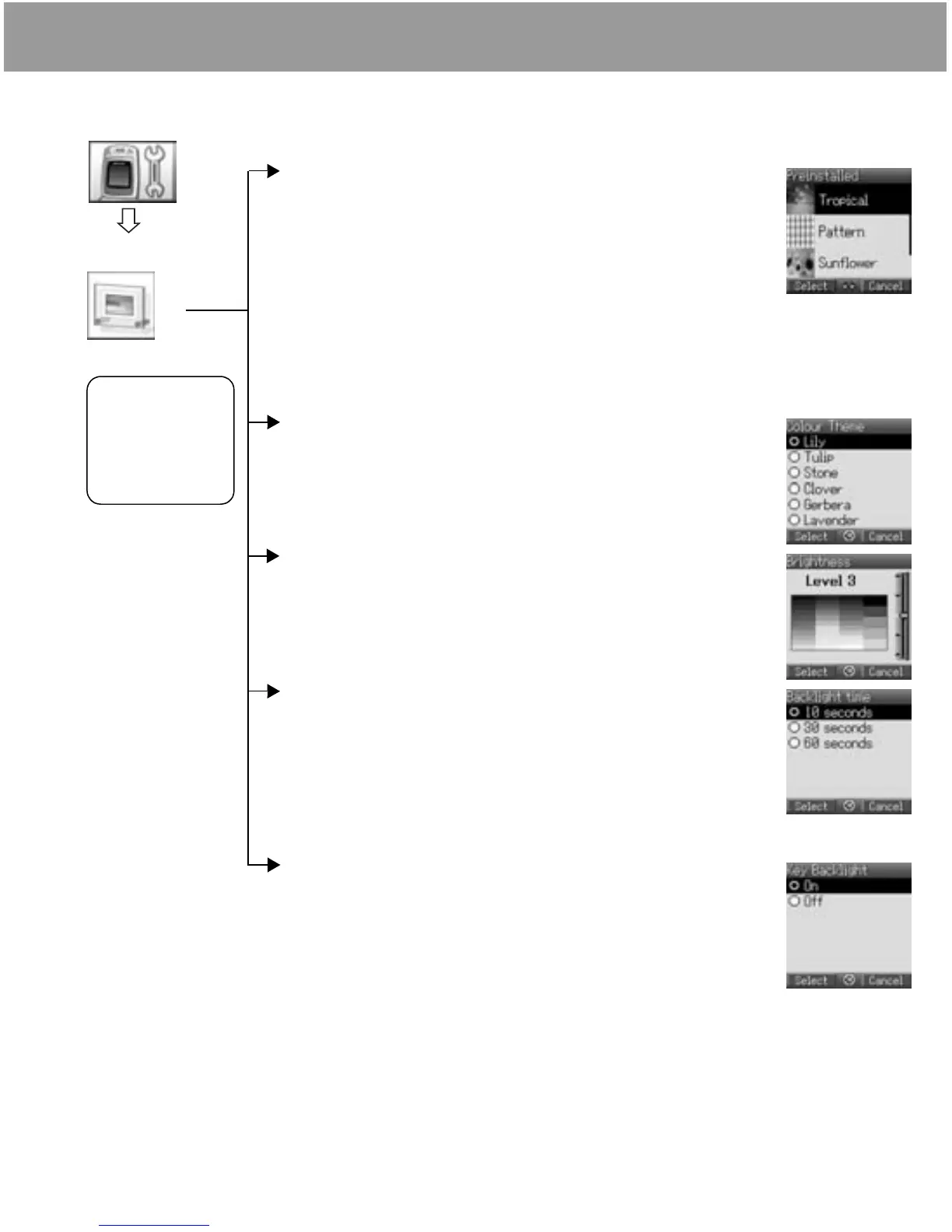
Display setting
Setting Wallpaper
From Display menu
1 4 Wallpaper < / A
2 4 Preinstalled, My Media or Download < / A
3 4 required data
4 To view and save, press < then < / A to save
or
To save without viewing, press A
Setting Display Colour Theme
From Display menu
1 4 Colour Theme < / A
2 4 required colour < / A
Setting Display Brightness
From Display menu
1 4 Brightness < / A
2 4 adjust the brightness level (1 - 5) < / A
Setting Backlight time
From Display menu
1 4 Backlight time < / A
2 4 required time < / A
The backlight goes out, then display is turned off in 1 minute.
Setting Key Backlight
From Display menu
1 4 Key Backlight < / A
2 4 On or Off < / A
Display
Display Colour,
Brightness,
Wallpaper,
Backlight time and
Key Backlight can
be changed.
Settings












 To Next Page