EasyManua.ls Logo

Panasonic AG-7330 - VHS Index Search System (VISS)

Panasonic AG-7330
50 pages
Print Icon
To Next Page IconTo Next Page
To Previous Page IconTo Previous Page
Loading...
VHS
INDEX
SEARCH
SYSTEM
(VISS)
[VHSINDEXSEARCHSYSTEM(VISS)
It
is
possible
to
locate
the
beginning
of
a
desired
programme
in
forward
or
reverse
direction
in
the
Fast
Forward
or
Rewind
mode
by
skipping
up
to
99
index
signals.
To
be
able
to
use
the
VHS
Index
Search
function,
index
signals
must
be
recorded
on
the
tape.
When
recording
index
signals,
space
them
so
that
the
interval
between
two
signals
is
more
than
2
minutes
in
normal
playback
time.
ein the
following
cases,
the
VHS
Index
Search
function
may
not
work
correctly:
elf
the
tape
has
portions
without
any
recording.
elf
a
recording
was
replaced
by
another
recording.
Recording
Index
Signals
Index
signals
can
be
recorded
during
recording
or
on
already
recorded
tapes.
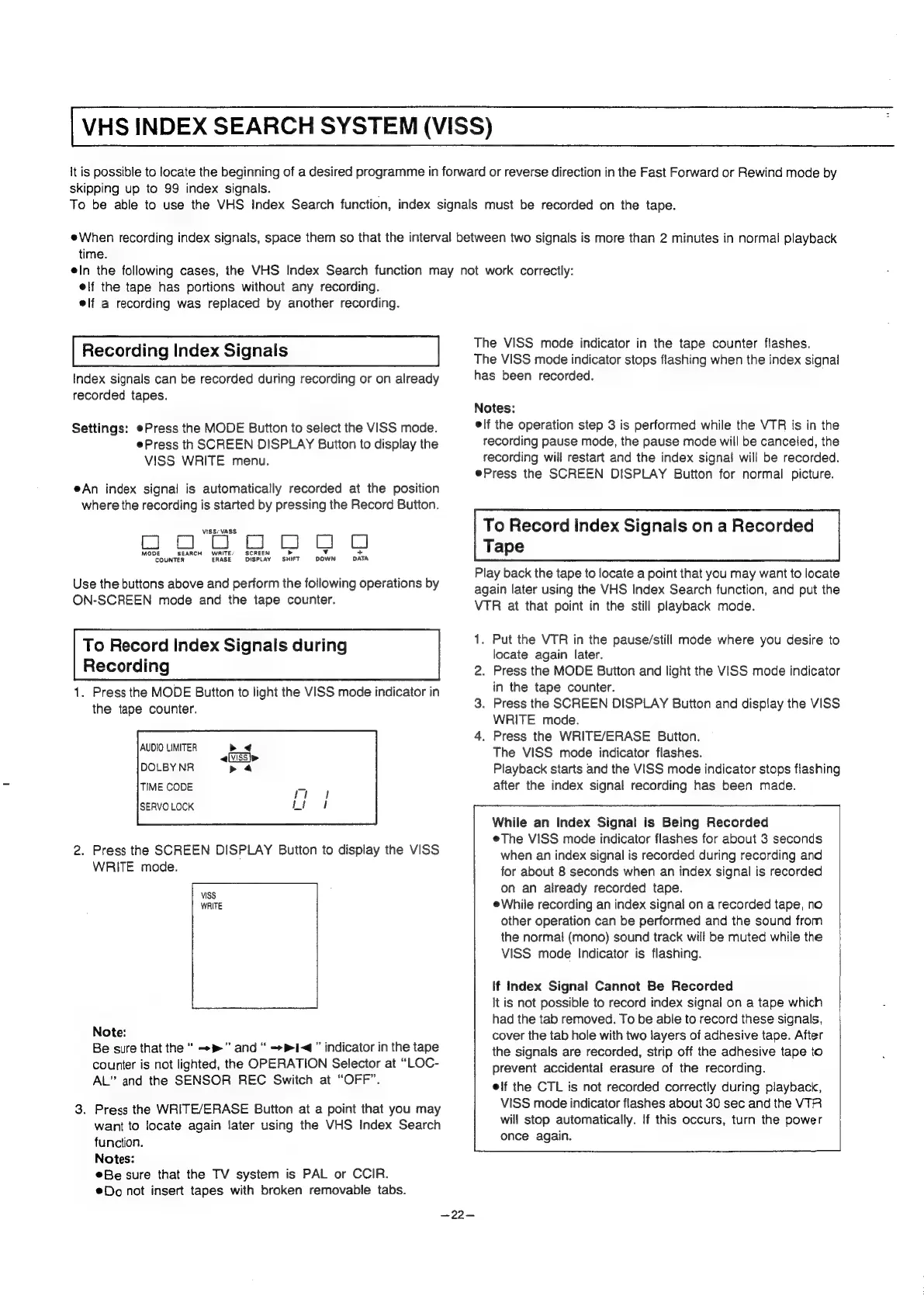
Settings:
¢Press
the
MODE
Button
to
select
the
VISS
mode.
ePress
th
SCREEN
DISPLAY
Button
to
display
the
VISS
WRITE
menu.
eAn
index
signal
is
automatically
recorded
at
the
position
where
the
recording
is
started
by
pressing
the
Record
Button.
VISS/VASS
aa
aa
C}
SCREEN
CI Cl
C)
COUNTER
ERASE
DISPLAY
SHIFT
DOWN
DATA
Use
the
buttons
above
and
perform
the
following
operations
by
ON-SCREEN
mode
and
the
tape
counter.
To
Record
Index
Signals
during
Recording
1.
Press
the
MODE
Button
to
light
the
VISS
mode
indicator
in
the
tape
counter.
2.
Press
the
SCREEN
DISPLAY
Button
to
display
the
VISS
WRITE
mode.
VISS
WRITE
Note:
Be
sure
that
the
“
-»”
and
“
+1”
indicator
in
the
tape
counter
is
not
lighted,
the
OPERATION
Selector
at
“LOC-
AL”
and
the
SENSOR
REC
Switch
at
“OFF”.
3.
Press
the
WRITE/ERASE
Button
at
a
point
that
you
may
want
to
locate
again
later
using
the
VHS
Index
Search
function.
Notes:
®Be
sure
that
the
TV
system
is
PAL
or
CCIR.
Do
not
insert
tapes
with
broken
removable
tabs.
—22—
The
VISS
mode
indicator
in
the
tape
counter
flashes.
The
VISS
mode
indicator
stops
flashing
when
the
index
signal
has
been
recorded.
Notes:
elf
the
operation
step
3
is
performed
while
the
VTR
is
in
the
recording
pause
mode,
the
pause
mode
will
be
canceled,
the
recording
will
restart
and
the
index
signal
will
be
recorded.
ePress
the
SCREEN
DISPLAY
Button
for
normal
picture.
To
Record
Index
Signals
on
a
Recorded
Tape
Play
back
the
tape
to
locate
a
point
that
you
may
want
to
locate
again
later
using
the
VHS
Index
Search
function,
and
put
the
VTR
at
that
point
in
the
still
playback
mode.
1.
Put
the
VTR
in
the
pause/still
mode
where
you
desire
to
locate
again
later.
2.
Press
the
MODE
Button
and
light
the
VISS
mode
indicator
in
the
tape
counter.
3.
Press
the
SCREEN
DISPLAY
Button
and
display
the
VISS
WRITE
mode.
4.
Press
the
WRITE/ERASE
Button.
The
VISS
mode
indicator
flashes.
Playback
starts
and
the
VISS
mode
indicator
stops
flashing
after
the
index
signal
recording
has
been
made.
While
an
Index
Signal
is
Being
Recorded
eThe
VISS
mode
indicator
flashes
for
about
3
seconds
when
an
index
signal
is
recorded
during
recording
and
for
about
8
seconds
when
an
index
signal
is
recorded
on
an
already
recorded
tape.
While
recording
an
index
signal
on
a
recorded
tape,
no
other
operation
can
be
performed
and
the
sound
from
the
normal
(mono)
sound
track
will
be
muted
while
the
VISS
mode
Indicator
is
flashing.
If
Index
Signal
Cannot
Be
Recorded
It
is
not
possible
to
record
index
signal
on
a
tape
which
had
the tab
removed.
To
be
able
to
record
these
signals,
cover
the tab
hole
with
two
layers
of
adhesive
tape.
After
the
signals
are
recorded,
strip
off
the
adhesive
tape
to
prevent
accidental
erasure
of
the
recording.
elf
the
CTL
is
not
recorded
correctly
during
playback,
VISS
mode
indicator
flashes
about
30
sec
and
the
VTR
will
stop
automatically.
If
this
occurs,
turn
the
power
once
again.