EasyManua.ls Logo

Panasonic AG-7330 - Page 9

Panasonic AG-7330
50 pages
Print Icon
To Next Page IconTo Next Page
To Previous Page IconTo Previous Page
Loading...
@
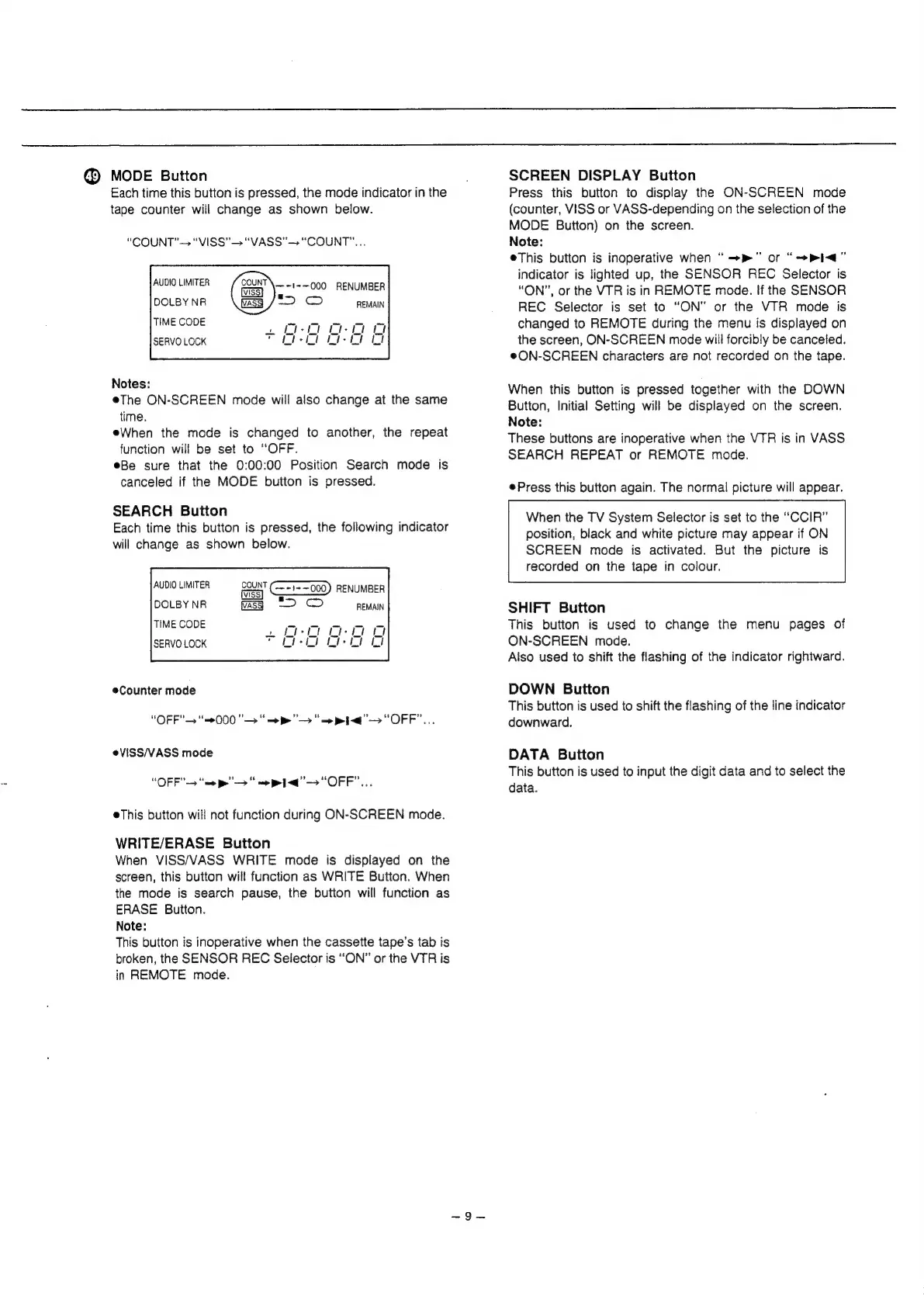
MODE
Button
Each
time
this
button
is
pressed,
the
mode
indicator
in
the
tape
counter
will
change
as
shown
below.
“COUNT’“VISS”—>
“VASS"—
"COUNT"...
AUDIO
LIMITER
DOLBY
NR
TIME
CODE
SERVO
LOCK
COUNT
—
=~t=—000
RENUMBER
.
2 ©
REMAIN
Notes:
eThe
ON-SCREEN
mode
will
also
change
at
the
same
time.
eWhen
the
mode
is
changed
to
another,
the
repeat
function
will
be
set
to
“OFF.
eBe
sure
that
the
0:00:00
Position
Search
mode
is
canceled
if
the
MODE
button
is
pressed.
SEARCH
Button
Each
time
this
button
is
pressed,
the
following
indicator
will
change
as
shown
below.
COUNT
FENCE
Ss
> ©
REMAIN
Counter
mode
“OFF”
“=000
">
“=>
p>"
"=
pig"
“OFF”...
eVISS/VASS
mode
“OFF"—
“me
pe"
—>
“me
1d"
“OFF”...
eThis
button
will
not
function
during
ON-SCREEN
mode.
WRITE/ERASE
Button
When
VISS/VASS
WRITE
mode
is
displayed
on
the
screen,
this
button
will
function
as
WRITE
Button.
When
the
mode
is
search
pause,
the
button
will
function
as
ERASE
Button.
Note:
This
button
is
inoperative
when
the
cassette
tape’s
tab
is
broken,
the
SENSOR
REC
Selector
is
“ON”
or
the
VTR
is
in
REMOTE
mode.
SCREEN
DISPLAY
Button
Press
this
button
to
display
the
ON-SCREEN
mode
(counter,
VISS
or
VASS-depending
on
the
selection
of
the
MODE
Button)
on
the
screen.
Note:
eThis
button
is
inoperative
when
“
—-»”
or
“Pi”
indicator
is
lighted
up,
the
SENSOR
REC
Selector
is
“ON”,
or
the
VTR
is
in
REMOTE
mode.
If
the
SENSOR
REC
Selector
is
set
to
“ON"
or
the
VTR
mode
is
changed
to
REMOTE
during
the
menu
is
displayed
on
the
screen,
ON-SCREEN
mode
will
forcibly
be
canceled.
e@ON-SCREEN
characters
are
not
recorded
on
the
tape.
When
this
button
is
pressed
together
with
the
DOWN
Button,
Initial
Setting
will
be
displayed
on
the
screen.
Note:
These
buttons
are
inoperative
when
the
VTR
is
in
VASS
SEARCH
REPEAT
or
REMOTE
mode.
®Press
this
button
again.
The
normal
picture
will
appear.
When
the
TV
System
Selector
is
set
to
the
“CCIR”
position,
black
and
white
picture
may
appear
if
ON
SCREEN
mode
is
activated.
But
the
picture
is
recorded
on
the
tape
in
colour.
SHIFT
Button
This
button
is
used
to
change
the
menu
pages
of
ON-SCREEN
mode.
Aiso
used
to
shift
the
flashing
of
the
indicator
rightward.
DOWN
Button
This
button
is
used
to
shift
the
flashing
of
the
line
indicator
downward.
DATA
Button
This
button
is
used
to
input
the
digit
data
and
to
select
the
data.