EasyManua.ls Logo

Panasonic AG-8700E - Page 60

Panasonic AG-8700E
66 pages
Print Icon
To Next Page IconTo Next Page
To Previous Page IconTo Previous Page
Loading...
Should
trouble
occur,
check
out
the
items
listed
below
and
make
the
recommended
adjustments.
If
the
trouble
should
persist,
consult
with
your
dealer.
-
Symptom.
|:
Inspection/adjustment
No
power.
M@
|s
power
cord
disconnected?
No
operation
even
when
M@
Error
on
counter
display?
E-59
function
button
is
pressed.
™@
CONTROL
switch
on
REMOTE?
E-23
M@
Search
dial
mode
switch
on
MENU?
E-35
No
tape
fast
forwarding
or
M@
Has
tape
come
to
end
after
fast
forwarding
_
rewinding.
or
rewinding?
Hi
Memory
switch
at
AUTO
STOP?
No
recording
or
editing.
@
Cassette
tab
broken
out?
|
wc-a700
only)
@
Correct
setting
for
input
switch?
Playback
accompanied
by
@
“IMAGE
MODE
SELECT’
dial
menu
function
noise.
set
to
“EDIT”?
M@
Dirty
video
head?
M@
Has
tracking
been
adjusted
properly?
E-65
E-17
@
Has
colour
mode
been
set
to
B/W
mode
by
E-39
dial
menu
function?
™@
Is
vertical
sync
of
TV
monitor
adjusted
properly?
M@
Strong
fluctuations
in
supply
voltage
_
during
recording?
M™
Is
cassette
tape
acceptable?
Striping
appears
on
part
of
picture
during
normal
playback.
No
colour
on
playback
pictures.
Disturbances
affect
playback
picture
at
regular
intervals.
tovwony
zoronv
op
O30\A_O3GIA
at
=
SFL
Uj
=
8
68
8e8
vW
r
acioer
Ly
6
——
ae
5
SnOKanS)
anal
io
(}+—Audio
out
©
TIP
TP
yey
rr
Switch
a3
[2
i
3
z
0
Bao
5
+4
-6
J
s
;
S
8S
as
Sere
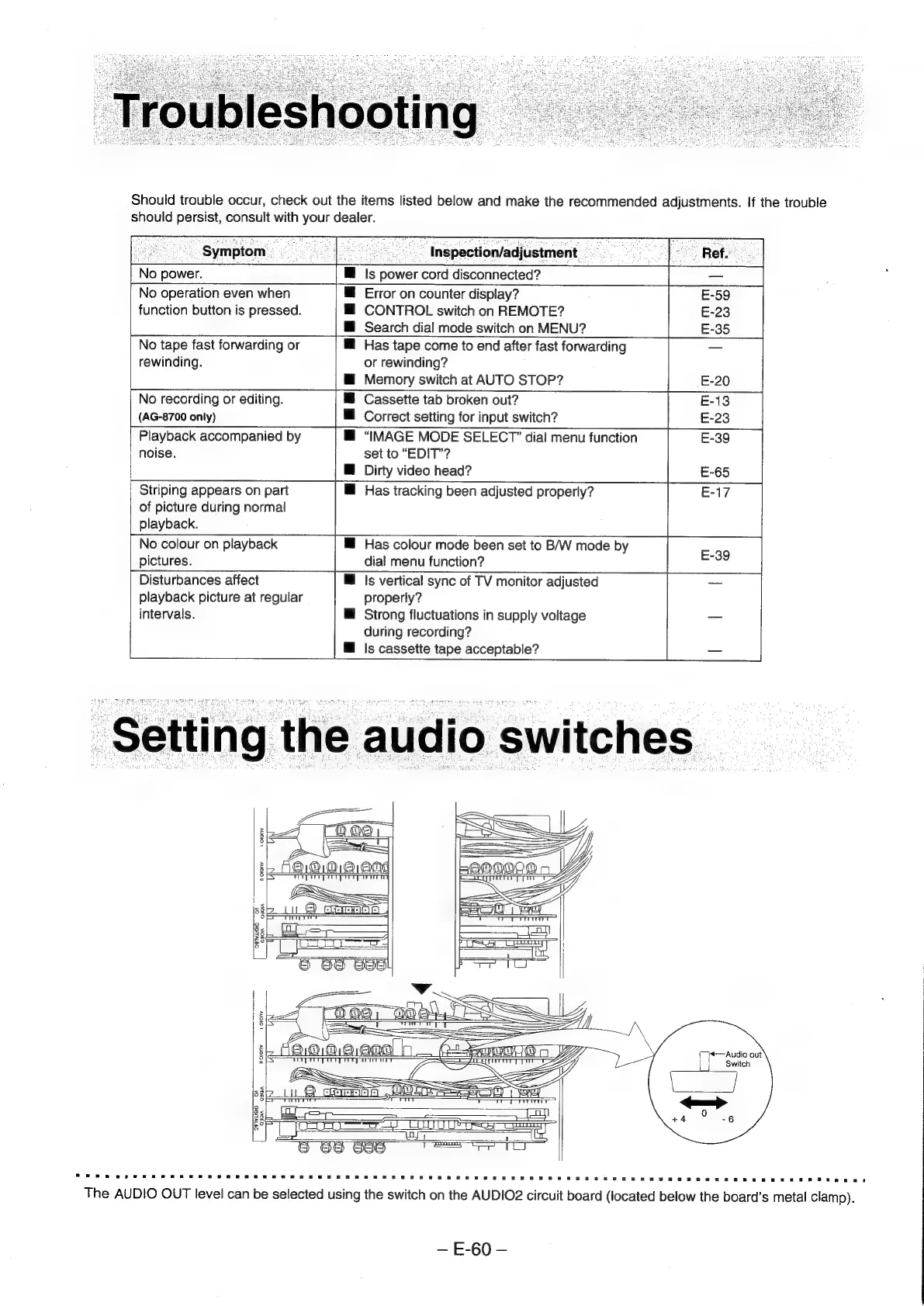
The
AUDIO
OUT
level
can
be
selected
using
the
switch
on
the
AUDIO2
circuit
board
(located
below
the
board’s
metal
clamp).
E-60