EasyManua.ls Logo

Panasonic AG-8700E - Page 63

Panasonic AG-8700E
66 pages
Print Icon
To Next Page IconTo Next Page
To Previous Page IconTo Previous Page
Loading...
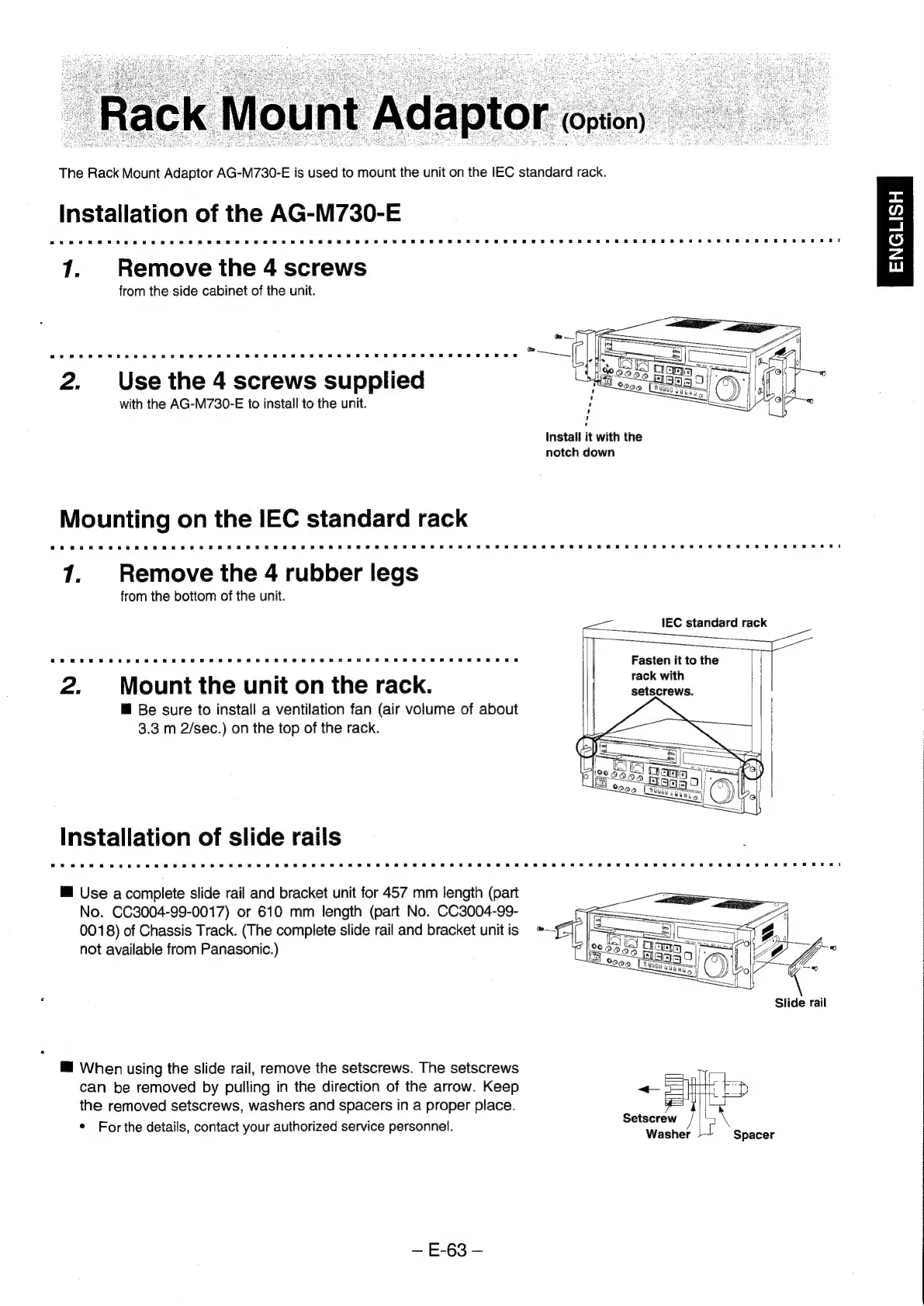
The
Rack
Mount
Adaptor
AG-M730-E
is
used
to
mount
the
unit
on
the
IEC
standard
rack.
Installation
of
the
AG-M730-E
7.
Remove
the
4
screws
from
the
side
cabinet
of
the
unit.
<
a
o
=
Lu
2.
Use
the
4
screws
supplied
with
the
AG-M730-E
to
install
to
the
unit.
Install
it
with
the
notch
down
mounting
on
the
IEC
standard
rack
1.
Remove
the
4
rubber
legs
from
the
bottom
of
the
unit.
Ce
Fasten
it to
the
rack
with
2.
Mount
the
unit
on
the
rack.
setscrews.
™@
Be
sure
to
install
a
ventilation
fan
(air
volume
of
about
3.3
m
2/sec.)
on
the
top
of
the
rack.
installation
of
slide
rails
@
Use
a
complete
slide
rail
and
bracket
unit
for
457
mm
length
(part
No.
CC3004-99-0017)
or
610
mm
length
(part
No.
CC3004-99-
0018)
of
Chassis
Track.
(The
complete
slide
rail
and
bracket
unitis
*
not
available
from
Panasonic.)
Slide
rail
@
When
using
the
slide
rail,
remove
the
setscrews.
The
setscrews
Mees
can
be
removed
by
pulling
in
the
direction
of
the
arrow.
Keep
«Stor
FD
the
removed
setscrews,
washers
and
spacers
in
a
proper
place.
a
*
For
the
details,
contact
your
authorized
service
personnel.
FASTEN
|
8
Washer
}~
Spacer
E-63