53 (E)
CONTENTS
Setup menus
The underlined items indicates the initial setting.
USER menu
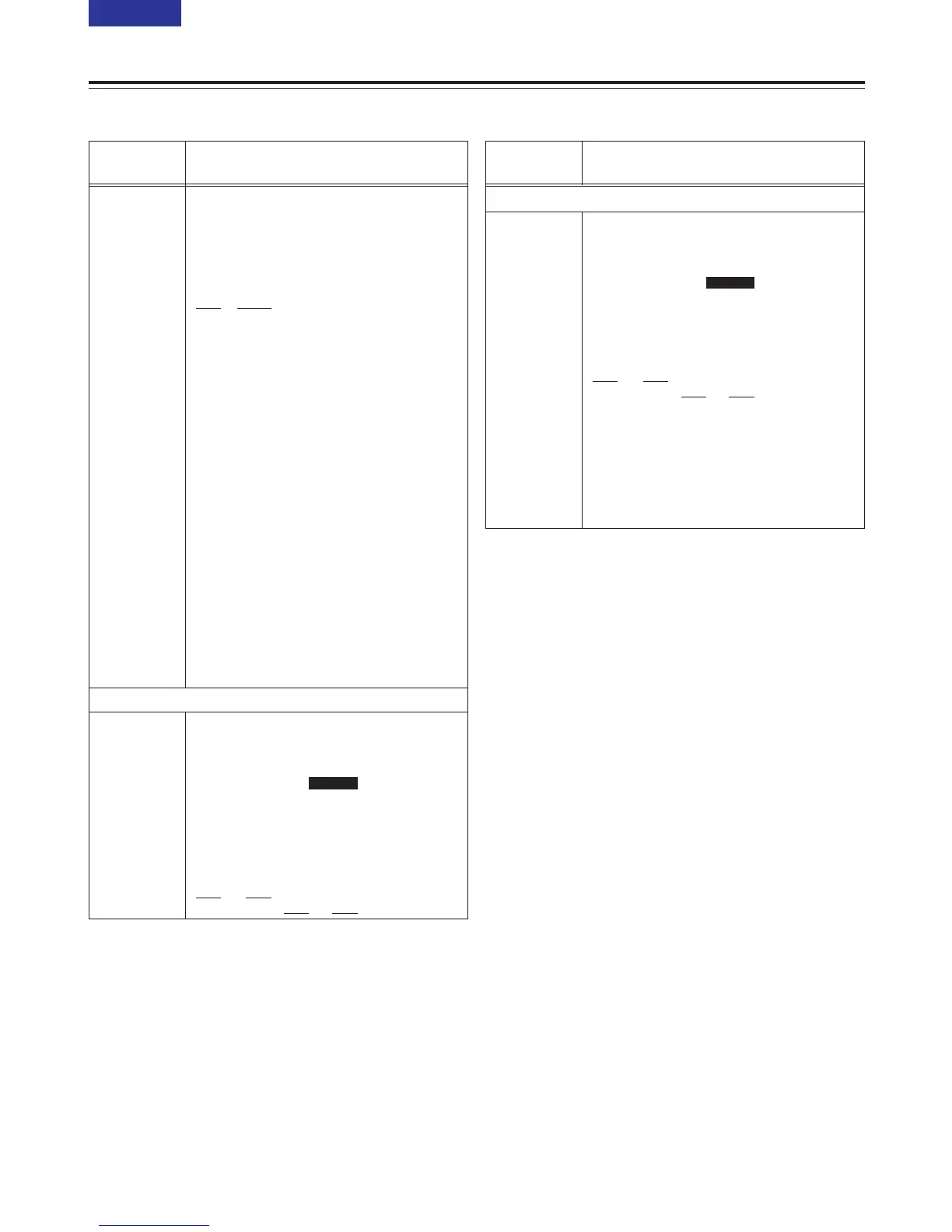
<V BLANK>
No./Item Description
800
ADD LINE 25
00
REC LINE1
Sub-screen
For selecting the mode for recording signals
on additional lines.
0000 OFF
: No signals are recorded on
additional lines.
0001 YC422
: The 422 mode signals are
recorded on 1 line.
0002 YC411
: The 411 mode signals are
recorded on 1 line.
0003 Y1_B/W
: Only the Y signal is recorded on
1 line directly.
0004 Y1_BPF
: Only the Y signal is recorded on
1 line after it has been separated
from the C signal.
0005 C1
: Only the C signal is recorded on
1 line.
0006 Y2_B/W
: Only the Y signal is recorded on
2 lines directly.
0007 Y2_BPF
: Only the Y signal is recorded on
2 lines after it has been
separated from the C signal.
0008 C2
: Only the C signal is recorded on
2 lines.
<Notes>
OWhen a setting from “0001 (YC422)” to “0008
(C2)” is selected and the STOP button is
pressed, operation transfers to the sub-screen,
and the recording line or lines can be selected.
To return from the sub-screen, press the STOP
button again.
OThe setting takes effect when the system
format is 25 Mbps.
For selecting the additional line where the
signals are to be recorded.
[625i system] [525i system]
0000 7L 0000 10L
::::
0015 22L 0012 22L
0016 320L 0013 263L
: : 0014 273L
0031 335L : :
0032 623L 0025 284L
0026 525L
No./Item Description
01
REC LINE2
Sub-screen
For selecting the additional line where the
signals are to be recorded.
[625i system] [525i system]
0000 7L 0000 10L
::::
0015 22L 0012 22L
0016 320L 0013 263L
: : 0014 273L
0018 322L ::
: : 0016 275L
0031 335L : :
0032 623L 0025 284L
0026 525L
<Note>
This menu item is not displayed when additional
line mode setting “1” through “5” has been
selected.
SD955B



 To Next Page