71 (E)
CONTENTS
The VTR can be operated by commands when the
RS-232C interface is used.
(See command table on pages 74, 75.)
$ Conditions for acknowledging
commands from RS-232C interface
O The front panel CONTROL switch must be at
REMOTE.
O The setup menu No. 204 “RS232C SEL” must be
ON.
If the above conditions are not met, [ACK] + [STX]
ER001 [EXT] is returned to the external unit.
Whether the [ACK] code is returned depends on the
setting which has been selected for setup menu
item No. 209 “RETURN ACK”.
Hardware specifications
External interface specifications
RS-232C interface
O Connector specifications
Connector:
D-SUB 25-pin (crossover cable supported)
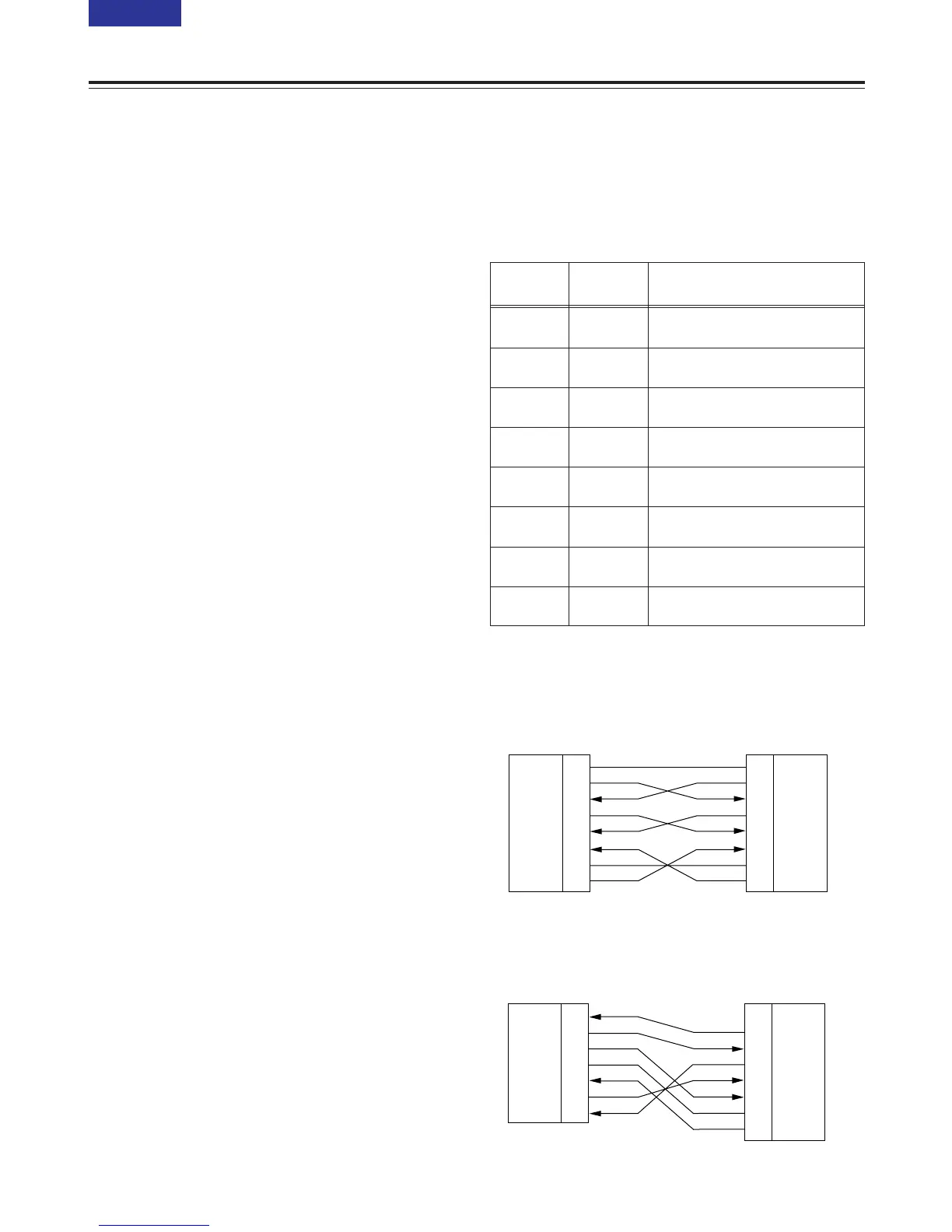
O Example of connection with controller (PC)
Using crossover cable with D-SUB 25-pin
connectors
Pin No. Signal Description
1 FG Protective ground
(Frame ground)
2 RXD Received data
(Data is sent to PC.)
3 TXD Transmitted data
(Data is received from PC.)
4 CTS Clear to send
(Shorted with pin 5.)
5 RTS Request to send
(Shorted with pin 4.)
6 DTR Data terminal ready
(No processing)
7 SG Signal ground
(Signal ground)
20 DSR Data set ready (+ voltage output after
communication enable status)
PC side
(D-SUB 25-pin connector)
VTR side



 To Next Page