52
Chapter 4
Adjustments and settings for recording
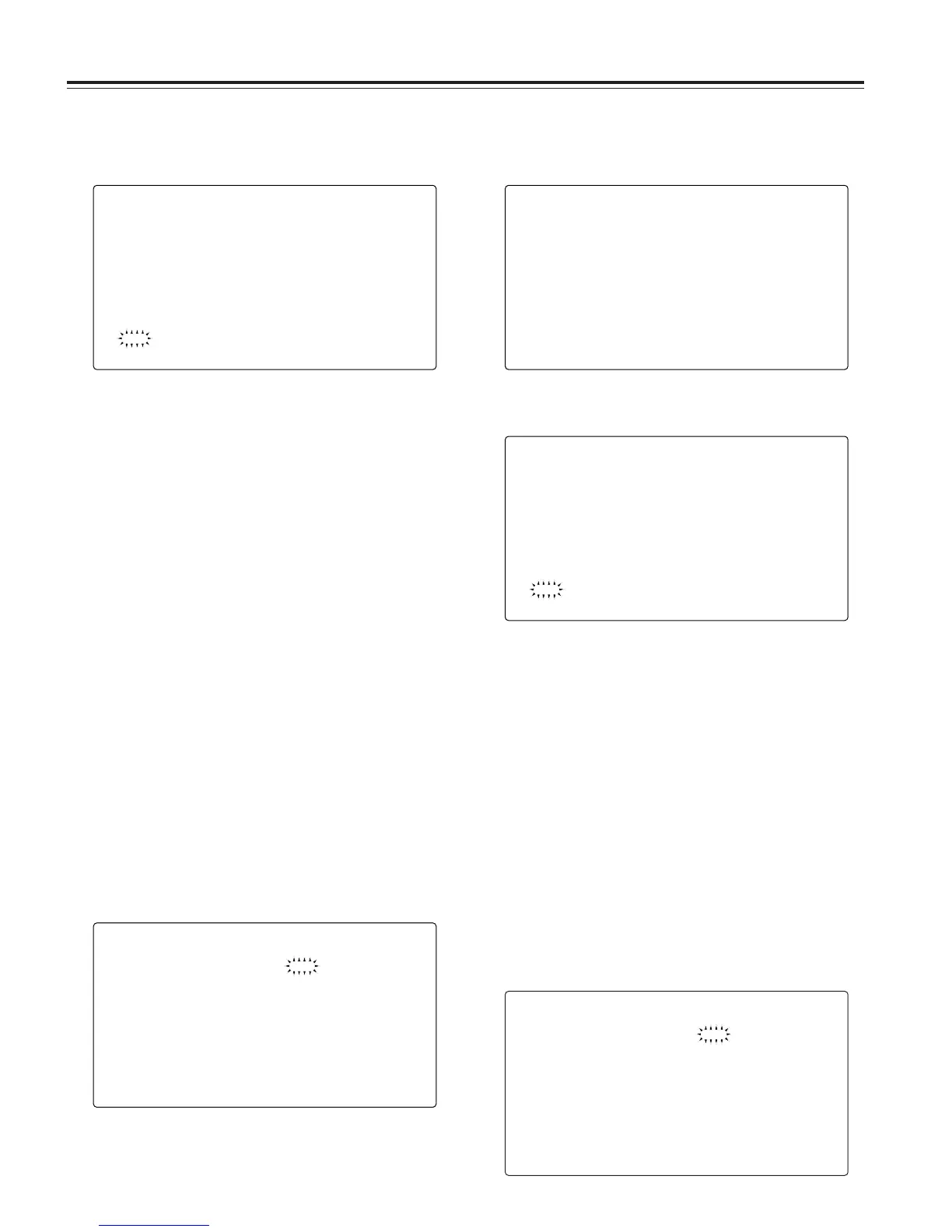
< SCENE >
READ USER DATA
#
SCENE SEL :1
READ
WRITE
RESET
TITLE1 : ********
TITLE2 : ********
TITLE3 : ********
TITLE4 : ********
3
When the JOG dial button is pressed, the scene file
number starts flashing. Turn the JOG dial button to select
the scene file whose data is to be loaded.
6
When the JOG dial button is pressed, the following
message appears.
WRITE?
YES
#
NO
7
Turn the JOG dial button to move the arrow (cursor) to
YES, and press the JOG dial button.
The setting data is now stored in the scene file area of the
unit’s internal memory.
8
Press the MENU button to exit the menu operations.
4
Press the JOG dial button to enter the scene file.
5
Turn the JOG dial button to move the arrow (cursor) to
the WRITE item.
< SCENE >
READ USER DATA
SCENE SEL ;1
READ
#
WRITE
RESET
TITLE1 : ********
TITLE2 : ********
TITLE3 : ********
TITLE4 : ********
1
Perform a menu operation to open the <SCENE> screen.
2
Turn the JOG dial button to move the arrow (cursor) to
the SCENE SEL item.
Reading the setting data used for the scene files
4-9-4
How to use the scene file data
The setting data can be written in the scene file area of the
unit’s internal memory and the data written can be read from
this area. Up to four scene files can be registered. By using
this data, the appropriate setup statuses can be established
speedily.
At the factory, the unit’s default statuses were set in TITLE1-3
and the FILM-LIKE parameters were set in TITLE4. The
contents of TITLE4 can be changed.
Writing the setting data used for the scene files
< SCENE >
READ USER DATA
#
SCENE SEL :1
READ
WRITE
RESET
TITLE1 : ********
TITLE2 : ********
TITLE3 : ********
TITLE4 : ********
1
Perform a menu operation to open the <SCENE> screen.
2
Turn the JOG dial button to move the arrow (cursor) to
the SCENE SEL item.
3
When the JOG dial button is pressed, the scene file
number starts flashing. Turn the JOG dial button to select
the scene file in which data is to be saved.
3
When the JOG dial button is pressed, the following
message appears.
4
Turn the JOG dial button to move the arrow (cursor) to
YES, and press the JOG dial button.
The data written in the user area of the unit’s internal
memory is now read, and the setting is completed.
5
Press the MENU button to exit the menu operations.
READ?
YES
#
NO








 To Next Page