82
Chapter 7 Menu description tables
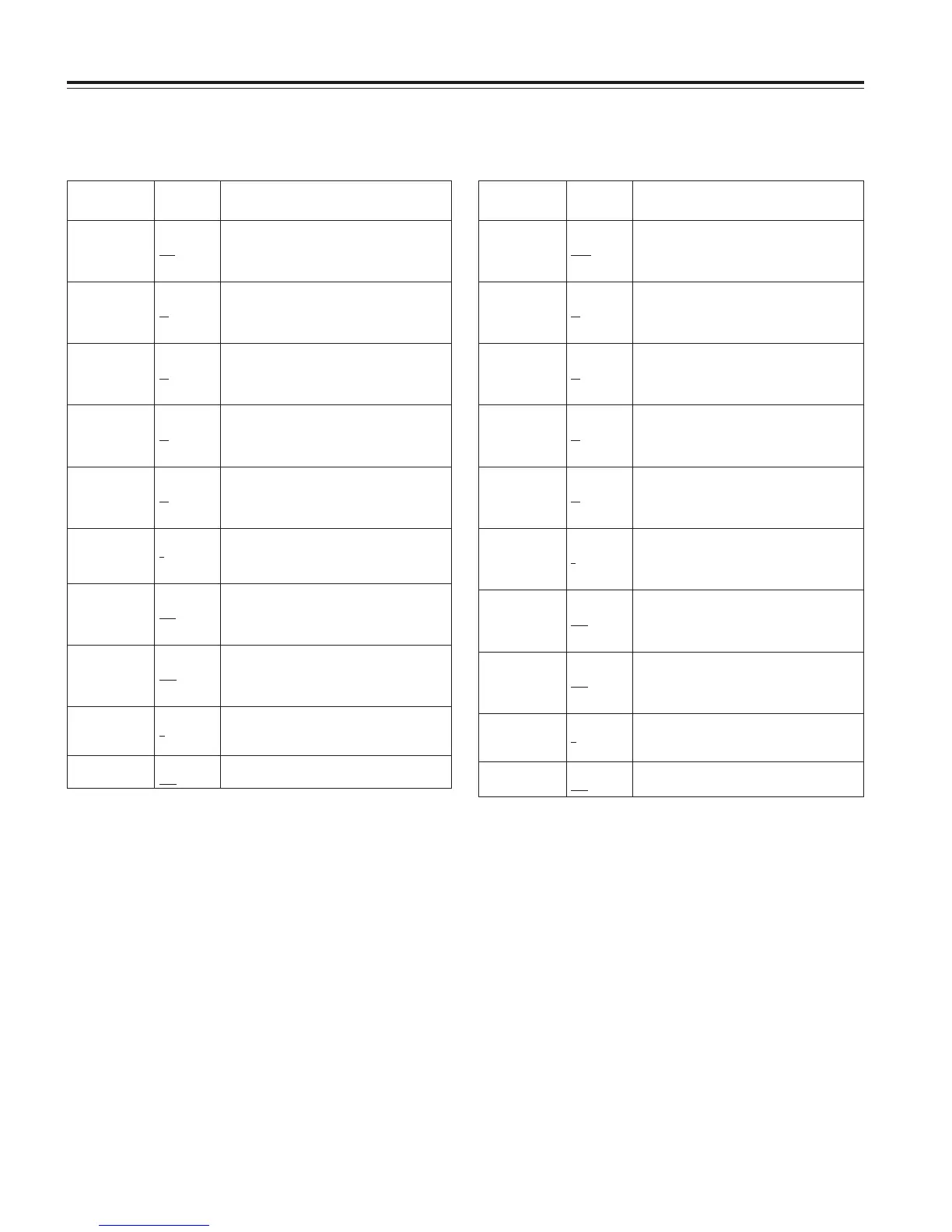
7-3-5 MID SETTING
MATRIX TABLE OFF
A
B
For selecting the color correction table.
COLOR CORRECT ON
OFF
For selecting ON or OFF for the color
correction.
Item
Variable
range
Remarks
MASTER GAIN –3dB
:
9dB
:
30dB
For setting the master gain to –3, 0, 3, 6, 9,
12, 15, 18, 21, 24, 27 or 30 dB.
H.DTL LEVEL 00
:
20
:
63
For performing the H.DTL LEVEL setting.
V.DTL LEVEL 00
:
10
:
31
For performing the V.DTL LEVEL setting.
DTL CORING 00
:
03
:
15
For performing the DTL CORING setting.
H.DTL FREQ. 00
:
20
:
31
For performing the H.DTL FREQ setting.
LEVEL DEPEND. 0
1
:
5
For performing the LEVEL DEPEND setting.
MASTER GAMMA 0.35
:
0.45
:
0.75
For setting the MASTER GAMMA in 0.01
steps.
BLACK STRECH –3
:
OFF
:
+3
For setting the gamma curve of the dark
areas.
7-3-6 HIGH SETTING
MATRIX TABLE OFF
A
B
For selecting the color correction table.
COLOR CORRECT ON
OFF
For selecting ON or OFF for the color
correction.
Item
Variable
range
Remarks
MASTER GAIN –3dB
:
18dB
:
30dB
For setting the master gain to –3, 0, 3, 6, 9,
12, 15, 18, 21, 24, 27 or 30 dB.
H.DTL LEVEL 00
:
10
:
63
For performing the H.DTL LEVEL setting.
V.DTL LEVEL 00
:
10
:
31
For performing the V.DTL LEVEL setting.
DTL CORING 00
:
08
:
15
For performing the DTL CORING setting.
H.DTL FREQ. 00
:
20
:
31
For performing the H.DTL FREQ setting.
LEVEL DEPEND. 0
:
3
:
5
For performing the LEVEL DEPEND setting.
MASTER GAMMA 0.35
:
0.55
:
0.75
For setting the MASTER GAMMA in 0.01
steps.
BLACK STRECH –3
:
OFF
:
+3
For setting the gamma curve of the dark
areas.
The underlining in the variable range column indicates the setting in the preset mode.





 To Next Page