58
Chapter 5 Preparation
When using a battery pack made by Sony or
other company
When using the NP-1B or BP-90
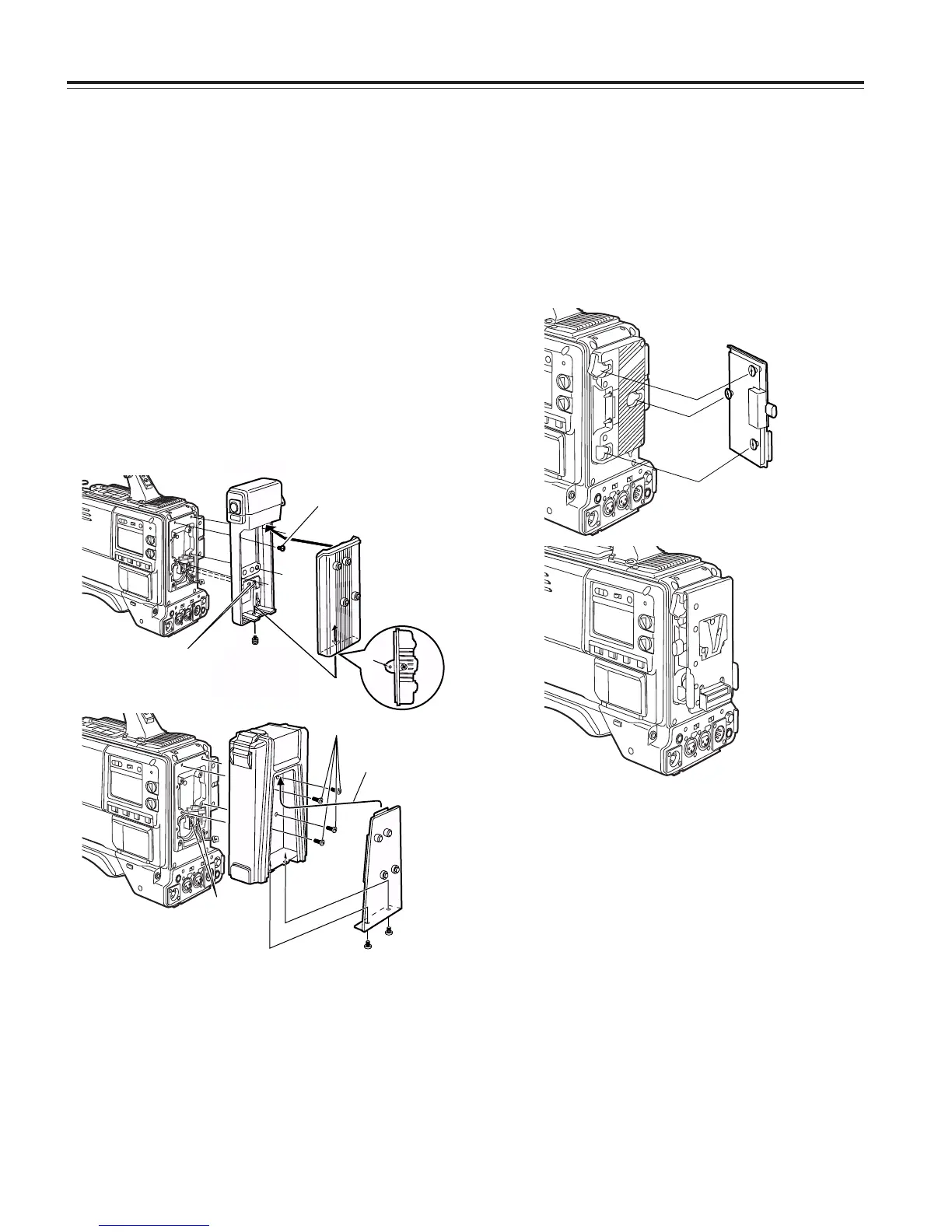
Using the V-mount type battery pack
Attach the V-mount adapter plate.
Insert it in the direction shown by the arrows, and slide it into
place.
Please consult your local dealer for any questions regarding
the NP/BP adapter plate or V-mount adapter plate.
To set the battery, select the battery setting that corresponds
to the battery made by Sony or other company for the
BATTERY SELECT item on the <BATTERY/TAPE> screen.
3
Set the battery type.
Select the battery setting that corresponds to the battery
made by Sony for the BATTERY SELECT item on the
<BATTERY/TAPE> screen.
For details, refer to “Chapter 7 Menu description tables.”
<Note>
When the BP-90 is to be used, use the AU-BP402 setting.
1
Remove the battery holder.
2
Attach the battery case made by Sony to the unit.
1 Tighten the mounting screws.
2 Tighten the power contact screws.
3 Insert the top of the detached cover in the direction
shown by the arrows.
4 Align the holes in the bottom of the cover (metal part)
with the holes at the bottom of the case, and use the
screws to attach the case.
<Note>
When mounting the battery holder, take care not to pinch
the connecting cord.
Screw provided
with mounting
connector for
NP-1B
1
2
4
Battery case
3
Usable batteries made by IDX:
• NP-L50
• NP-L50D
• ENDURA50
• ENDURA80
Usable batteries made by Sony:
• NP-1B
• BP-90
• BP-L60
• BP-L90
Usable battery made by PACO:
• HP-30A




 To Next Page