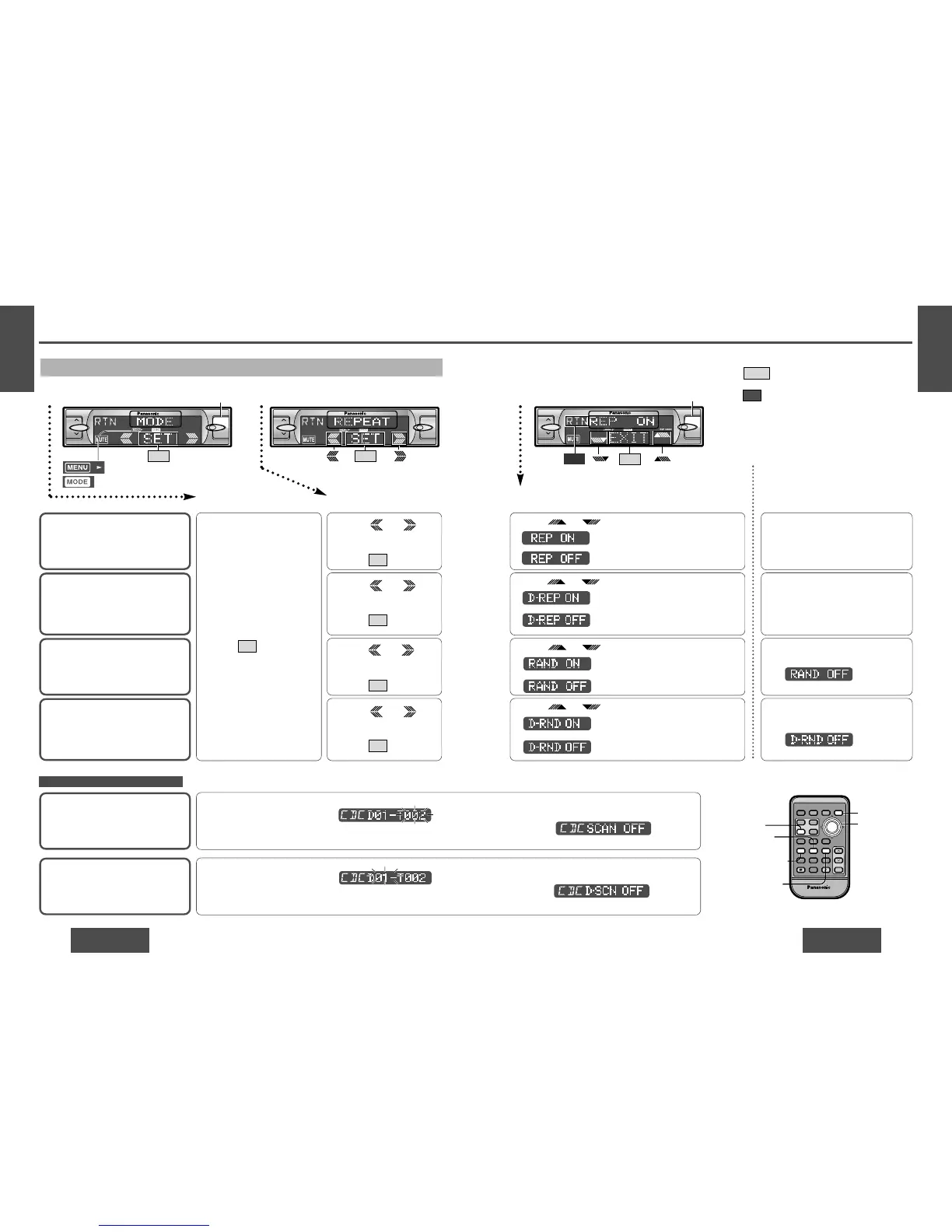
Disc Random Play
Default: D-RND OFF
1 Press /
[%] or [$] to select
“D-RANDOM”.
2 Press /[SET] to set.
SET
1 Press /
[%] or [$] to select
“REPEAT”.
2 Press /[SET] to set.
SET
Disc Scan Play
Default: Off
Disc Repeat Play
Default: D-REP OFF
1 Press /
[%] or [$] to select
“D-REPEAT”.
2 Press /[SET] to set.
SET
Press /["] or [#] to change setting.
3 Setting
: All the available tracks on all discs
plays in a random sequence.
: Cancel
Press /["] or [#] to change setting.
: All the available tracks on the current
disc plays in a random sequence.
: Cancel
Press [5] (SCAN) to change set-
ting.
Press /["] or [#] to change setting.
: Repeat the current track.
: Cancel
Press /["] or [#] to change setting.
: Repeat the current disc.
: Cancel
Press and hold [5] (SCAN) for
more than 2 seconds to change
setting.
Direct setting on the remote con-
trol unit when the menu is not
displayed
Press [4] (RANDOM) to change setting.
On: “RAND” lights.
Off:
(Displayed for 2 seconds.)
Press and hold [4] (RANDOM) for
more than 2 seconds to change setting.
On: “RAND” blinks.
Off:
(Displayed for 2 seconds.)
Press [6] (REPEAT) to change setting.
(When you press a button, the
screen on the left is displayed for
2 seconds.)
Press and hold [6] (REPEAT) for more
than 2 seconds to change setting.
(When you press a button, the
screen on the left is displayed for
2 seconds.)
Note:
≥ Press /[MENU]/[MENU], [DISP] (display) to
return to the regular mode.
≥ Press /[RET] (RETURN) to return to the previ-
ous display.
≥ REP: Lights during repeat play.
Blinks during disc repeat play.
RAND: Lights during random play.
Blinks during disc random play.
RTN
EXIT



 To Next Page