39
• Indicator
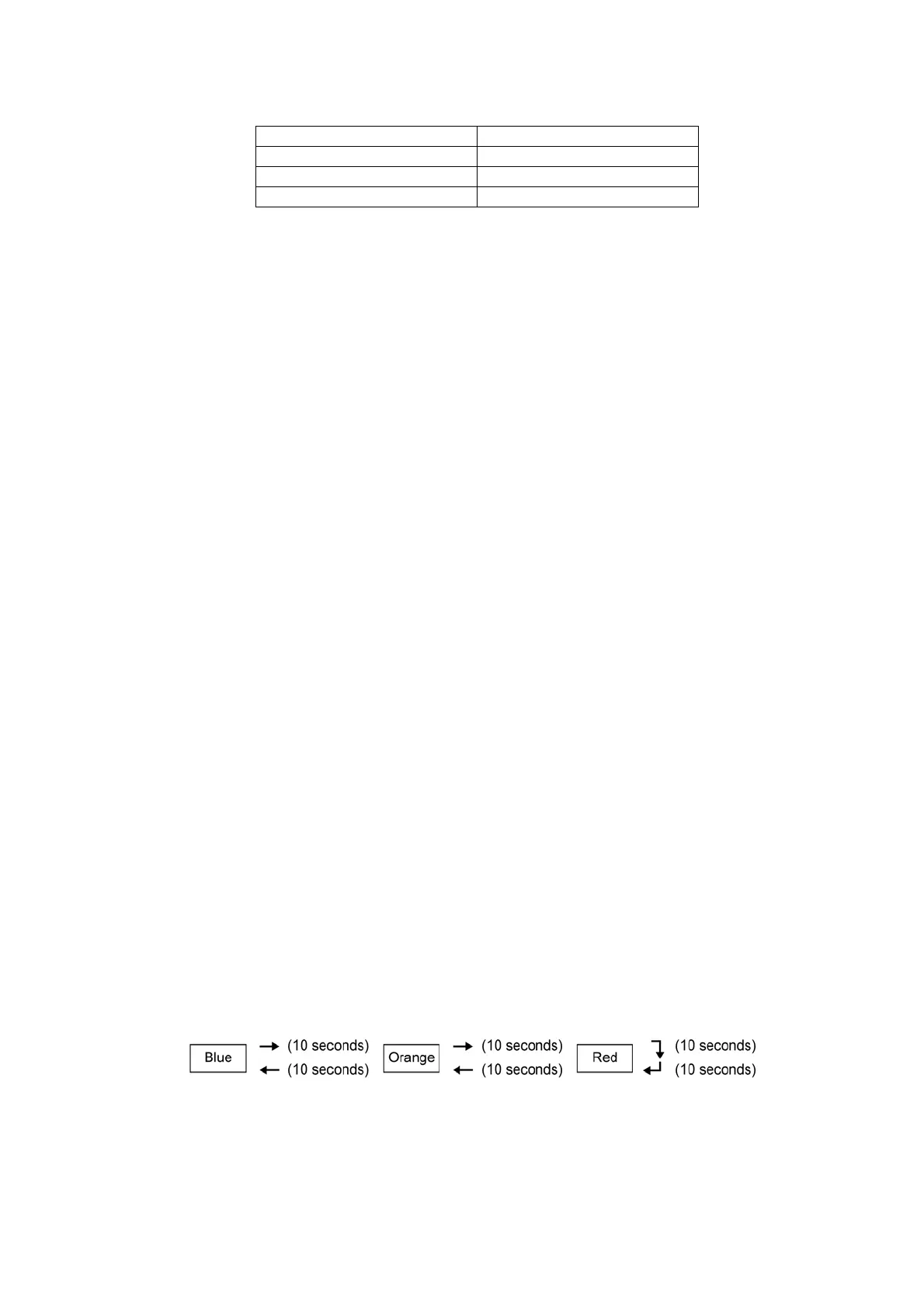
- When Patrol operation starts, Patrol LED is ON with 3 different colors:
- Then e-ion operation starts based on dirtiness level, both Patrol LED and e-ion LED are ON.
• Remote Control Receiving Sound
- Normal Operation Patrol Mode : Beep
- Patrol Mode Stop : Long Beep
- Patrol Mode Normal Operation : Beep
-Stop Patrol : Beep
• Timer Control
- When ON timer activates when unit stops, previous operation resumes and restored last saved Patrol operation status.
- When ON timer activates during any operation, no change and carry on current operation.
- When OFF timer activates during any operation, all operation stops and the latest Patrol operation status is saved.
• Power Failure Control
- During Patrol individual operation, if power failure occurs, after power resumes, Patrol individual operation resumes
immediately.
- During combination operation, if power failure occurs, after power resumes combination operation resume immediately.
- When e-ion operation is ON during patrol operation if power failure occurs, after power resumes, only patrol operation will
resume but e-ion operation will not resume.
• Error Detection Control
- The Patrol error detection control starts once the power is supplied to Patrol sensor. However, the error will display when the
Patrol operation is ON.
- Error detection method:
• If the Patrol sensor is opened circuit continuously for 6 hours, Patrol sensor error occurs. However, the error will display
only when the Patrol operation is ON.
- Patrol Sensor Control after error occurs
• During any operation mode combines with Patrol operation
- Power supply to Patrol sensor is OFF
- Air conditioner normal mode operation continues with Patrol LED blinking.
- The Patrol LED continues blinking if the patrol operation is ON and stops blinking if the patrol operation is OFF.
• During Patrol individual mode
- Power supply to Patrol sensor is OFF
- Patrol LED blinks.
- The Patrol LED continues blinking if the Patrol operation is ON and stops blinking if the Patrol operation is OFF.
- Error cancel condition:
• Power supply reset
• Power Operation Demo Mode
- Patrol Operation Demo Mode start condition.
• Press “Auto OFF/ON” button at indoor unit for 5 seconds to enter Forced Cooling Operation, then press “Patrol” button at
remote control for 5 seconds and release.
- The Patrol indicator change color every 10 seconds follows the pattern below for demo purpose:
- During demo, all operation stops, remote control buttons and auto OFF/ON button are ignored.
- Patrol Operation Demo Mode stop condition.
• Press “Patrol” button for 5 seconds and release.
• Power supply reset.
Patrol LED Air Quality
Blue Clean
Orange Moderate
Red Dirty




 To Next Page