19
5
Let it dry and reinstall it.
Be sure the “FRONT” mark is facing you.
* Damaged air filter.
Consult the nearest authorized dealer.
Part No.: CWD00240.
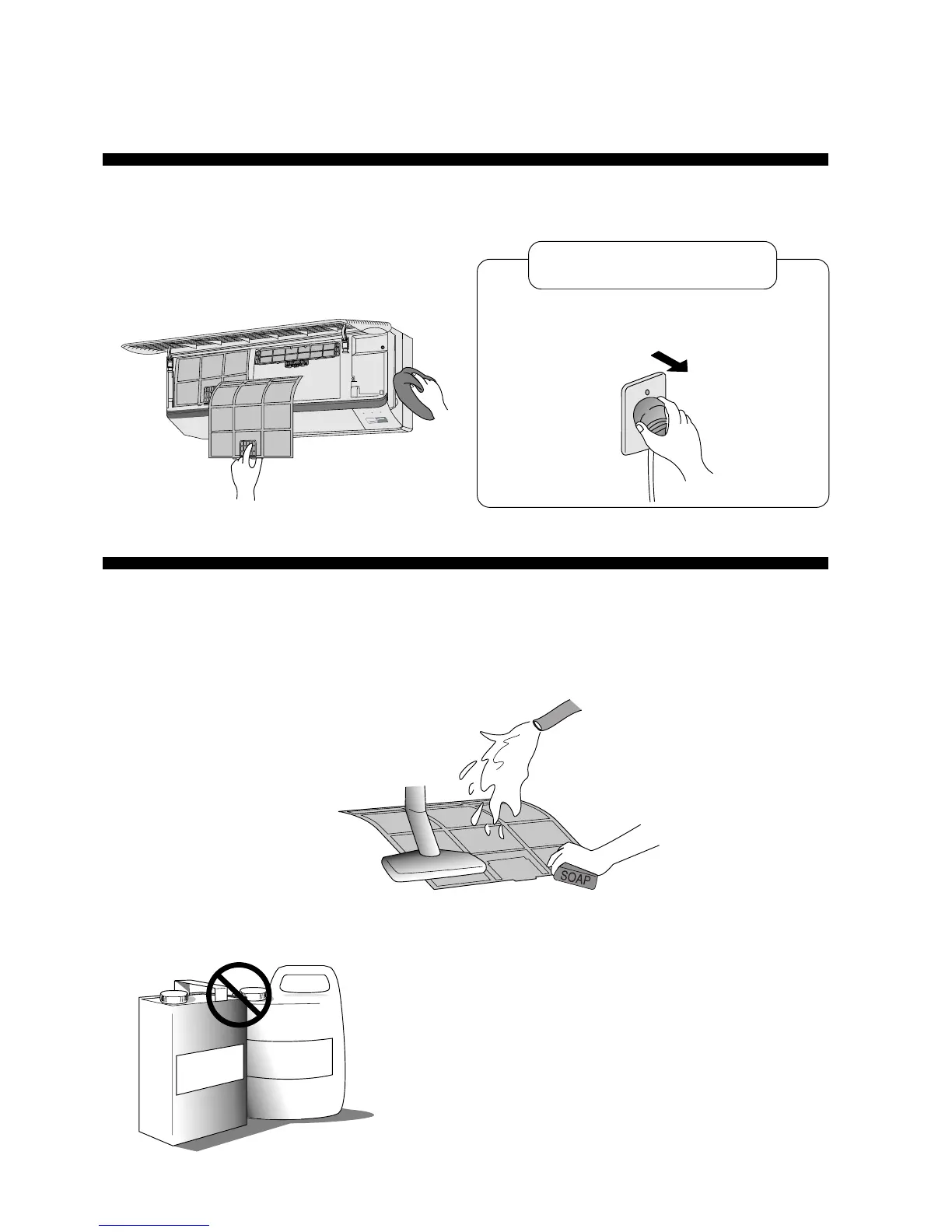
• Do not clean using benzene, thinner, scouring powder or cloths
soaked in caustic chemicals.
2
Remove dirt using a
vacuum cleaner.
3
Wash back of the air filter
with water.
CARE AND MAINTENANCE
● Cleaning the Air Filter
Switch OFF and unplug the power cord before
cleaning the air conditioner.
!
Caution
4
If badly soiled, wash it
with soap or a mild
household detergent.
● Cleaning the Indoor Unit and Remote Control
• Wipe gently with a soft, dry cloth.
• Do not clean with water hotter than 40°C or with
polishing fluids.
• The front panel can be removed and cleaned with
water.
1
Open the front grille and remove the two air
filters. Hold the tab, lift up slightly then pull down.
T
h
i
n
n
e
r
Benzene
POWER
ECONOMY
POWERFUL
SLEEP
TIMER
(Recommendation:- If the unit is operated in a dusty environment, clean the filters every two weeks,
continuous use of this dirty filters will reduce cooling efficiency)



 To Next Page