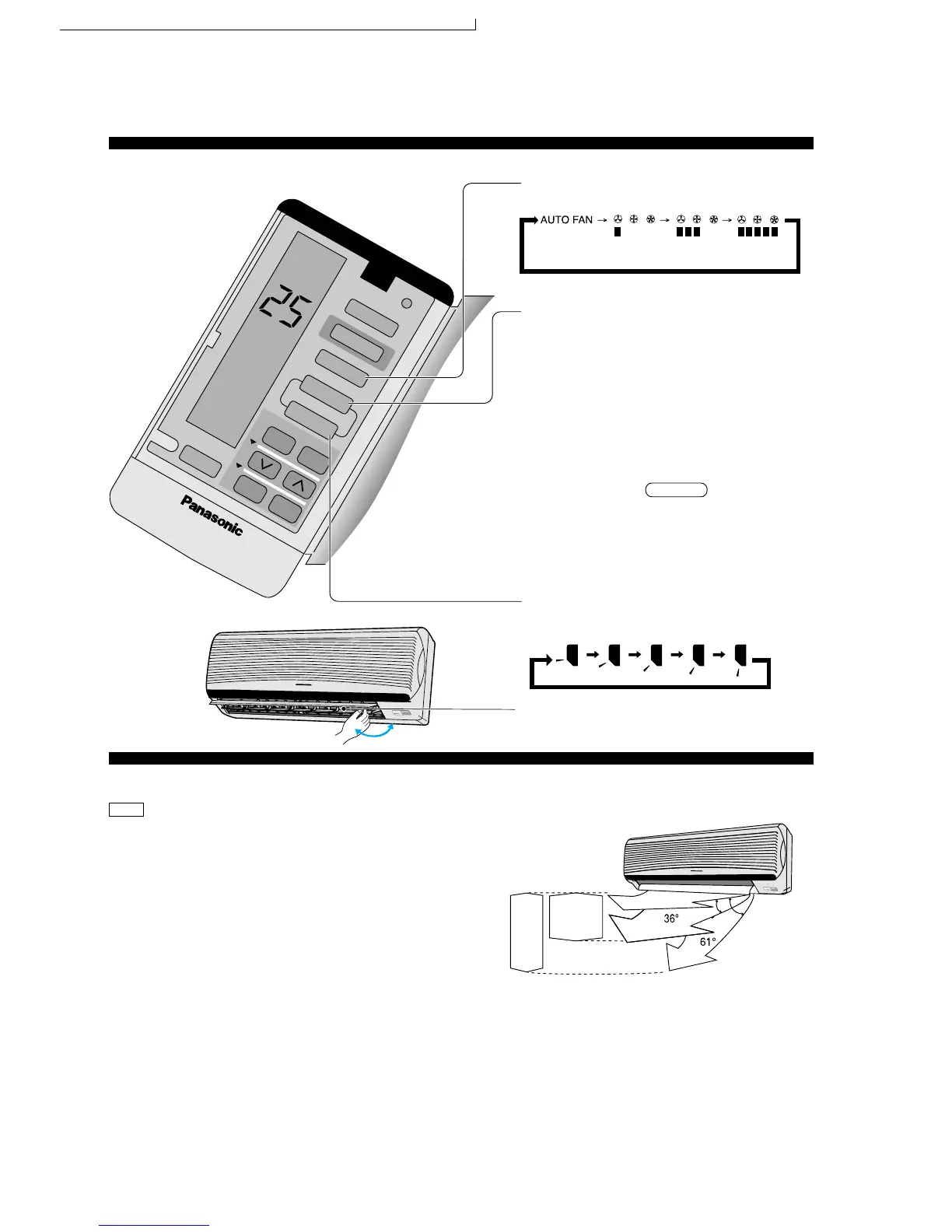
● Adjusting Airflow Direction And Fan Speed
■ Operation details
* Five stages of adjustments can be made in
this range.
Louver adjustment range
Press to select Fan speed
• The display changes in this order
Automatic Low Medium High
Selecting Vertical Airflow Direction
Press AUTO,
Selecting Vertical Airflow Direction
Press AUTO,
• Cooling and Soft Dry – The louver swing up
and down automatically.
• Heating – When the discharge air
temperature is low such as at the start of
heating operation, the air blows at
horizontal level. As the temperature rises,
the hot air blows in a downwards direction.
• To stop the automatic airflow direction
operation,press MANUAL button.
Press MANUAL
• Manual selection of Vertical Airflow Direction
Louver.
• The display changes in this order.
Horizontal Airflow Direction
• Adjust it manually.
POWER
ECONOMY
POWERFUL
SLEEP
TIMER
AIR SW
ING
TIMER
CLOCK
1
2
3
COOL
AUTO FAN
M
ODE
ECONOMY
FAN SPEED
AUTO
MANUAL
ON OFF
SET
CANCEL
SLEEP
Heating
POWER
E
C
O
N
O
M
Y
P
O
W
E
R
F
U
L
SLEEP
TIMER
Cooling
Soft Dry
– Heating Operation
Defrosing Operation
Depend on the outdoor temperature, the operation
occasionally stops to melt the frost on the outdoor unit.
• Heat is obtained from outdoor air to warm up the room.
When the outdoor ambient air temperature falls, the heating
capacity of the unit might be reduced.
We recommend that you use an additional heating device
when the outdoor ambient air temperature is low.
Automatic Airflow Volume
• The speed of the Indoor fan is adjusted automatically
according to the operation. The Indoor fan stops occasionally
during cooling operation.
HEAT
44
CS-MA95KE CU-MA185KE / CS-MA125KE CU-MA245KE / CS-MA75KE / CS-MA125KE CU-MA195KE



 To Next Page