12
Fan Speed / Air Swing Adjustment
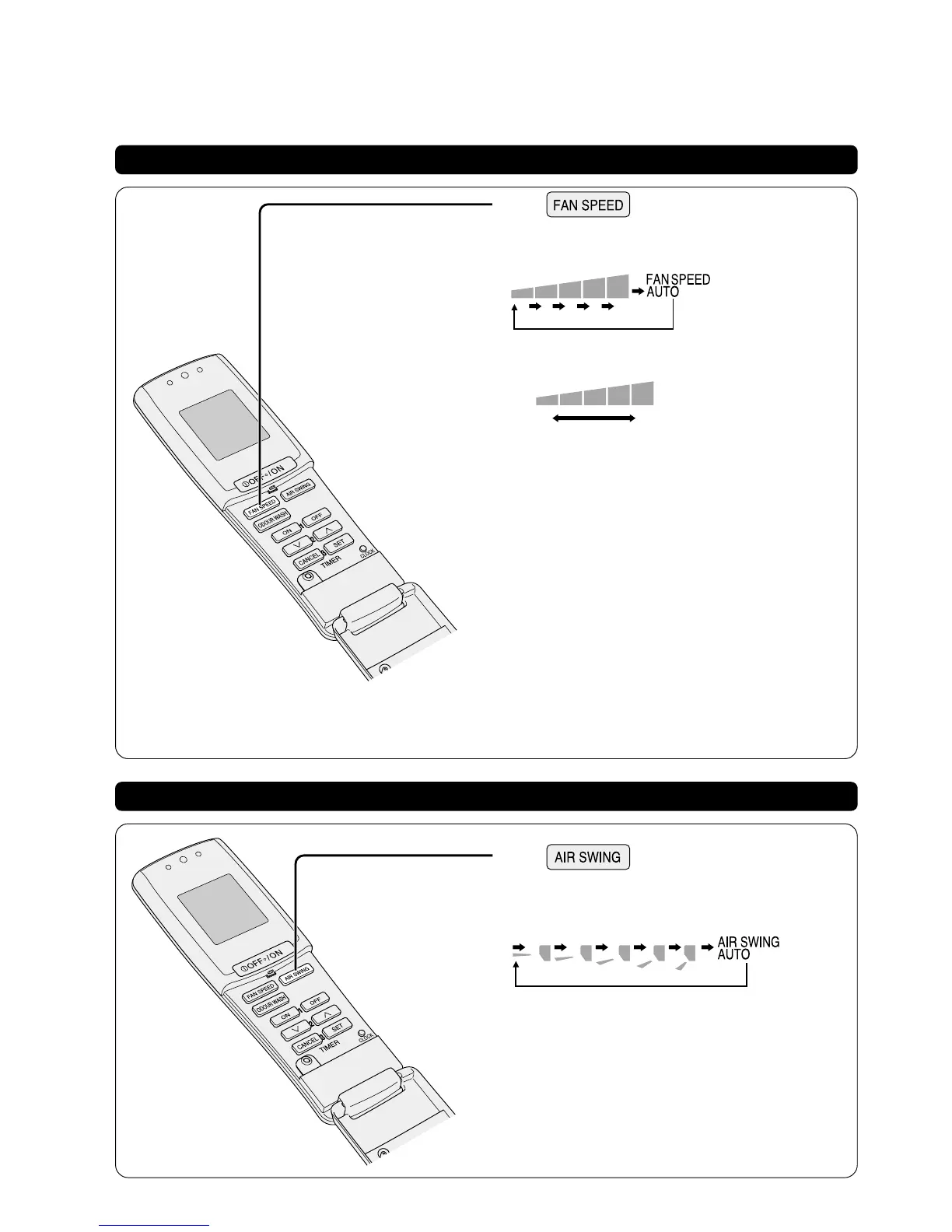
Changing the fan speed
● You may select from 5 stages of fan speed apart from the
auto fan speed.
● Continuously pressing:
The indication will change accordingly.
The increase in size of indication indicates higher fan speed.
Low
High
● During DRY mode, should the room temperature is higher
than the remote control set temperature, the fan speed will
be running to that set by the remote control. Whenever the
room temperature approaches the set temperature level,
the fan speed will be running in the Low fan speed
regardless of the indication.
■ AUTOMATIC FAN SPEED
HEATING:
Fan speed will be running in the Low fan speed when the
air temperature is low. Fan speed will be running in the
High fan speed when the air temperature is high.
COOLING / DRY:
During COOLING mode, adjust the fan speed to create
cool airflow.
The air outflow will be delayed for 40 seconds during the
start of operations under the COOLING / DRY modes.
Furthermore, sometimes there may be airflow cutoff during
operation. (Page 22)
Changing the vertical airflow directions
● You may select from 5 stages of air swings apart from the
auto air swing.
● Continuously pressing:
The indication will change accordingly
(The indications are just air swing guidelines, which may
differ with the actual indoor unit louvre positions and angles)
Press
Press



 To Next Page