14
Powerful operations / Quiet operations
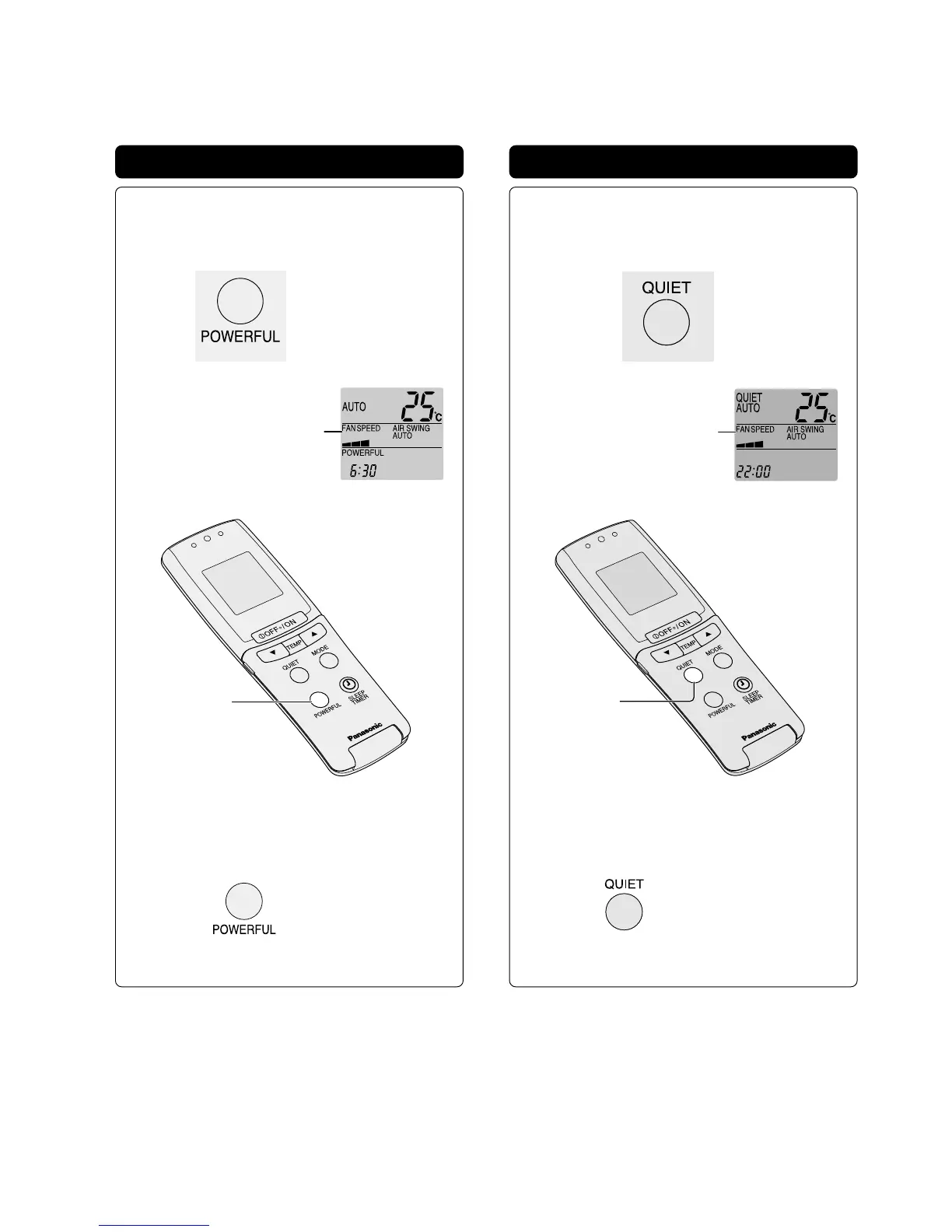
Powerful Mode operation
Use this mode when you need a much powerful
operation.
IN OPERATION (ON)
Press
Remote control
display panel
The fan speed will be
automatically adjusted higher
than the set fan speed.
“POWERFUL”
button
■ TO CANCEL MODE
● “POWERFUL” stops displaying in the remote
control main display panel.
● The temperature setting will be automatically adjusted for:
HEATING : Higher temperature
COOLING • DRY : Lower temperature with an
increase in fan speed.
● This “POWERFUL” mode is inoperative during AIR
CIRCULATION mode.
● This “POWERFUL” mode is inoperative when the “QUIET”
mode is in operation.
Quiet Mode operation
Use this mode when you need a quiet operation.
IN OPERATION (ON)
Press
Remote control
display panel
The fan speed will be
automatically adjusted lower
than the set fan speed.
“QUIET”
button
■ TO CANCEL MODE
● “QUIET” stops displaying in the remote
control main display panel.
● To prevent the unit from over running its capabilities, there
are times when the unit will not provide maximum coolness
and heat.
● During operations, it is normal for the operation noise level
to increase. (For air conditioner protection)
● Do not operate this mode concurrently with the
“POWERFUL” mode.
Press once more
Press once more



 To Next Page