ENGLISH
19
Care and maintenance
Caution
■ Ensure that the operation is stopped,
power supply is off before you do the air
conditioner cleaning.
The internal high speed fan may cause injuries.
■ Ensure that you are on firm footing
before attempting to repair or service
the air conditioner.
The unit in operation may cause injuries.
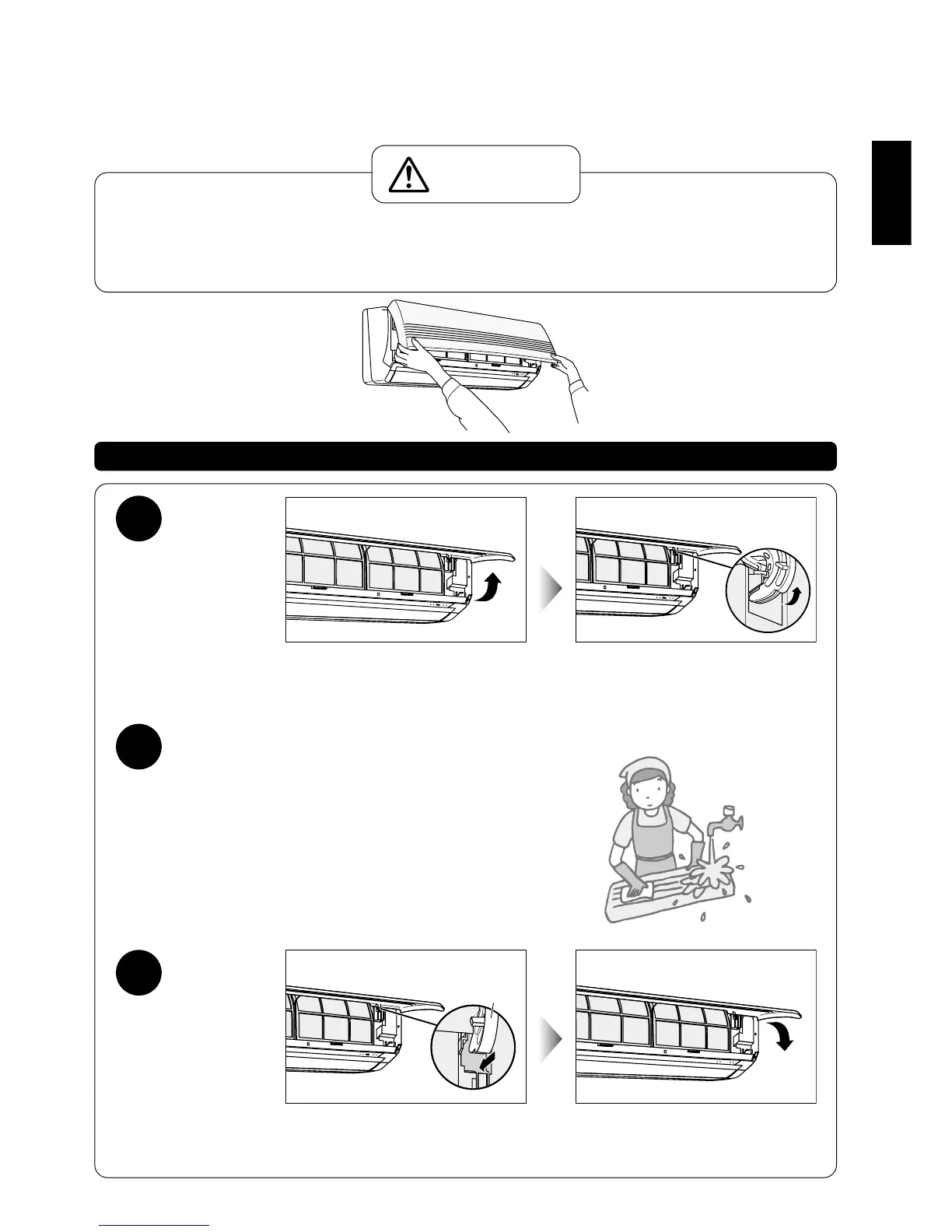
Cleaning the front panel (Must be removed from unit before washing)
1
Raise the
front panel
Slowly lift the front panel towards you and
stop when the panel reaches a horizontal
position.
Then, pull the panel out slantingly up-
wards.
• If a platform is used, ensure that it will
not topple.
• Be careful not to drop the front panel.
2
Wash and dry the front panel
Cleanse with a soft cloth and sponge.
Then, wipe dry the excess moisture and leave the panel to
dry in the shade.
● Avoid pressing hard on the surface and avoid the use of a hard
brush. (To prevent injuries)
● Apply some mild kitchen detergent (neutral type) to wash off
stubborn dirt and grime.
● Avoid drying the panel in direct sunlight or over a stove.
(May cause colour fading and structural distortions)
3
To fix the
front panel
Level the front panel horizontally and insert
the fulcrum into the indoor unit slots.
Closing.
Fulcrum



 To Next Page