20
Care and maintenance
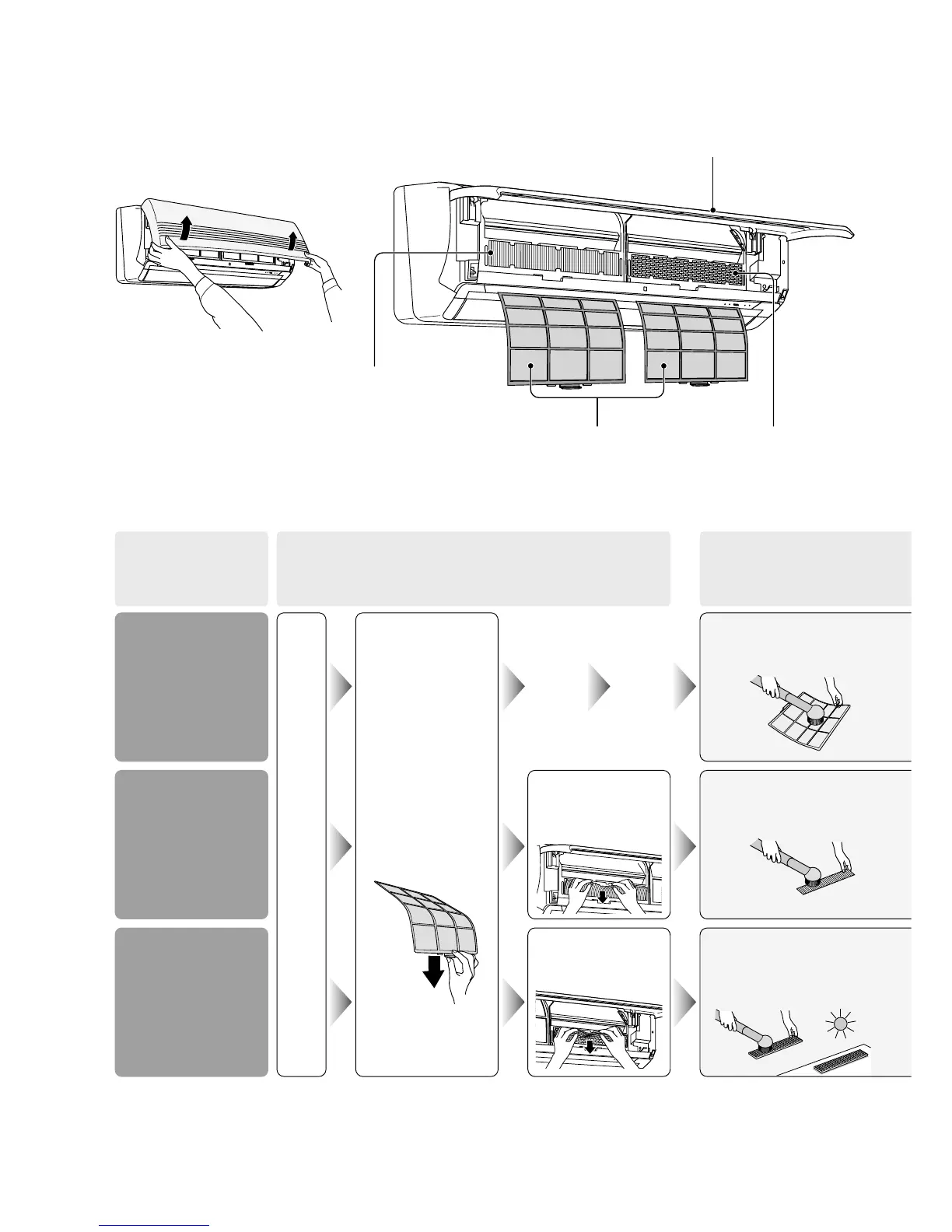
Slowly lift the front panel towards
you and stop when the panel
reaches a horizontal position.
Catechin air
purifying filter
Air filter
Solar refreshing
deodorizing filter
Front panel
PRODUCT
NAME
(When to
repair / change it)
HOW TO REMOVE
HOW TO MAINTAIN /
SERVICE
Air filter
(When the indoor unit
“Filter Lamp” is
blinking)
Catechin air
purifying filter
(Once every half a year)
* Complete change
once approximately
every 3 years
Solar refreshing
deodorizing
filter
(Once every half a year)
* Complete change once
approximately every 3 years
With power supply off and front panel opened.
Remove the air
filter
(one on each
right and left hand
side)
● Lift up a bit and
pull downwards.
Remove the
catechin air
purifying filter
Remove the
solar
refreshing deodor-
izing
filter
Suck up the dust and dirt
by a vacuum cleaner
Suck up the dust and dirt
by a vacuum cleaner
Suck up the dust and dirt
by a vacuum cleaner and
dry it under the sun
(For 6 hours and above)



 To Next Page