ENGLISH
9
Remote control preparations
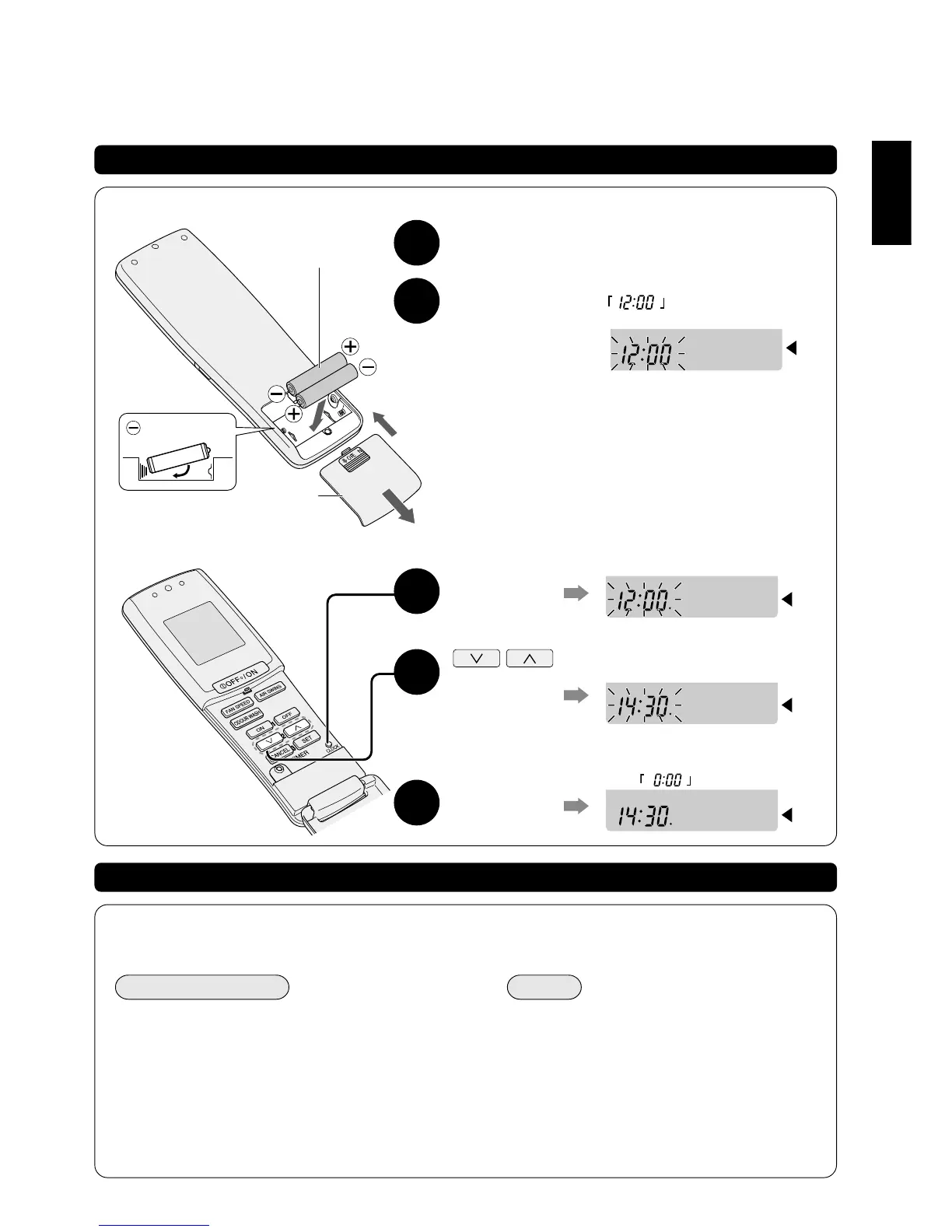
■ HOW TO INSERT THE BATTERIES
1
Remove the back cover.
2
Insert the
batteries and
close the back
cover.
● Check whether the display
on the remote control is
blinking.
If there is no display, recheck and
adjust the position of the batteries.
● Synchronize to the local time.
Blinking
2 units of AAA
alkaline batteries
Back cover
■ HOW TO SYNCHRONIES TO THE LOCAL TIME
1
Press the
clock button
2 Use the up-
down arrow
buttons to
adjust the
time
3
Press the
clock button
Blinking
Blinking
Lighted
[Not
blinking]
● Fast advance by pressing the button
continuously.
● At midnight 12.00 o’clock, the display will
show:
(Example) 2.30 pm will be:
Replacing the batteries
■ REPLACEMENT PERIOD
● The standard replacement period is 1 year.
● Whenever there is weak signal reception or weak display on the remote control.
PLEASE COMPLY
As the cause of breakdowns and injuries is normally due
to electrolyte leakage, heat up or breakages, please
comply with the following recommendations:
● Always replace both the alkaline batteries at the same
time. (Manganese batteries have shorter life spans)
● Avoid using rechargeable (Ni-Cd types) batteries. (Due
to differences in dimensions, shapes and operating
properties)
● Remove both the batteries if the remote control is not
to be used for a long period.
NOTE
● You may replace the batteries before the
recommended replacement due date.
● The supplied batteries are for your initial
operation use, hence you may need to replace
them earlier than the standard 1 year period.
( )
Insert from the
side way.



 To Next Page