EasyManua.ls Logo

Panasonic CU-M1403KE - Page 16

Panasonic CU-M1403KE
31 pages
Print Icon
To Next Page IconTo Next Page
To Previous Page IconTo Previous Page
Loading...
i
!
i
i
i
H
i
;
j
if
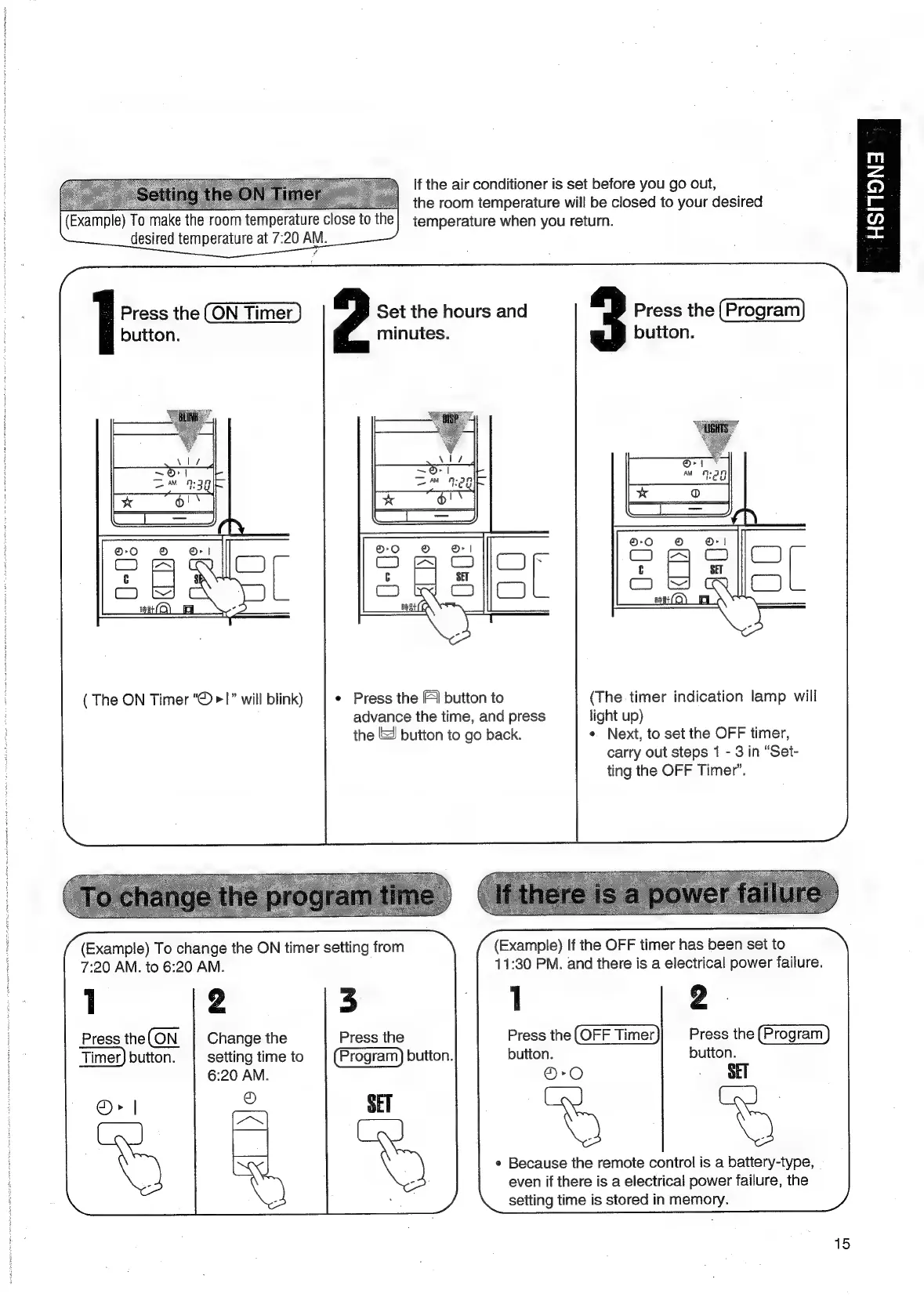
the
air
conditioner
is
set
before
you
go
out,
:
the
room
temperature
will
be
closed
to
your
desired
To
make
the
room
temperature
close
to
the]
temperature
when
you
return.
desired
temperature
at
7:20
AM.
(Example)
m
z
co)
Lee
o
=x
Press
the
Set
the
hours
and
Press
the
button.
minutes.
button.
(
The
ON
Timer
“©
>1”
will
blink)
¢
Press
the [FI
button
to
(The
timer
indication
lamp
will
advance
the
time,
and
press
light
up)
the
&
button
to
go
back.
*
Next,
to
set
the
OFF
timer,
carry
out
steps
1
-
3
in
“Set-
ting
the
OFF
Timer’.
(Example)
If
the
OFF
timer
has
been
set
to
11:30
PM.
and
there
is
a
electrical
power
failure.
Press
the
Press
the
button.
button.
©-O
SET
(Example)
To
change
the
ON
timer
setting
from
7:20
AM.
to
6:20
AM.
1
2
5
Press
the
ON
Change
the
Press
the
Timer)
button.
|
setting
time
to
button.
6:20
AM.
®>
|
S
SET
¢
Because
the
remote
control
is
a
battery-type,
even
if
there
is
a
electrical
power
failure,
the
setting
time
is
stored
in
memory.
15

Related product manuals