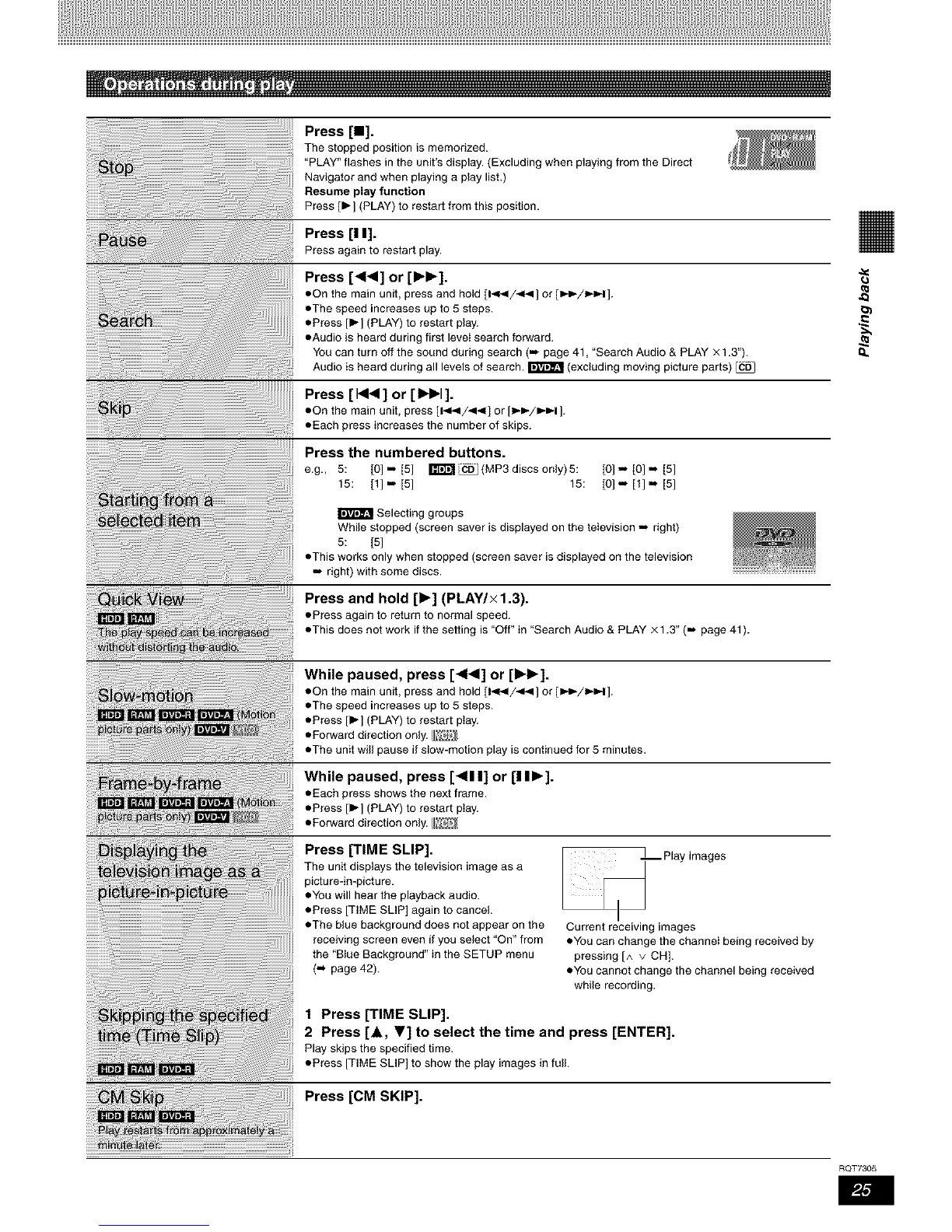
Press [Ig].
The stopped position is memorized.
"PLAY" flashes in the unit's display. (Excluding when playing from the Direct
Navigator and when playing a play list.)
Resume play function
Press [1_] (PLAY) to restart from this position.
Press [I I].
Press again to restart play.
Press [4141] or [1_1_].
eOn the main unit, press and hold [1_1/_141] or [l_P-/l_l].
eThe speed increases up to 5 steps.
ePress [1_] (PLAY) to restart play.
eAudio is heard during first leveI search forward.
You can turn off the sound during search (m page 41, 'Search Audio & PLAY x 1.3").
Audio is heard during all levels of search. _ (excluding moving picture parts)
Press [1414] or [1_t_1].
eOn the main unit, press [14_/441] or [_-_/_=,-I].
eEach press increases the numberof skips.
Press the numbered buttons.
e.g., 5: [0].=[5] ITF_I_CDj(MP3dIscsonly)5: [0] =. [0] m [5]
15: [1] ... [5] 15: [0] =. [1] = [5]
Selecting groups
While stopped (screen saver is displayed on the television =. right)
5: [5]
eThis works only when stopped (screen saver is displayed on the television
=. right) with some discs.
Press and hold [1_] (PLAY/x 1.3).
ePress again to return to normal speed.
eThis does not work if the setting is 'Off" in "Search Audio& PLAY x 1.3" (... page41).
o,.
While paused, press [4141]or [1_1_].
eOn the main unit, press and hold [1_1/_141] or [l_P-/l_l].
eThe speed increases up to 5 steps.
ePress [1_] (PLAY) to restart play.
eForward direction only. _
eThe unit will pause if slow-motion play is continued for 5 minutes.
While paused, press [411 I] or [I II_].
eEach press showsthe next frame.
ePress [_-] (PLAY)to restart play.
ePorwarddirection only.&_
Press [TIME SLIP].
The unit displays the television image as a
picture-in-picture.
eYou will hear the playback audio.
ePress [TIME SLIP] again to cancel.
eThe blue background does not appear on the
receiving screen even if you select 'On" from
the "Blue Background" in the SETUP menu
(._ page 42).
Play images
Current receiving images
eYou can change the channeI being received by
pressing [^ v CH].
eYou cannot change the channel being received
while recording.
1 Press [TIME SLIP].
2 Press [A, V] to select the time and press [ENTER].
Play skips the specified time.
ePress [TIME SLIP] to show the play imagesin full.
Press [CM SKIP].
RQT7305










 To Next Page