[AV OUT/DIGITAL] socket
The illustrations and screens in this manual may differ from the actual
product.
[MENU/SET]
(menu display/set/finish)
Left cursor button (◄)
• Self-timer
Down cursor button (▼)
• Macro Mode
Up cursor button (▲)
• Exposure
Compensation
Right cursor button (►)
• Flash
●
In this manual, the button that is used is shaded or indicated
by▲▼◄►.
●
We recommend you use a battery with sufficient battery power or the
AC adaptor when recording motion pictures.
●
If the power supply is cut off due to a power cut or the AC adaptor being
disconnected, the motion picture being recorded using the AC adaptor
will not be recorded.
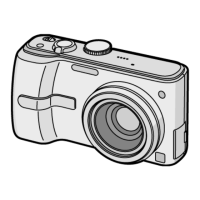
Camera ON/OFF switch
Shutter button
Mode dial
Flash
Self-timer indicator/AF Assist Lamp
Lens barrel
Lens
LCD monitor
[EXPOSURE] button
[DISP.] button
[Q.MENU]/[
/ ]
(Delete/Return) button
Speaker
Microphone
REC/PLAY switch
[E.ZOOM] button
●
Always use a genuine Panasonic AC adaptor (DMW-AC5G: optional).
●
When using an AC adaptor, ensure that the Panasonic DC coupler
(DMW-DCC5; optional) and AC adaptor (DMW-AC5G; optional) are
used.
Zoom lever
We recommend using the
supplied hand strap to avoid
dropping the camera.
Tripod receptacle
• Ensure that the tripod is stable.
Card/Battery door
Release lever
DC coupler cover



 To Next Page
 Loading...