EasyManua.ls Logo

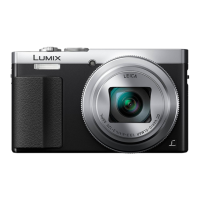
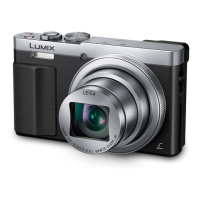
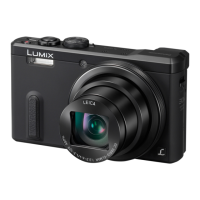
Panasonic Lumix DMC-TZ70 - User Manual

Panasonic Lumix DMC-TZ70
305 pages
Print Icon
To Next Page IconTo Next Page
Loading...
SQW0215
M0115KZ0
Operating Instructions
for advanced features
Digital Camera
Model No. DMC-TZ70/DMC-ZS50
Please read these instructions carefully before using this product, and
save this manual for future use.

Table of Contents

Other manuals for Panasonic Lumix DMC-TZ70

Questions and Answers

  • J
    Janet BarnesSep 10, 2025
    Why is the monitor/viewfinder turned off although the camera is turned on, on my Panasonic Digital Camera?
    • M
      Mr. Brandon SinghSep 10, 2025
      If the monitor/viewfinder is turned off although the camera is turned on, it could be that a hand or object is close to the eye sensor, which switches the monitor display mode to viewfinder display mode.
  • T
    todd14Aug 22, 2025
    Why are recorded pictures blurred on my Panasonic Digital Camera and the stabiliser function ineffective?
    • D
      Dawn CurtisAug 22, 2025
      If recorded pictures appear blurred and the stabiliser function is ineffective, hold the camera firmly with both hands, keeping your arms close to your body. This issue can occur because the shutter speed is slower in dark locations, making the stabiliser function less effective.
  • H
    Hayley PierceAug 25, 2025
    Why is the charging lamp flashing on my Panasonic Digital Camera?
    • L
      lisamarshallAug 25, 2025
      If the charging lamp is flashing, it might be due to charging in a place with extremely high or low temperatures. Reconnect the USB connection cable and retry charging in a place where the ambient temperature is 10 °C to 30 °C (50 °F to 86 °F). Note that these temperature conditions also apply to the battery itself.
  • M
    Melissa HurstAug 26, 2025
    What to do if no images appear on TV from my Panasonic Lumix DMC-TZ70, or the image is blurred or not coloured?
    • M
      Megan PotterAug 27, 2025
      If no images appear on TV, and the image is blurred or not coloured, ensure that the television has been switched to auxiliary input and that the connection is correct.
  • T
    Timothy HardingAug 27, 2025
    Why can't I record pictures on my Panasonic Digital Camera?
    • C
      Cynthia WilliamsAug 27, 2025
      If you cannot record pictures, it is likely because the built-in memory/card is full. Free up space by deleting unwanted pictures.
  • R
    Robert MortonAug 29, 2025
    Why do recorded pictures look white on my Panasonic Lumix DMC-TZ70 Digital Camera?
    • L
      Lori SullivanAug 29, 2025
      If recorded pictures look white, the lens may be dirty (fingerprints, etc.). Turn the camera on to extract the lens barrel, and clean the lens surface with a soft, dry cloth.
  • P
    Phyllis MendozaSep 18, 2025
    Why do reddish horizontal streaks appear on the screen during recording with my Panasonic Lumix DMC-TZ70 Digital Camera?
    • H
      Haley MooneySep 18, 2025
      If reddish horizontal streaks appear on the screen during recording, this is characteristic of the MOS sensors, which serve as the camera’s pickup sensors. The streaks appear when the subject has a bright part. It is recommended that you take pictures while taking care not to expose the screen to sunlight or any other source of strong light.
  • M
    martinezkevinSep 12, 2025
    What to do if my Panasonic Lumix DMC-TZ70 Digital Camera does not work even if it is turned on?
    • B
      Brittany HallSep 12, 2025
      If the camera does not work even if it is turned on, the battery may not be inserted correctly, or it needs recharging.
  • T
    Tina RossSep 8, 2025
    What to do if pictures do not show on the LCD monitor of my Panasonic Digital Camera?
    • M
      mary54Sep 8, 2025
      If pictures do not show on the LCD monitor, the camera may be set for viewfinder display. Press the [LVF] button and switch to LCD monitor display.
  • B
    Bailey BeanSep 5, 2025
    Why is no flash emitted from my Panasonic Lumix DMC-TZ70?
    • M
      Margaret CollinsSep 5, 2025
      If no flash is emitted, the flash may be set to [ ] ([Forced Flash Off]). The flash becomes unavailable in certain modes such as [Auto Bracket], [Burst] (excluding [ ] ([Flash Burst])), Scene Modes ([Scenery], [Night Scenery], [Handheld Night Shot], [HDR], [Sunset], [Starry Sky], [Glass Through], [High Speed Video], [3D Photo Mode]), [Creative Control] Mode, and [Panorama Shot] Mode.

Summary

Preparations

Before use

Safety and handling guidelines for camera operation and environmental considerations.

Names and Functions of Main Parts

Identification and purpose of camera buttons, dials, and components.

Charging battery

Instructions for inserting, charging, and managing the camera battery.

Saving your pictures (cards and built-in memory)

Information on where pictures are saved and compatible memory card types.

Setting the clock

Guide to setting the camera's date, time, and time zone for accurate recording.

Basics

Sequence of operations

Step-by-step guide for basic camera operation from power-on to playback.

Taking pictures with automatic settings [Intelligent Auto] Mode

Guide to using the Intelligent Auto mode for simplified shooting.

Recording motion pictures

How to record videos, including starting, stopping, and using the motion picture button.

Viewing your pictures

Instructions for accessing and viewing recorded still and motion pictures.

Using the [Setup] menu

Overview of settings available in the Setup menu for camera configuration.

Application (Record)

Using Zoom

Explanation of optical, extra optical, and digital zoom functions.

Taking pictures with flash

Guide to using different flash modes and their applications.

Taking pictures with Auto Focus

How to use various AF modes like Face Detection and AF Tracking.

Taking pictures by setting the aperture value and shutter speed [Manual Exposure] Mode

Using Manual Exposure mode for full control over aperture and shutter speed.

Taking Pictures with different picture effects [Creative Control] Mode

Applying creative filters and effects to pictures before shooting.

Application (View)

Retouching pictures

Adjusting color and brightness of pictures using Auto or Creative Retouch.

Using the [Playback] menu

Overview of functions available in the Playback menu for picture management.

Wi-Fi Function and NFC Function

Introduction to Wi-Fi and NFC functions for wireless connectivity.

Operating the camera using a smartphone;tablet

Steps for connecting and using the camera with a smartphone or tablet.

Sending pictures to a PC

Methods for transferring pictures from the camera to a personal computer.

Transferring pictures automatically [Smart Transfer]

Setting up automatic picture transfers to PC, AV equipment, or Cloud Folder.

Connecting with other devices

Viewing on TV screen

How to display pictures and videos on a television screen.

Storing recorded still pictures and motion pictures on your PC

Copying files from camera to PC using USB or card reader.

Printing

Instructions for printing pictures directly from the camera to a printer.

Others

List of LCD monitor;Viewfinder displays

Explanation of icons and information shown on the camera's screen and viewfinder.

Q&A Troubleshooting

Solutions for common problems encountered during camera operation.

Usage cautions and notes

Important safety, handling, and maintenance precautions for the camera.

Panasonic Lumix DMC-TZ70 Specifications

General IconGeneral
Megapixel12.1 MP
Camera typeCompact camera
Sensor typeMOS
Image stabilizerYes
Total megapixels12.8 MP
Image sensor size1/2.3 \
Image formats supportedJPG, MPO, RAW
Supported aspect ratios1:1, 3:2, 4:3, 16:9
Maximum image resolution4000 x 3000 pixels
Still image resolution(s)[4:3] 4000x3000 (12M) / 3264x2448 (8M EZ) / 2560x1920 (5M EZ) / 2048x1536 (3M EZ) / 640x480 (0.3M EZ)/[3:2] 4000x2672 (10.5M) / 3264x2176 (7M EZ) / 2560x1712 (4.5M EZ) / 2048x1360 (2.5M EZ) / 640x424 (0.3M EZ)/[16:9] 4000x2248 (9M) / 3840 x 2160 (8M EZ) / 2560x1440 (3.5M EZ) / 1920x1080 (2M EZ) / 640x360 (0.2M EZ)/[1:1] 2992x2992 (9M) / 2448x2448 (6M EZ) / 1920x1920 (3.5M EZ) / 1536x1536 (2.5M EZ) / 480x480 (0.2M EZ)
Digital zoom4 x
Optical zoom30 x
Focal length range4.3 - 129 mm
Maximum aperture number6.4
Minimum aperture number3.3
Lens structure (elements/groups)12/9
Maximum focal length (35mm film equiv)720 mm
Minimum focal length (35mm film equiv)24 mm
FocusTTL
Focus adjustmentAuto
Normal focusing range0.05 - ∞ m
Auto focusing (AF) modesContinuous Auto Focus, Tracking Auto Focus
Normal focusing range (tele)2 - ∞ m
Normal focusing range (wide)0.5 - ∞ m
Light meteringCentre-weighted, Evaluative (Multi-pattern), Spot
ISO sensitivity80, 100, 200, 400, 800, 1600, 3200, 6400
Light exposure modesAperture priority AE, Manual, Shutter priority AE
ISO sensitivity (max)6400
ISO sensitivity (min)80
Light exposure controlProgram AE
Light exposure correction± 2EV (1/3EV step)
Fastest camera shutter speed1/2000 s
Slowest camera shutter speed60 s
Flash modesAuto, Flash off, Flash on, Red-eye reduction, Slow synchronization
Flash range (tele)2 - 3.3 m
Flash range (wide)0.6 - 6.4 m
Power source typeBattery
Video resolutions640 x 480, 1280 x 720, 1920 x 1080 pixels
Motion JPEG frame rate50 fps
Video formats supportedAVCHD, MP4
Maximum video resolution1920 x 1080 pixels
Analog signal format systemNTSC, PAL
Internal memory86 MB
Compatible memory cardsSD, SDHC, SDXC
Field of view100 %
Display diagonal3 \
Display resolution (numeric)1040000 pixels
USB version2.0
HDMI connector typeMicro
Wi-Fi standards802.11b, 802.11g, Wi-Fi 4 (802.11n)
Scene modesChildren, Food, Night portrait, Pet, Portrait, Sports
Image editingCrop, Resizing
Photo effectsSkin tones
White balanceAuto, Cloudy, Daylight, Incandescent, Shade, Sunny
Camera playbackSingle image, Slide show
Self-timer delay2, 10 s
Camera file systemDCF, Exif 2.3, RAW
Battery voltage3.6 V
Battery capacity1250 mAh
Battery life (CIPA standard)300 shots
Product colorBlack, Silver
Cables includedUSB
Magnification2.59 x
Viewfinder screen size0.2 \
Weight and Dimensions IconWeight and Dimensions
Depth34.4 mm
Width110.7 mm
Height64.6 mm
Weight217 g
Weight (including battery)243 g

Related product manuals