19
6 Operating Instructions
6.1. Taking out the Disc from BD-Drive Unit when the Disc cannot be ejected
by OPEN/CLOSE button
6.1.1. Forcible Disc Eject
1. Turn on the power, press and hold [OK], [B] and [Y] on the remote control at the same time for more than 5 seconds.
"00RET" is displayed on the TV.
2. Repeatedly press [ ] on the remote control or [POWER] on the unit until "06FTO" is displayed on the TV.
3. Press [OK] on the remote control or [OPEN/CLOSE] on the unit.
6.1.2. When the Forcible Disc Eject can not be done.
1. Turn off the power and pull out AC cord.
2. Put deck so that bottom can be seen.
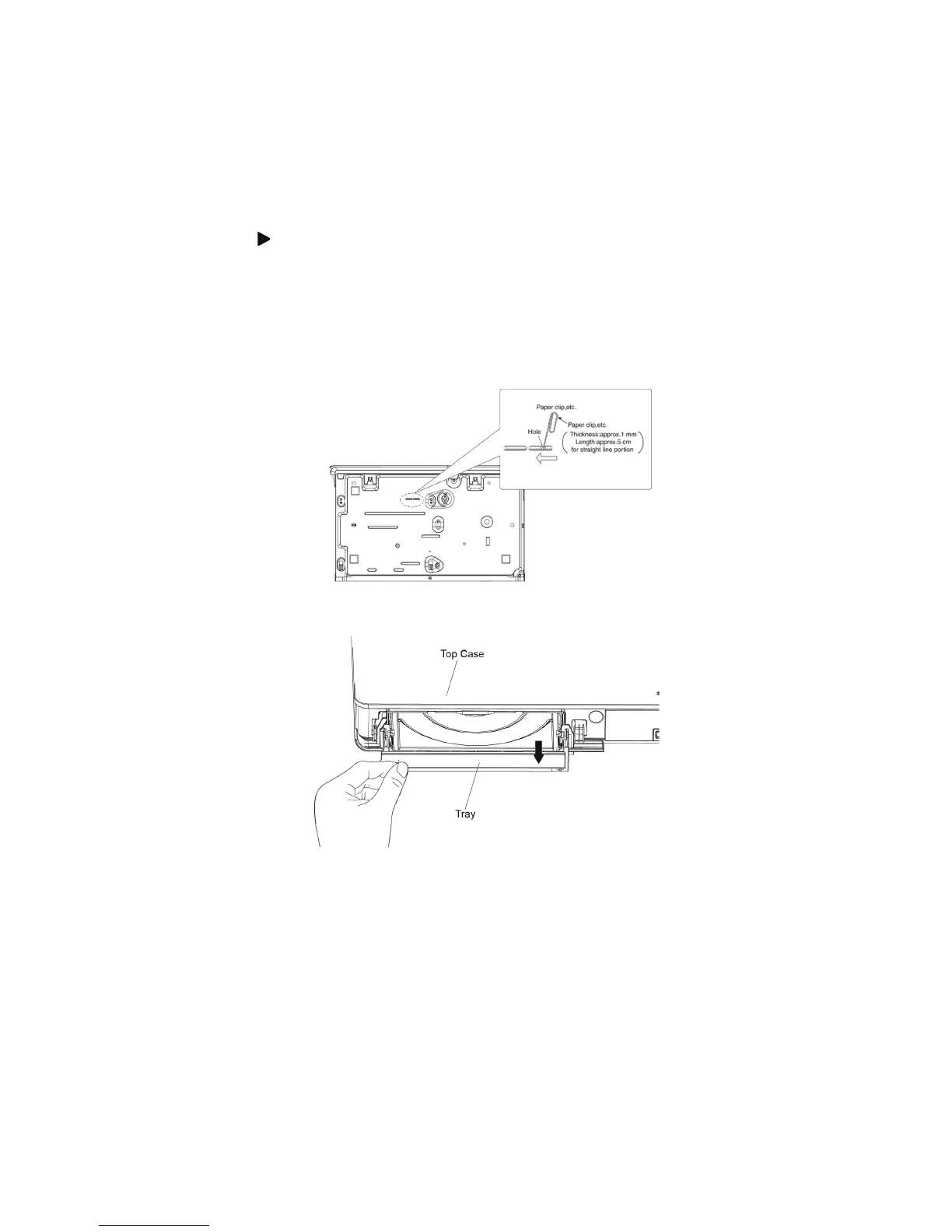
3. Insert the Paper clip, etc. into the hole on the bottom of BD Drive and slide the Paper clips, etc. in the direction of the arrow to
eject tray slightly.
4. Put deck upward, and pick out Tray by finger.










 To Next Page