46
9.4.2. Adjustment
9.4.2.1. The adjustment value setting of Drive Unit/OPU replacement
1. Power ON
2. Press and hold [5] [9] [Red] button on the remote control concurrently for 5 sec.
3. Display "70RET"
4. Press
[ ] button on the remote control then display "80SRV". Press [OK] button.
5. It reboots automatically.
6. Display "SERV" (Service Mode)
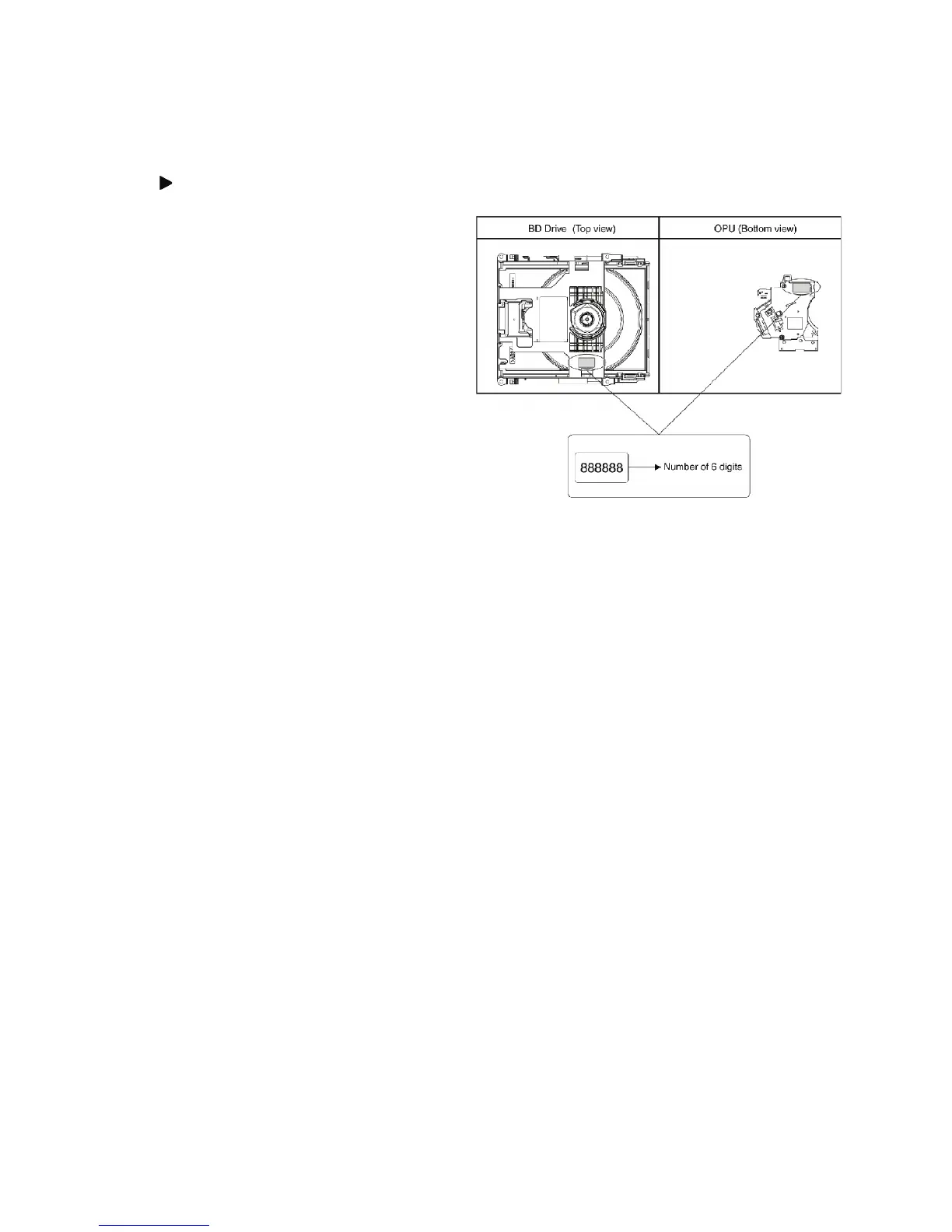
7. Input the number of 6 sdigits adjust value that is wrote on
Drive Unit/OPU replacement part.
8. Input [7] [2] in "SERV" then display "DQR" total 6 digits
that is the adjustment value write-in state.
9. It will be OK if "DQR OK"is displayed.
---The confirmation method ---
10. Input [0] [0],return to "SERV".
11. Input [0] [9],the adjustment value is confirmed.
If the same as the inputted adjustment value of 6 digits, it
is write-in OK.










 To Next Page