12
4
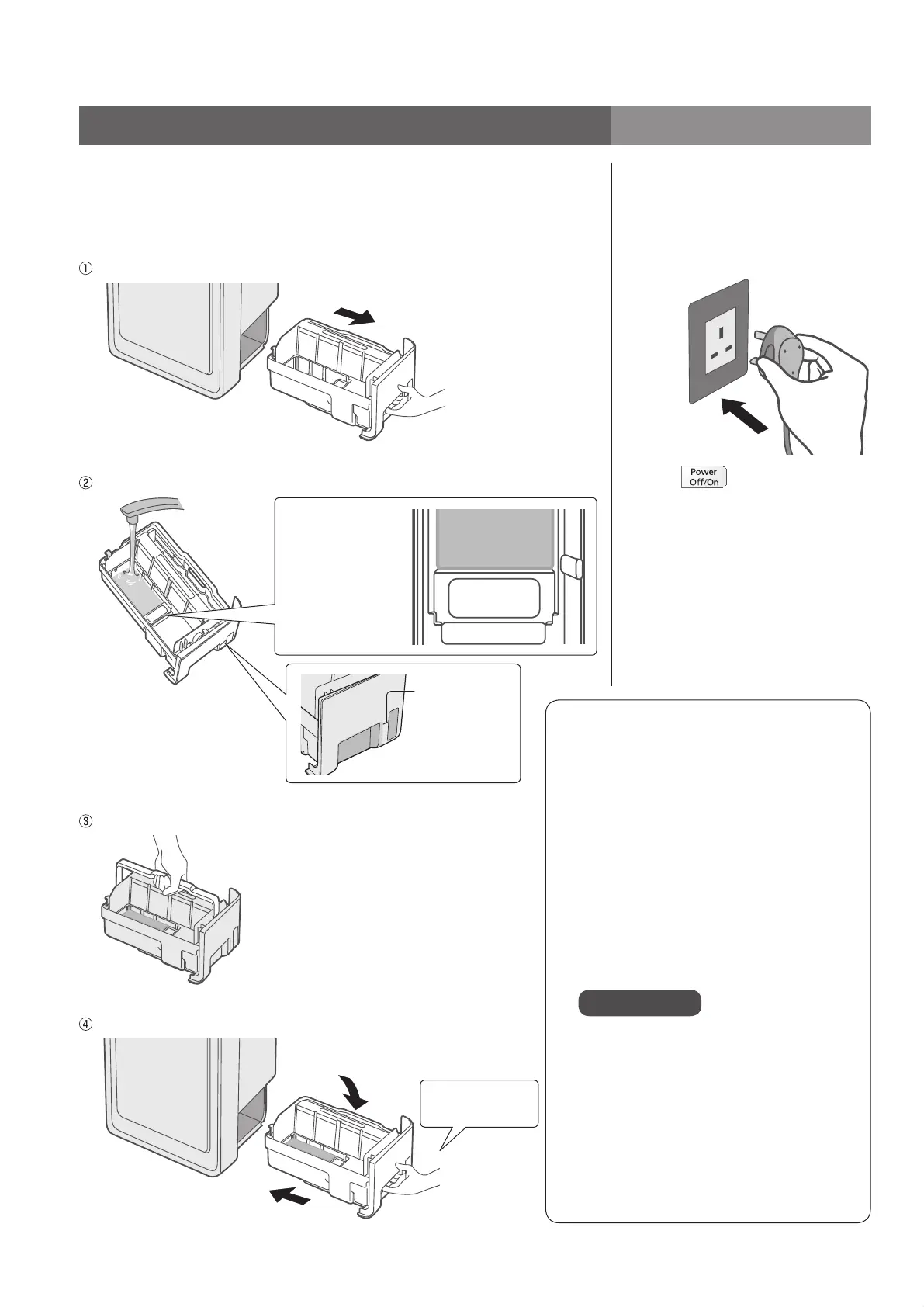
Remove the tray, fill it with water, and install it
back.
(Water is not required when the product operates in “Clean air” mode.)
Be sure to disconnect the power plug.
Remove the tray.
Fill it with water.
Filled with water
up to here
[Filled with water
up to here] indicates
the upper limit line.
(If water is poured
above the line,
water is likely to
spill.)
Guide of full
capacity
Hold the tray handle and carry the tray taking care not to tilt it.
Reinstall the tray slowly.
Push the tray handle down
to the humidifying filter side.
Push the tray back
until it clicks.
Fill the tray with water Turn on
Be sure to use the tap water
(This is because tap water is normally
chlorine-disinfected to prevent breeding
of bacteria.)
Do not use the following water:
Water above 40 °C or mixed with
detergent. (Otherwise, deformation or
failure may occur.)
Water mixed with chemicals, air
fresheners, or essential oil. (It may
damage the tray and cause spillage or
wet the furniture. : P.8)
Water from water purifier, ionized
alkaline water and well water. (It may
cause mold or bacteria.)
Attention
If you have to use the well water
(drinkable), please maintain and clean
the tray, the humidifying filter, the filter
frame more frequently.
Continuous operation time of a
tray of water
Operates for about 4.6 hours. (Under
the condition of [Hi] / room temperature
20 °C and humidity 30 %)
5
Connect the power
plug.
Wipe the water off the
power plug and your
hands before inserting it.
Press , and the clean sign
(P.14) blinks blue or red for
about 5 seconds.
Preparation
VXL40M_EN_ARA.indd 12 9/30/2015 2:57:59 PM




 To Next Page