High−level Instructions
3 − 223
Explanation of example
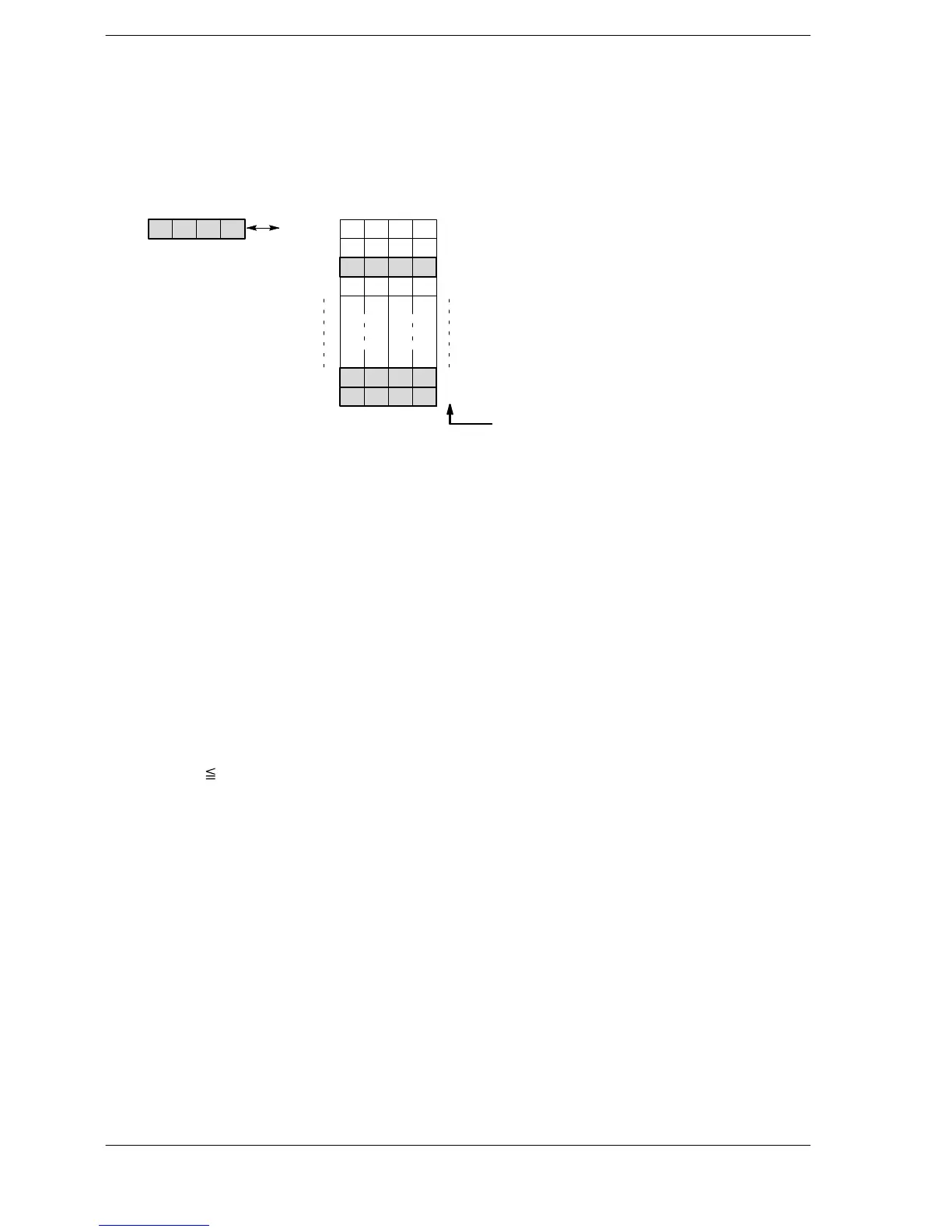
Searches for the value given in data registers DT10 and DT11 in the block of data register DT20 through
DT40 when trigger R0 turns on.
For example, to search the area of the value called H01234567, “H01234567” would be written to DT10 and
DT11.
01
DT11,
DT10:
[S1]
Searched data
0 [S2]
Block of 32-bit area
DT21,DT20:
23 45 67 01 23 57 64
1DT23,DT22: 12 FF12 FF
2DT25, DT24: 01 23 45 67
3DT27, DT26: 7FFF7FFF
9DT39, DT38:
01 23 45 67
10 [S3]DT41, DT40: 01 23 45 67
Relative position number
If “DT24 and DT25”, “DT38 and DT39”, and “DT40 and DT41” match the searched data, the following occurs.
− The number “K3” of data items that match the searched data (DT10 and DT11) is stored in special
data register DT90037.
− The position “K2” of the first matching data item, counting from data register DT20, is stored in special
data register DT90038.
Description
Searches for values matching S1 in the block of 32-bit areas specified by S2 (starting area) through S3
(ending area) when the trigger turns on.
When the search operation is performed, the search results are stored as follows.
− The number of data items that match S1 is stored in special data register DT90037.
− The position of the first matching data item, counting from the starting 32-bit area S2, is stored in
special data register DT90038.
The starting area S2 and ending area S3 should:
− Be the same type of operand.
− Satisfy S2
S3.
Data S1 is searched from S2 to S3.
Precautions during programming
If “0” or an even number is specified in S2, specify an even number in S3 as well.
If an odd number is specified in S2, specify an odd number in S3 as well.
Flag conditions
・Error flag (R9007): Turns on and stays on when:
・Error flag (R9008): Turns on for an instant when:
− The area specified using the index modifier exceeds the limit.
− S2 > S3.





 To Next Page