High−level Instructions
3 − 567
S2+1: Second word
Specifies the method for displaying data in the upper.
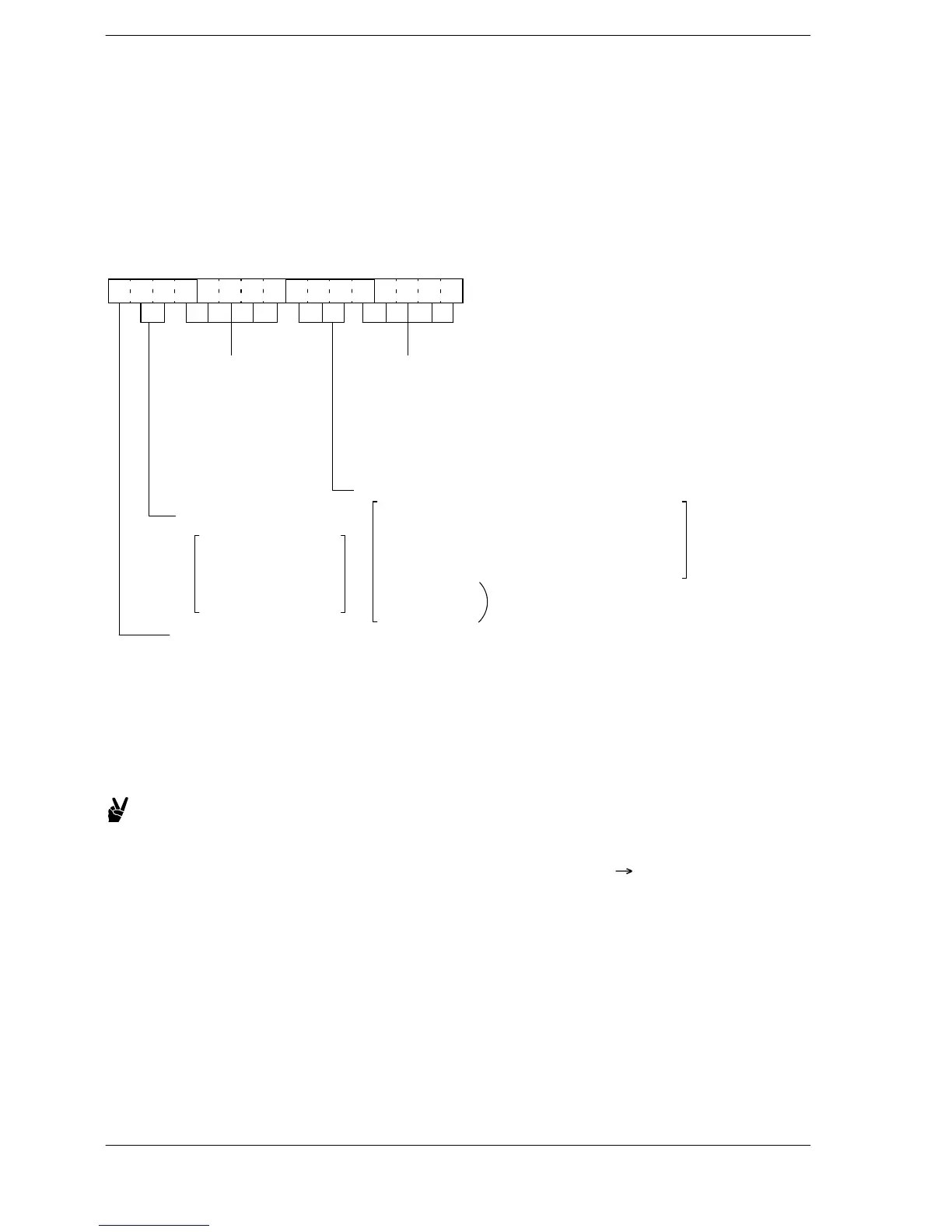
The bits shown in the figure below are allocated. Please specify with the H constant.
S2+2: Third word
Specifies the method for displaying data in the lower.
The bits shown in the figure below are allocated. Please specify with the H constant.
15
Data display format (bits 7 to 5)
000: 5−digit decimal with sign
001: 4−digit hexadecimal or 4−digit BCD display
010: bit display
011: 5−character ASCII data display
100: 7−segment data display
101: Undefined
110: Undefined
111: Undefined
12 11 8 7 4 3 0
Digit delete designation
(bits 12 to 8)
[0: display, 1: no display]
− bit 8: 1st last digit
− bit 9: 2nd last digit
− bit 10: 3rd last digit
− bit 11: 4th last digit
− bit 12: 5th last digit
Decimal place display position (bits 4 to 0)
[0: no display, 1: display]
− bit 0: 2nd last digit
− bit 1: 3rd last digit
− bit 2: 4th last digit
− bit 3: 5th last digit
− bit 4: 3rd first digit
Color designation
(bits 14 and 13)
00: Undefined (When
specifying, Green)
01: Green
10: Red
11: Orange
Zero suppress (bit 15)
[0: Yes, 1: No]
Undefined for 101 and later will be
error if specifying undefined data
Remarks)
If displaying decimal point in the format of 5−digit decimal
with sign, the value(s) before the decimal point should be
displayed.
Example:
To change the color to red, put 10 for bits 14 and 13.
Specify in this way: 0100 0000 0000 0000
H4000.
FP–e





 To Next Page