EasyManua.ls Logo

Panasonic FV-SWGR1 - User Manual

Panasonic FV-SWGR1
14 pages
Print Icon
To Next Page IconTo Next Page
Loading...
INSTALLATION AND OPERATING INSTRUCTIONS
Remote Control for Energy Recovery Ventilator (ERV)
CONTENTS
SAFETY INSTRUCTIONS ........................................ 2
INSTALLATION INSTRUCTIONS ........................23
INSTALLATION AND OPERATING
REQUIREMENTS ................................................... 4
SUPPLIED ACCESSORIES....................................... 4
PART NAMES AND DIMENSIONS.......................... 4
HOW TO INSTALL ............................................ 57
TEST RUN ............................................................. 7
RS485 CONNECTION SETTINGS ....................... 78
LIST OF REGISTER ADDRESSES.......................810
KEY FUNCTIONS AND DISPLAY
DESCRIPTION ..............................................1011
OPERATION.................................................1112
USE AND MAINTENANCE INSTRUCTIONS........... 12
TROUBLESHOOTING........................................... 13
WIRING DIAGRAM ............................................. 13
SPECIFICATIONS................................................. 14
Model No. FV-SWGR1
Thank you for purchasing this Panasonic product.
Please read these instructions carefully before attempting to install, operate or service the
Panasonic product.
Please carefully read “INSTALLATION INSTRUCTIONS” (P.23) of this instructions before
installation. Failure to comply with instructions could result in personal injury or property
damage. Please explain to users how to operate and maintain the product after installation,
and this booklet should be presented to users. Please carefully read “USE AND MAINTENANCE
INSTRUCTIONS” (P.12) of this instructions before operation.Please retain this booklet for
future reference.

Questions and Answers

Overview

This document provides installation and operating instructions for the Panasonic Remote Control for Energy Recovery Ventilator (ERV), Model No. FV-SWGR1.

Function Description

The Panasonic FV-SWGR1 is a remote control designed to manage Energy Recovery Ventilators (ERVs). It allows users to control various aspects of the ERV's operation, including power on/off, air volume, ventilation mode, and timer functions. The remote control can link up to 10 ERVs, making it suitable for managing multiple units within a system. It features an LCD screen for displaying operational status, time, and alerts, along with physical buttons for user interaction. The device supports RS485 communication for integration with centralized control systems, enabling more advanced monitoring and control capabilities.

Important Technical Specifications

  • Voltage and Frequency: 220 V~50 Hz
  • Rated Power: 2.0 W
  • Weight: 0.26 kg
  • Ambient Temperature: -10°C ~ 40°C
  • Control Wire: Fixed wiring with a nominal cross-sectional area of 1.5 mm² per core and a rated voltage of 300 V/500 V or less.
  • RS485 Connection:
    • Information Transfer Mode: Start-stop synchronous mode; start bit: 1bit; data bit: 8bit; stop bit: 1bit; parity check bit: nil.
    • Check Field: Adopts 16-bit CRC (Cyclic Redundancy Check) in MODBUS-RTU mode.
    • Basic Form of Protocol: Modbus frame structure.
    • Address Bar: Valid scope of address: 1-63.
    • Data Zone: Byte order used in Modbus data zone: Big-Endian (High-order byte → Low-order byte).
    • Data Transfer Rate: 9600 bps.
    • Terminal Resistance: 120 Ω (can be turned ON for wire lengths ≥ 200m).
    • Machine Address Setting: DIP SW 6 bits, default address is 1.
  • Mounting: Requires a switch box with recommended exterior dimensions of ≥102 mm x 102 mm x 35 mm (H x W x D). Recommended mounting height is approximately 1.5 m above the ground for clear vision.
  • RS485 Interference: Should be at least 1 m away from TV sets, broadcast radios, computers, etc., to avoid distorted images or noise.

Usage Features

The remote control offers a range of features for convenient ERV management:

  • Power On/Off: A dedicated Standby key allows switching the ERV between running and standby modes. The ERV will resume operation in the last mode used before being switched off.
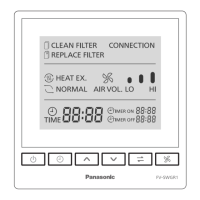
  • Air Volume Adjustment: Users can switch the air flow volume between "Hi" (High) and "Lo" (Low) using the AIR VOLUME key. The LCD displays the current air volume setting with bars (shortest bar for Low, all three bars for High).
  • Ventilation Mode Selection: The HEAT EXCHANGE/NORMAL key allows switching between heat exchange mode and normal ventilation mode.
  • Clock Setting: The remote control allows setting the local time. The TIME indicator flashes when the time is not set and stays solid once set. The clock time display also flashes if not set.
  • Timer ON/OFF Function:
    • Setting: Users can set specific times for the ERV to turn ON (TIMER ON) or OFF (TIMER OFF). This function requires the clock to be set first. The TIMER ON/OFF indicators stay solid once the timer is set.
    • Air Volume for Timer ON: While setting TIMER ON, the air volume for the ERV can also be set.
    • Cancellation: Timer settings can be canceled by simultaneously pressing the TIME and "✓" keys for 3 seconds, or by setting the hours or minutes of TIMER ON or TIMER OFF to " - ".
  • Filter Status Indicators:
    • CLEAN FILTER Indicator: Flashes when the ERV has run for 720, 1440, or 2160 hours, indicating that the filter needs cleaning. The LCD displays F-1, F-2, or F-3 accordingly.
    • REPLACE FILTER Indicator: Flashes when the ERV has run for 2880 hours, indicating that the filter needs replacement. The LCD displays F-4.
  • Filter Reset: After cleaning or replacing the filter, users can reset the indicators by pressing the "^" and "✓" keys simultaneously for more than 3 seconds. This clears the alert and recalculates the service duration.
  • LCD Backlight: The LCD backlight automatically turns off after 1 minute of inactivity and can be turned back on by pressing any key.
  • RS485 Connection Status: The CONNECTION icon indicates the status of the RS485 connection:
    • Rapidly Flashing: Intranet connection underway.
    • Solid On: Intranet connection successful.
    • Off: No valid network signal detected (possible causes include no signal from centralized control, wrong wiring, broken line, or disabled RS485 function).
  • RS485 Function Enable/Disable: The RS485 function can be enabled or disabled by pressing and holding the TIME key and the "✓" key simultaneously for 3 seconds. A slow flash of the CONNECTION icon three times indicates disabling, while rapid flashing or solid on indicates enabling.

Maintenance Features

  • Filter Cleaning/Replacement Alerts: The remote control provides clear visual alerts (CLEAN FILTER and REPLACE FILTER indicators, along with F-1 to F-4 displays) to prompt users for timely filter maintenance, ensuring optimal ERV performance and air quality.
  • Cleaning Instructions: The manual advises wiping dirt off the product surface with a cloth slightly dampened with neutral detergent and then drying with a soft cloth. It explicitly prohibits the use of gasoline, diluent, benzene, abrasive powder, chemical cloth, or spray insecticide, as these can cause scratches or deformation.
  • Professional Installation and Repair: Emphasizes that installation should be entrusted to a professional to prevent electric shock or fire. Users are advised not to modify or repair the product themselves but to contact the dealer for service.
  • Power Disconnection for Maintenance: Users are instructed to disconnect the power supply before performing any maintenance.
  • Relocation: If the remote control needs to be relocated, it should be reinstalled by the dealer where it was purchased.
  • End-of-Life Disposal: At the end of its service life, the product should be dismounted by a professional to prevent accidental falls, rather than being left unattended.

Panasonic FV-SWGR1 Specifications

General IconGeneral
BrandPanasonic
ModelFV-SWGR1
CategoryRemote Control
LanguageEnglish

Related product manuals