−1-6−
LAN 1 port RJ-45 is located at I/O panel.
USB 2.0 4 standard Type A ports 5 standard Type A ports
2 Powered-USB ports (12Vx1, 24Vx1) are located at I/O
panel.
Audio 1 port of Line-out is located at front & bottom side of main.
1 port of MIC-in is located at front & bottom side of main. I/O
panel.
Cash Drawer 1 port RJ 6pin type (+24V) is located at I/O panel.
1 port DIN 6pin type (+12V) is located at I/O panel
Others 1 x 8pin connector for HDD power and FAN control in stand
Switch 1 Power Switch (power on / off) Is located at front & bottom
side of main.
- Note: Power on/off by pushing a short period.
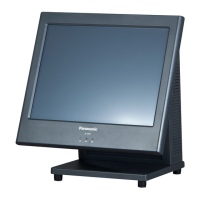
LED 3 LED Indicator are located at Front panel of main display
1 Power status (3 colors: green, red, yellow)
Yellow/Green : operating
Red : power off
Blink of yellow/green :standby
Blink of red : standby
1 HDD status (2 colors: green, yellow)
Yellow/Green :light on access
1 LAN status (2 colors : green, yellow)
Yellow/green : Light on access.
Rating 100 V ac-240V ac, 50/60 Hz, Class I
Input 90 V ac to 264 V ac,47 to 63 Hz
Output +24 V dc ±5%
Power
Supply
input
Efficiency Energy Star ver.5
Size Depend ID
Weight Depend ID


 To Next Page
 Loading...